$50–$500/month Website Maintenance Plans for SMBs: Checklist
A website maintenance plan is a recurring service that keeps your site secure, backed up, and running properly. For a small or midsize business site, that typically costs between $50 and $500 a month depending on complexity, with e-commerce stores and high-traffic sites landing at the higher end. If your site handles payments, stores customer data, or generates real revenue, a professional plan is worth the cost. If it’s a simple brochure site with light traffic, a disciplined DIY routine can work.
TL;DR:
- Regular security scans, off-site backups, and staged updates are critical for preventing site breaches and data loss.
- Monthly maintenance costs range from $50 for simple sites to over $1,000 for e-commerce with fast response times and advanced security.
- DIY maintenance may suffice for small, low-risk sites, but high-traffic or payment-handling sites require professional management.
- Vendors should specify backup locations, restore testing frequency, and response times in writing to ensure reliability.
- Prioritizing an annual restore test and a fixed maintenance schedule ensures long-term site stability and legal compliance.
Table of Contents
- Quick Summary
- What Is a Website Maintenance Plan and Why It Matters
- Core Components and How Often Each Task Should Happen
- Pricing and Tier Examples: What Each Tier Actually Delivers
- DIY vs Professional Maintenance: A Decision Framework
- How to Read and Compare Maintenance Plans Before You Sign
- Sample Monthly and Quarterly Plans by Site Type
- Tools and Resources for Ongoing Site Upkeep
- How Phenyx Approaches Maintenance and Marketing Together
- Legal and Compliance Considerations in Website Maintenance
- What Actually Separates a Good Maintenance Habit From a Good Intentions List
- Get a Maintenance Plan Built Around Your Actual Site
- Sources
Quick Summary
- Weekly security scans and monthly software updates catch most problems before visitors ever notice.
- Off-site backups with tested restores matter more than backup frequency alone.
- Monthly plans for small sites typically run in the lower hundreds; e-commerce and managed plans cost more and scale upward.
- Any vendor worth hiring will name a specific backup location, restore-test cadence, and response time in writing.
- Maintenance service is often bundled into broader marketing retainers, so upkeep and growth work stay coordinated.
- Quarterly accessibility and performance reviews prevent slow, invisible damage to conversions and search rankings.
What Is a Website Maintenance Plan and Why It Matters
A website maintenance plan is a standing agreement, whether it’s a monthly subscription or an internal routine, that covers the recurring work a site needs to stay secure, fast, and functional. That includes software updates, backups, security monitoring, performance checks, and periodic content review.
Owners skip this until something breaks, and by then the fix costs far more than prevention would have. Five things are on the line every month a site goes unmaintained: search rankings drop when pages slow down or break, security holes widen as software ages, checkout and lead forms quietly fail, mobile visitors bounce faster on sluggish pages, and outdated content erodes trust with buyers doing due diligence before they call.
Academic reviews of software-managed systems back this up directly: routine maintenance and testing measurably reduce long-term failure rates compared to systems left alone until something fails. A maintenance plan is how you buy that reduction on purpose instead of discovering it the hard way.
Core Components and How Often Each Task Should Happen
A real maintenance plan covers eight areas: security scanning, software and plugin updates, backups, uptime monitoring, performance checks, content accuracy, accessibility, and analytics reporting. Skip any one of them long enough and it becomes the reason your site goes down or drops in rankings.
Security scanning checks for the vulnerability patterns the OWASP Top Ten tracks, things like injection flaws and broken access control, which cause a disproportionate share of website breaches. Software updates patch the holes those scans find. Backups give you a way back if an update goes wrong or a site gets compromised anyway. Uptime monitoring catches outages in minutes instead of hours. Performance checks matter because mobile devices now account for roughly half of all web traffic, and a slow mobile experience loses visitors before they see anything else. Content checks catch broken links and outdated pricing. Accessibility audits against WCAG standards keep the site usable and legally defensible. Analytics reporting tells you whether any of this is actually working.
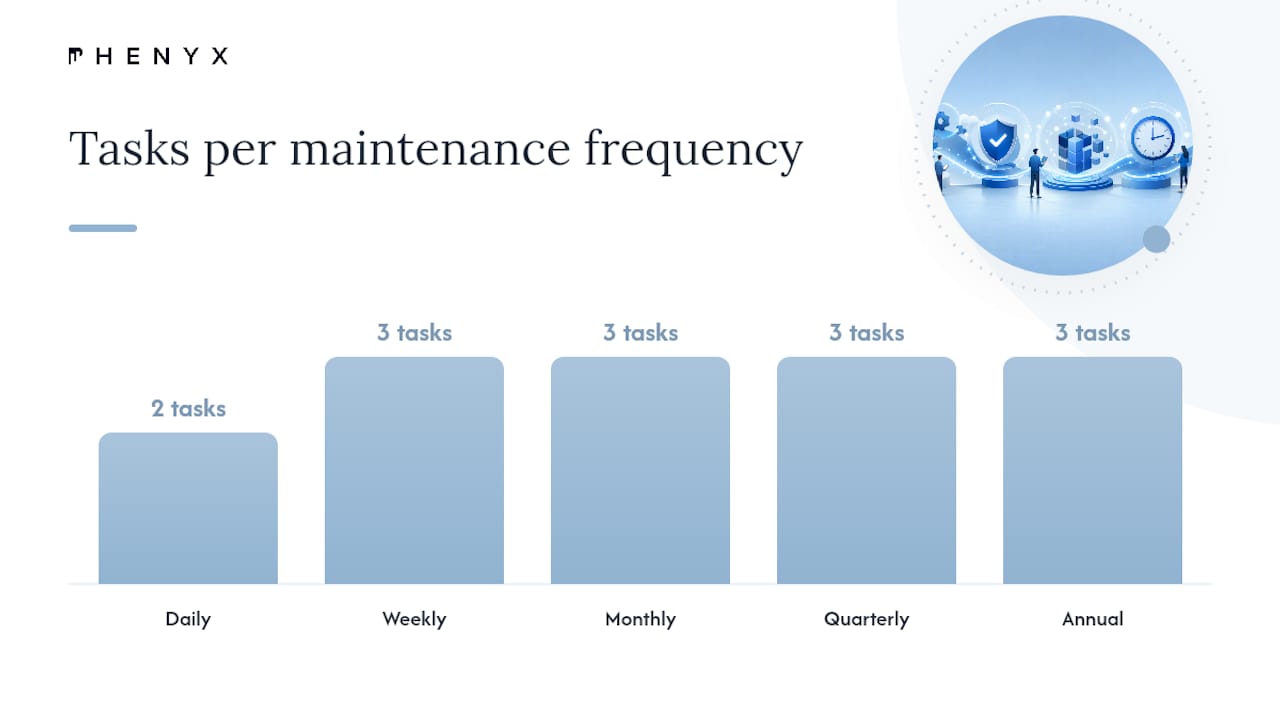
Here’s how those tasks typically map onto a calendar:
| Frequency | Tasks |
|---|---|
| Daily | Uptime monitoring; automated backups for e-commerce and high-transaction sites |
| Weekly | Security scans; broken link checks; spam/comment moderation |
| Monthly | Software and plugin updates; database cleanup; performance and speed checks |
| Quarterly | Full backup restore test; accessibility audit; content and SEO review |
| Annual | Full security audit; hosting and domain renewal review; disaster recovery test |
Three trust signals separate a real plan from a checkbox exercise. First, updates get applied on a staging environment and tested before they touch the live site, since skipping staging is one of the most common reasons sites break unexpectedly. Second, backups live off-site, away from the production server, and someone actually restores from them on a schedule rather than assuming they’ll work. Third, the provider names a specific response time for incidents in writing, not a vague promise to “get to it soon.”
Pro Tip: Ask any provider to show you their last restore test, not just describe their backup schedule. A backup nobody has restored in six months is a hope, not a plan.
Pricing and Tier Examples: What Each Tier Actually Delivers
Monthly maintenance pricing scales with how much risk is associated with the site and the required speed of problem resolution. Pricing tiers vary accordingly for small and midsize businesses.:
- Light tier ($50 to $100/month): Uptime monitoring, monthly updates, weekly backups, basic security scanning. Fits a simple brochure site with low traffic and no e-commerce.
- Basic tier ($100 to $250/month): Everything in light, plus weekly security scans, quarterly performance and accessibility checks, and a few hours of content edits included.
- Standard/managed tier ($250 to $500/month): Daily monitoring, staging environment for updates, tested restore procedures, a named response-time SLA, and monthly reporting.
- Managed e-commerce tier ($400 to $1,000+/month): Daily backups, payment and plugin security monitoring, faster SLA response (often same-business-day), and performance tuning tied to conversion rates.
Four factors drive where a quote lands within these bands: how fast the provider commits to responding (a 4-hour SLA costs more than a 48-hour one), whether the site runs e-commerce with payment processing, how many plugins or custom integrations need testing after each update, and whether hosting is bundled into the plan or billed separately. A detailed cost breakdown for WordPress sites shows how plugin count and hosting choice alone can swing a quote by hundreds of dollars a month.
For occasional work outside a retainer, freelancers typically bill hourly for maintenance tasks, with rates varying by provider and region. A retainer usually wins financially once you’re paying for more than two or three hours of work a month, because you’re also getting monitoring and response time you don’t get from hourly billing.
DIY vs Professional Maintenance: A Decision Framework
Three questions decide whether you should handle maintenance yourself or hand it to a professional:
- How complex is the site? A five-page brochure site with no plugins is manageable in-house. A site with a custom theme, a dozen plugins, and third-party integrations is not something to learn on the fly.
- How much revenue or data runs through it? If the site processes payments, stores customer information, or generates leads that convert to real sales, the cost of downtime or a breach far outweighs a monthly retainer.
- Do you have the time and skill in-house? Someone has to actually run updates, check backups, and respond when something breaks, usually within hours, not whenever there’s a free afternoon.
Cost comparisons make the trade-off concrete. DIY costs are mostly hosting fees, often $10 to $50 a month, plus your own time. Freelancers run $50 to $150 an hour for ad hoc fixes. Agency retainers run $50 to $1,000+ a month depending on tier, but include monitoring and response time DIY can’t match.
Outsourcing stops being optional once you’re running e-commerce, handling regulated customer data, or generating enough revenue that even a few hours of downtime costs more than a year of retainer fees.
How to Read and Compare Maintenance Plans Before You Sign
Every proposal should answer the same set of questions before you sign anything. If a vendor is vague on any of these, treat that as a warning sign rather than a formality.
- Where exactly are backups stored, and how often are they tested with an actual restore?
- Is there a staging environment where updates get applied and tested before going live?
- What is the named response time for a security incident or site outage, in hours, not “as soon as possible”?
- Are small content edits included, and how many per month?
- What happens if the site goes down outside business hours?
Red flags include contracts that describe “monitoring” without specifying what’s monitored, backup language that never names a storage location, and any provider unwilling to commit to a written response time. Vague promises are cheap. Specific ones cost money because they mean something.
Pro Tip: On a discovery call, ask “walk me through the last time you restored a client site from backup.” A provider who can answer in detail has actually done it. One who talks in generalities probably hasn’t.
Sample Monthly and Quarterly Plans by Site Type
Three sample schedules give you a starting point to adapt or hand directly to a vendor.
Static brochure site (5 to 10 pages): Weekly uptime checks, monthly software updates, quarterly backup restore test, quarterly content review. Response time: 48 hours. Rough cost: $50 to $100/month.
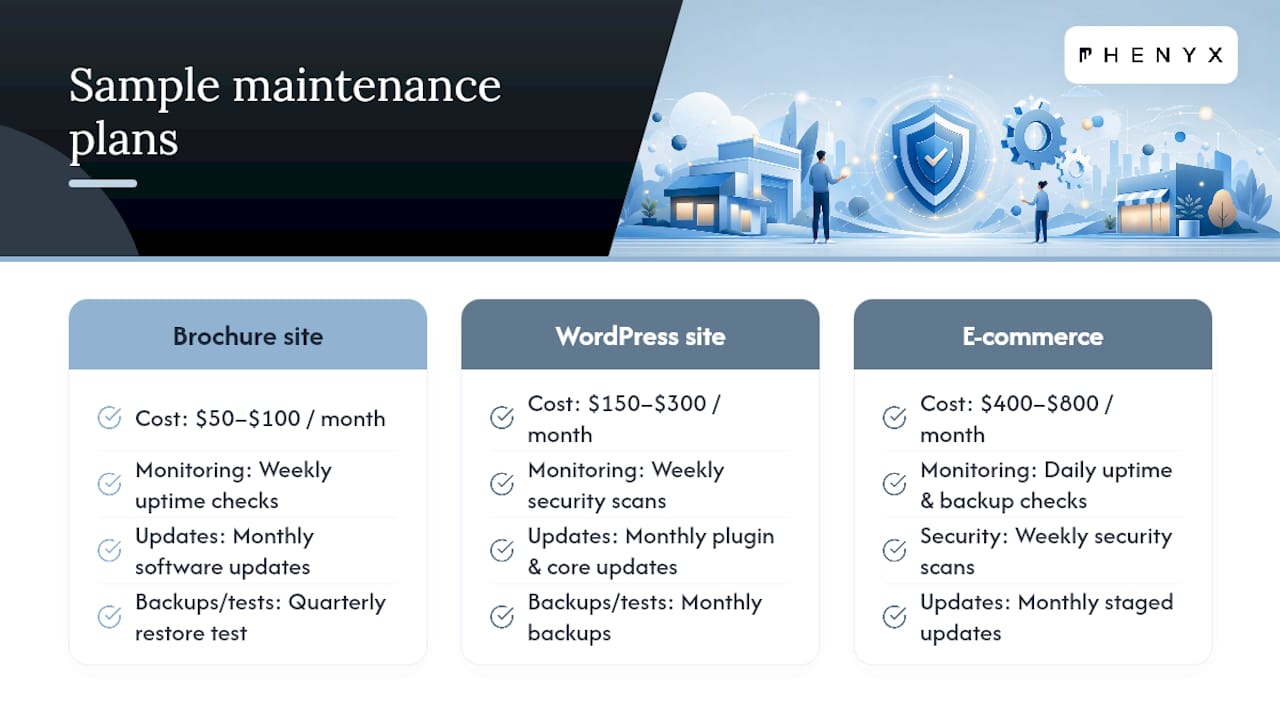
WordPress content site with regular blog posts: Weekly security scans, monthly plugin and core updates, monthly backups, quarterly accessibility and SEO review. Response time: 24 hours. Rough cost: $150 to $300/month.
E-commerce store: Daily uptime and backup checks, weekly security scans, monthly staging-tested updates, quarterly full restore test and performance tuning. Response time: same business day. Rough cost: $400 to $800/month.
Escalate from monthly to daily monitoring the moment a site starts processing payments, storing customer accounts, or generating leads that matter to revenue. A marketing audit checklist is a useful companion here, since a quarterly technical review pairs naturally with a quarterly look at whether the site is still converting the way it should.
Tools and Resources for Ongoing Site Upkeep
You don’t need specific vendor names to build a solid plan, just the right categories covered. Six categories matter most: uptime monitors that alert you within minutes of downtime, off-site backup storage separate from your hosting account, a staging host where updates get tested first, a security scanner that checks for known vulnerability patterns, an accessibility checker run against WCAG criteria, and analytics tools that track whether traffic and conversions hold steady after changes.
Each category reduces a specific kind of risk. Backup storage protects against data loss. Staging protects against update-induced breakage. Security scanning catches problems before attackers do. For accessibility specifically, pairing WCAG compliance with SEO strategy tends to improve both usability and search visibility at once, since many accessibility fixes overlap directly with technical SEO best practices.
How Phenyx Approaches Maintenance and Marketing Together
Some agencies run web design, SEO, and video production in-house, which means maintenance work doesn’t happen in isolation from the rest of a site’s marketing performance. A redesigned site built for performance needs a maintenance plan behind it just as much as an older one does, and Phenyx’s project work reflects that pairing of design and ongoing support. For clients who need it, maintenance may be scoped directly into a broader marketing retainer rather than billed as a disconnected add-on.
Legal and Compliance Considerations in Website Maintenance
Two compliance areas belong in every maintenance plan, not as an afterthought but as scheduled work. Accessibility is the first. The WCAG standard is the benchmark courts and regulators point to when accessibility complaints arise, and a quarterly audit against those success criteria is the most practical way to stay ahead of legal exposure while also improving usability for every visitor.
Data privacy is the second. If your site collects visitor data through forms, cookies, or e-commerce checkout, you likely have obligations under regulations like the GDPR for European visitors or state-level privacy laws in the US, depending on where your customers are located. Maintenance touches this directly: privacy policies need periodic review, cookie consent tools need testing after every major update, and any third-party script added to the site (a new analytics tag, a chat widget) should get checked against your data handling disclosures.
Security maintenance also carries compliance weight. Following basic operational security guidance for small businesses, things like patching promptly and monitoring for known vulnerabilities, isn’t just good practice. It’s often the baseline regulators and cyber-insurance policies expect if a breach ever happens. None of this replaces legal counsel for your specific situation, but folding compliance checks into your existing maintenance calendar is far cheaper than handling them as a crisis response.
What Actually Separates a Good Maintenance Habit From a Good Intentions List
Most sites don’t fail because nobody cared. They fail because maintenance depended on someone remembering to do it, and eventually nobody did. The plans that hold up over years aren’t the ones with the fanciest tools. They’re the ones with a fixed date on a calendar that doesn’t move, whether that’s a Monday morning security scan or a first-of-the-quarter restore test.
If you take one habit from this guide, make it the restore test. Backups people never verify are the single most common false sense of security in small business web management. A structured approach treats that test as non-negotiable rather than optional.
— Phenyx
Get a Maintenance Plan Built Around Your Actual Site
Business owners who want maintenance handled by the same team that understands their site’s design, SEO, and marketing goals, instead of juggling a separate vendor for every piece, have agency options that offer that service. Because design, development, and ongoing support can live under one roof, updates can be tested properly and issues caught before they cost traffic or revenue.
Whether you need a full website redesign with a maintenance plan built in from day one, or want to pair ongoing upkeep with SEO and AEO services to keep growing while your site stays secure, Phenyx scopes that work around what your business actually needs. Businesses working with our Denver, Tampa, and and Dallas-Fort Worth teams get maintenance folded into the same retainer as their broader marketing work. Reach out for a quote and a straightforward look at what a maintenance plan should cost for your specific site.