
ActiveCampaign vs Mailchimp: Which One Fits Your Business?
Choose Mailchimp if you want to send good-looking emails quickly and your automation needs are basic. Choose ActiveCampaign if email is one part of a sales process, you need a built-in CRM, and you are willing to spend a few weeks learning a deeper tool. Most of the decision comes down to how much follow-up logic your marketing needs a year from now, not what it needs today.
Below, we compare the two on ease of use, automation, CRM, integrations and cost, then show how to decide and what to do after you do.
TL;DR
- Mailchimp is the faster start: a simple editor, a free plan and a gentler learning curve.
- ActiveCampaign is the stronger engine for multi-step automation, lead scoring and sales follow-up.
- Entry prices are close ($13 vs $15 per month), but costs diverge as your list and automation grow.
- The platform matters less than the strategy behind it: segments, offers and follow-up decide results.
Table of Contents
- Quick Summary
- What is the main difference between ActiveCampaign and Mailchimp?
- Which is easier to use?
- How do the automation features compare?
- Does ActiveCampaign work as a CRM?
- How much do they cost?
- How do integrations compare?
- Which business types fit each platform?
- Our perspective
- From platform choice to a working system
- How to decide in five steps
- FAQ
- Sources
Quick Summary
- Best for beginners: Mailchimp, based on its drag-and-drop editor and quick setup.
- Best for sales-driven teams: ActiveCampaign, which includes a CRM and pipeline tools.
- Automation depth: ActiveCampaign offers conditional branching, goals and CRM-linked actions; Mailchimp covers foundational flows.
- Starting prices: Mailchimp paid plans from $13 per month; ActiveCampaign plans from $15 per month.
- Free plan: Mailchimp has one; ActiveCampaign offers a 14-day trial.
- Integrations: ActiveCampaign reports a larger app catalog; Mailchimp has 300+ on Premium.
- Switching cost: Moving later means rebuilding automations, so choose for where you are headed.
- Our advice: Pick the tool that matches your follow-up process, then build the process first.
What is the main difference between ActiveCampaign and Mailchimp?
The two tools are built around different assumptions about the person using them.
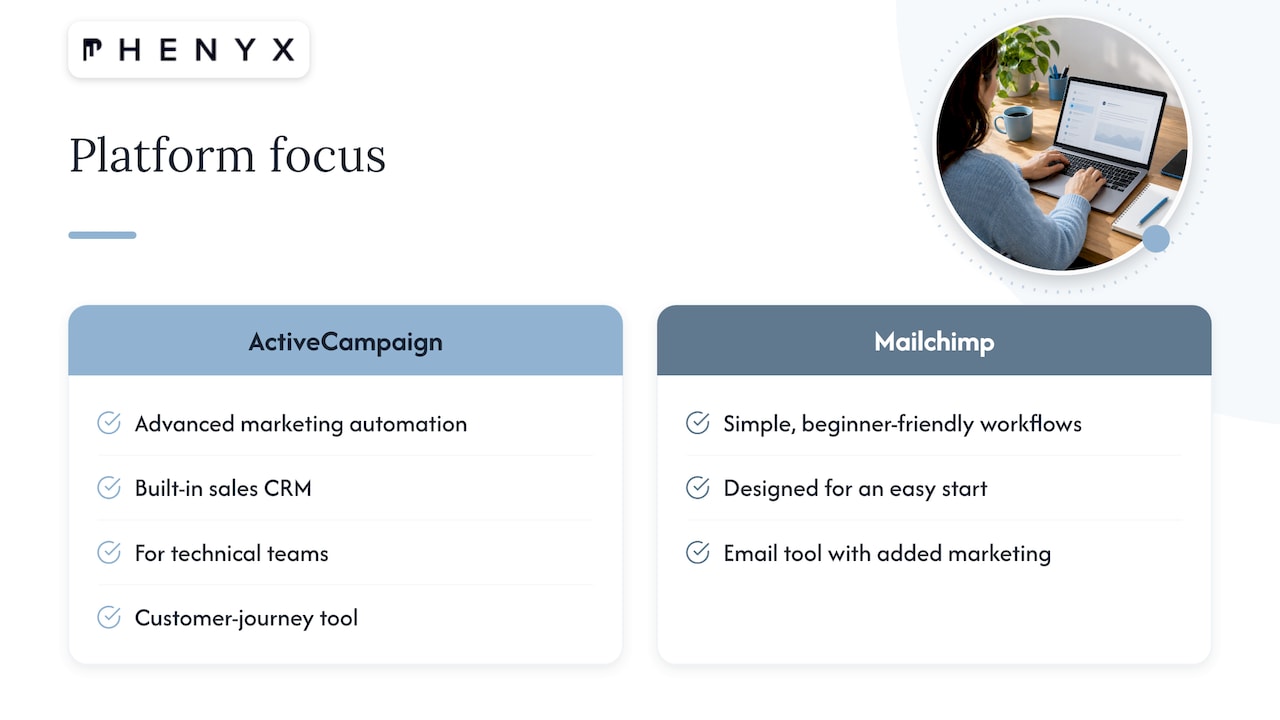
ActiveCampaign describes itself as an autonomous marketing platform and positions itself for growing businesses that need advanced automation and a built-in sales CRM. Mailchimp is designed around simplicity, speed and beginner-friendly workflows, according to ActiveCampaign’s own comparison page. Mailchimp tells a similar story from the other side: its comparison page frames Mailchimp as the easier place to start and ActiveCampaign as better suited to technical teams building intricate, multi-channel automations.
Both companies are describing their own products, so treat those pages as positioning. The pattern still holds up in independent reviews, which we cover below.
In practice, think of Mailchimp as an email tool that has added marketing features around it. Think of ActiveCampaign as a customer-journey tool that happens to send email. That difference shapes everything else: the interface, the pricing logic and the kind of team that ends up happy with each one.
Which is easier to use?
Mailchimp wins this one, and not narrowly.
A 2026 Zapier comparison describes Mailchimp as the easier setup for beginners and ActiveCampaign as having a steeper learning curve because of its automation depth, though it is powerful for people who invest the time. User ratings on G2 point the same way: Mailchimp scores 8.7 out of 10 for ease of use against 8.2 for ActiveCampaign, and G2 also rates Mailchimp higher for setup. ActiveCampaign’s email marketing score on the same page is 9.0, so the gap is about the learning curve, not the quality of the emails.
What that means day to day:
- First campaign: Mailchimp gets most people from signup to a sent newsletter in an afternoon.
- First automation: a welcome series is simple in both, but ActiveCampaign puts many more options in front of you.
- Month three: teams that outgrow a basic flow often find ActiveCampaign’s builder saves time, because logic that needs workarounds elsewhere is built in.
If you publish a creator newsletter and monetize with reader support, the simplicity of Mailchimp pairs well with a small touch like a tip link without hurting deliverability. Keeping the stack light is a legitimate strategy when email is a channel, not the engine of your sales.
How do the automation features compare?
This is where the two tools separate most clearly.
ActiveCampaign offers a visual automation builder with conditional if/then branching, behavior triggers, goal tracking and actions linked to CRM records. According to its comparison page, that makes it well suited to revenue-focused, multi-channel marketing. Mailchimp provides foundational automation, such as welcome series and abandoned cart flows, which are easier to set up but less flexible once you want multi-step paths.
Mailchimp’s own page says it includes more than 100 pre-built automation templates, predictive segmentation and custom reporting, and works with apps such as Shopify, Salesforce and QuickBooks Online. Templates are a real advantage when you do not want to design logic from scratch.
Here is a quick way to judge which side you are on. Write down what should happen after someone downloads a guide:
- If the answer is “send a welcome email, then a newsletter,” Mailchimp covers it.
- If the answer is “send a sequence based on what they click, score them, alert a salesperson at a threshold, and branch if they book a call,” you want ActiveCampaign.
The more your answer looks like the second one, the more a flexible builder pays off. If you are still mapping those steps, our guide to building effective email campaigns walks through the planning side before you touch any software.
Does ActiveCampaign work as a CRM?
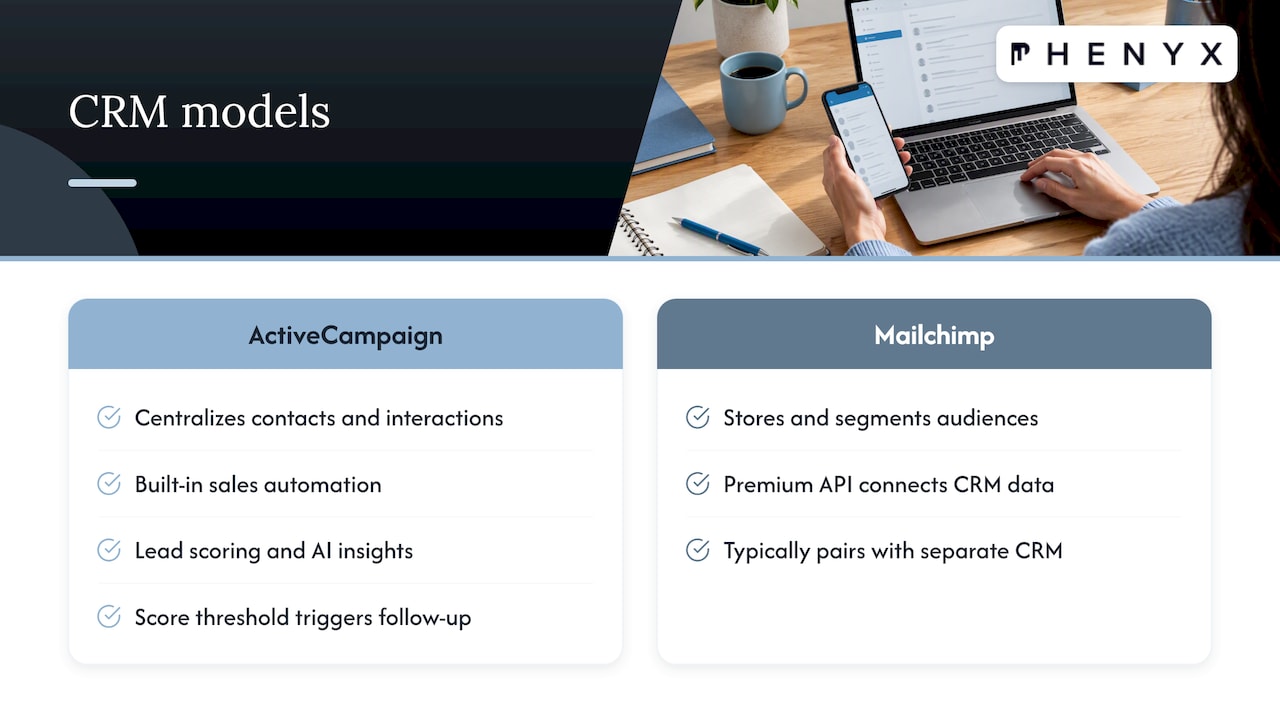
Yes. ActiveCampaign calls itself a marketing and sales automation platform with a CRM built for small and midsize businesses. Its CRM page says it centralizes contacts and customer interactions while adding sales automation, lead scoring and AI-driven insights.
The help center describes contact management features such as searching and sorting contacts, bulk editing, advanced searches and segments, and individual contact records. ActiveCampaign also publishes an outbound sequence recipe in which a deal entering a pipeline triggers a series of one-to-one emails, and a lead-score threshold afterward can create a follow-up task or move the lead into a nurture automation.
That is the practical value: marketing and sales see the same record. A contact who opens three emails and visits your pricing page can be flagged for a call without anyone exporting a spreadsheet.
Mailchimp can store and segment audiences, and its Premium plan offers an API to connect custom data sources such as CRM systems. The difference is that you typically connect a separate CRM instead of using one inside the platform. For a local service business with a short sales cycle, that may be fine. For a company with longer sales conversations, one system is easier to keep clean.
How much do they cost?
Both use pricing tied to your contact list, so the number you see on the pricing page is a floor, not a forecast.
| Mailchimp | ActiveCampaign | |
|---|---|---|
| Plan tiers | Free, Essentials, Standard, Premium | Starter, Plus, Pro, Enterprise |
| Entry price | Paid plans from $13 per month at 500 contacts | Plans from $15 per month |
| Free option | Free plan | 14-day trial |
| Top published tier | Premium at $350 per month for 10,000 contacts | Enterprise (custom) |
| Cross-channel and CRM | Varies by plan | Cross-channel on Plus and above; enhanced CRM, SMS and WhatsApp are add-ons |
The figures come from the vendors’ own pages: Mailchimp’s pricing page lists the plan tiers and the $13 Essentials starting price, plus Premium at $350 per month for 10,000 contacts. ActiveCampaign’s pricing page shows four plans priced by contact-list size, with multi-step automation and AI builders, and its CRM page states the $15 starting price and 14-day trial. Prices change, so confirm on the vendor pages before you commit.
Two things to keep in mind when you compare cost:
- Look at the plan you need, not the plan you start on. Features like advanced segmentation or predictive sending sit on higher Mailchimp tiers, and ActiveCampaign’s cross-channel features start at Plus.
- Count your own time. A cheaper tool that takes your team ten extra hours a month to work around is not cheaper.
How do integrations compare?
Both connect to the tools small businesses commonly run, including ecommerce stores, CRMs and forms. ActiveCampaign has historically emphasized breadth. Its 2021 sales engagement announcement cited more than 870 integrated apps at the time, including Salesforce and Microsoft Dynamics 365, and the catalog has grown since. Mailchimp’s Premium plan connects to 300+ integrations and covers email, SMS, audience targeting, automated workflows and A/B testing.
The number of integrations matters less than whether your specific tools are on the list and whether the data flows both ways. Before you decide, list the five systems that must talk to your email platform, such as your website forms, store, booking tool, accounting and CRM. Then check each one. If you run an ecommerce site, test how product and purchase data arrives, since that drives abandoned cart and post-purchase flows.
Which business types fit each platform?
A simple rule of thumb works well here.
Mailchimp fits you if:
- You are new to email marketing or have no dedicated marketer.
- Your main output is newsletters, promotions and a few basic automations.
- You want to test email at low cost before committing.
ActiveCampaign fits you if:
- You have a sales process with several stages and want marketing to feed it.
- You need lead scoring, segmentation by behavior and multi-path automation.
- Someone on your team can own the platform and keep improving it.
Independent roundups reach the same split, recommending Mailchimp for beginners who prioritize quick setup and ActiveCampaign for businesses that need deep automation and sales alignment. The tool you can actually run consistently beats the theoretically better one that sits half-configured.
Our perspective
We see this choice come up with almost every growing business we work with, and the honest pattern is that the platform is rarely the real problem. Businesses that struggle with email usually have a gap upstream: no clear segments, no defined handoff from marketing to sales, and a website that does not capture the right information in the first place.
That is why we treat the email platform as one piece of a connected system. Your forms live on your website, your leads come from search, ads and video, and your brand shapes whether anyone opens the message. When one in-house team handles those pieces, the email tool gets clean data, consistent design and a strategy built for your goals instead of a rigid template.
Our advice is to choose the platform that fits the follow-up process you want to run in twelve months, then let a structured approach guide the build: audience first, then offers, then automation. Whether that lands on a simple tool or a deeper one, the result is a system your team can actually maintain.
PHENYX
From platform choice to a working system
Picking between these tools is one decision in a bigger marketing picture. If you would rather not manage separate vendors for your website, search visibility, creative and email, our in-house team handles them together, with strategy tailored to your goals. Our MODS subscription offers ongoing, all-inclusive marketing support starting from $4,000 per month, and you can see how it works on our homepage.
Not sure where to begin? A growth plan is a good first step, and our short guide to a one-page small business marketing plan will help you define audiences and goals before you configure any software.
How to decide in five steps
- Map your follow-up. Sketch what should happen after a lead signs up, from first email to sales conversation.
- Count your contacts and channels. Estimate your list size in 12 months and whether you need SMS or other channels.
- Check your integrations. Confirm your website, store and CRM connect cleanly to each option.
- Test with real content. Use Mailchimp’s free plan or ActiveCampaign’s trial to build one real automation, not a demo.
- Assign an owner. Decide who will maintain the platform. Unowned tools drift, whatever their features.
If the sketch from step one fits on a sticky note, start simple. If it needs a whiteboard, start with the deeper tool. Either way, document your segments and naming so a future switch is not painful.
When you are ready to connect email with the rest of your pipeline, our guide to B2B lead generation strategies shows where email fits alongside other channels.
FAQ
Is ActiveCampaign better than Mailchimp?
It depends on what you need. ActiveCampaign is stronger for advanced automation, lead scoring and built-in CRM, while Mailchimp is easier to learn and quicker to launch. If your marketing is mostly newsletters, Mailchimp is usually enough. If you run a multi-stage sales process, ActiveCampaign tends to be the better fit.
Is ActiveCampaign cheaper than Mailchimp?
Not at the entry level. Mailchimp’s paid plans start at $13 per month, and ActiveCampaign’s plans start at $15 per month. Both scale with your contact count, so compare the specific plan with the features you need at your list size.
Is ActiveCampaign a good CRM?
It works well as a lightweight CRM for small and midsize businesses that want marketing and sales in one place. The vendor describes it as a CRM with sales automation and lead scoring. Companies with complex enterprise sales needs may still want a dedicated CRM connected to it.
Can I switch from Mailchimp to ActiveCampaign later?
Yes, and many businesses do as their needs grow. You can export contacts, but automations and templates usually need to be rebuilt. Keep your segments and flows documented from the start so the move takes days, not weeks.
Do I need either one if I work with a marketing agency?
Often yes, because your email platform holds your audience data and automations. An agency can choose, set up and manage it alongside your website, search and creative work. That keeps your messaging consistent and your data in one place.
Sources
- ActiveCampaign vs. Mailchimp
- ActiveCampaign: Marketing automation for any business
- Why choose Mailchimp over ActiveCampaign?
- Zapier: ActiveCampaign vs. Mailchimp
- G2: ActiveCampaign and Mailchimp compared
- Learn more about ActiveCampaign
- ActiveCampaign CRM
- ActiveCampaign contact management help
- ActiveCampaign outbound sequence recipe
- Mailchimp Premium plan details
- Mailchimp pricing plans
- ActiveCampaign pricing
- ActiveCampaign sales engagement announcement
- Best email marketing tools for small business
- Newsletter tip link and deliverability