


Social Media Content Calendar: A Practical Template Guide
A social media content calendar is a shared schedule that maps out what you post, where, when, and who owns it, so your team publishes on purpose instead of scrambling every morning. Its job is simple: turn scattered ideas into a repeatable production line with clear approval checkpoints.
Quick Summary
- A calendar needs at minimum: date, time, channel, final copy, asset link, owner, and status as common practice.
- Most teams build calendars in Google Sheets or Airtable before graduating to dedicated platforms.
- Standard content should be planned well ahead of publish date; major campaigns need much longer lead times for multi-stage approval, according to best practices for 2026.
- Sprout Social’s field framework covers publish date and time, platform, format, copy, creative asset, campaign or pillar, owner, and approval status.
- Hootsuite’s eight-step planning process moves from themes to brainstorming to scheduling in advance, per its content planning guide.
- Batching and repurposing one idea into several formats is the fastest way to fill a calendar without burning out your team, notes Storyflow’s planning system.
- A downloadable Google Sheets or Airtable template gets you running in under an hour, no rebuild required.
The minimal viable row, the one you should never publish without, includes: date, time, channel, final copy, asset link, owner, and status. Everything else is enhancement.
Key Takeaways
A social media content calendar works because it turns scattered posting decisions into a repeatable system with defined fields, owners, and approval states.
| Point | Details |
|---|---|
| Start with the minimal row | Every calendar needs date, time, channel, final copy, asset link, owner, and status before anything else. |
| Batch and repurpose | Turn one pillar idea into multiple platform variants instead of creating fresh content for every post. |
| Match tool to team size | Solo creators use Google Sheets or Buffer; agencies need Sprout Social, Hootsuite, or Planable for approval flows. |
| Lock down access | Use role-based permissions and revoke access promptly when contributors leave the team. |
| Bring in Phenyx when it stalls | Phenyx builds calendar-driven campaigns with structured approvals, asset libraries, and publishing support for teams that have outgrown a self-managed system. |
What is the difference between a social media calendar and a posting schedule?
A social media calendar includes strategy elements like content pillars, campaigns, and approval status, while a posting schedule is just the list of dates and times content goes live. The calendar is the planning layer; the schedule is one output of it.
How far in advance should I plan my social media content?
Standard, recurring content works well planned a few weeks ahead, while larger campaigns need a much longer runway, often six to eight weeks, to allow for creative production and multi-stage approvals.
What’s the best free tool for a social media content calendar?
Google Sheets is the most accessible free option for solo creators and small teams, and Airtable’s free tier adds structured fields and views once you outgrow a basic spreadsheet.
How many content pillars should my calendar have?
Most planning frameworks recommend three to five content pillars, enough to keep variety without diluting your messaging across too many themes at once.
When should I switch from a spreadsheet to a dedicated scheduling platform?
The clearest signal is repeated approval bottlenecks, if reviewers keep losing track of the current draft or a client approves the wrong version more than once, it’s time to move to a platform built around approval workflows.
Table of Contents
- What Is a Social Media Content Calendar and Why Do You Need One?
- What Fields Belong in Every Content Calendar?
- How Do You Build and Populate a Social Media Content Calendar?
- How Should You Organize a Calendar Across Different Platforms?
- Which Calendar Format Fits Your Team?
- Where Can You Get a Ready-Made Content Calendar Template?
- Which Scheduling Tool Fits Your Team Size and Budget?
- What Approval Workflow Keeps Content Moving Without Bottlenecks?
- How Do You Use the Calendar to Track Performance?
- When Should You Bring in an Agency to Run Your Calendar?
- How Do You Protect a Shared Content Calendar From Security Risks?
- What Do Growing Brands Get Wrong About Content Calendars?
- How Can Phenyx Help You Run a Content Calendar That Actually Works?
- Sources
What Is a Social Media Content Calendar and Why Do You Need One?
A social media content calendar isn’t a nice-to-have spreadsheet. It’s the operational backbone that separates brands who post consistently from brands who post when someone remembers. Below are the outcomes teams actually see when they run one properly.
- Faster production. Batching content around themes cuts the time spent starting from a blank page every day.
- Fewer missed approvals. A visible status column (draft, in review, approved, scheduled) stops posts from slipping through without sign-off.
- Predictable cadence. Once a calendar exists, posting frequency stops depending on whoever remembers to hit publish.
- Better campaign control. Cross-platform launches stay coordinated instead of drifting out of sync.
- Easier repurposing. One pillar idea becomes a LinkedIn post, an Instagram carousel, and a Reel without extra brainstorming.
A solo creator uses a calendar to stop losing three hours a week to “what do I post today” paralysis. A small marketing team uses it to keep sales, support, and marketing aligned on messaging before a product launch. An agency uses it to run five client accounts without mixing up brand voice or missing a client’s approval window.
The promise is straightforward: a working calendar means faster approvals, a cadence you can actually sustain, and lower production cost per post because nothing gets built twice.
What Fields Belong in Every Content Calendar?
Every calendar, whether it lives in a spreadsheet or a dedicated platform, needs the same core schema. Sprout Social’s field framework for calendars centers on publish date and time, platform, post format, copy, asset, campaign, owner, and status, and that structure holds up across team sizes.
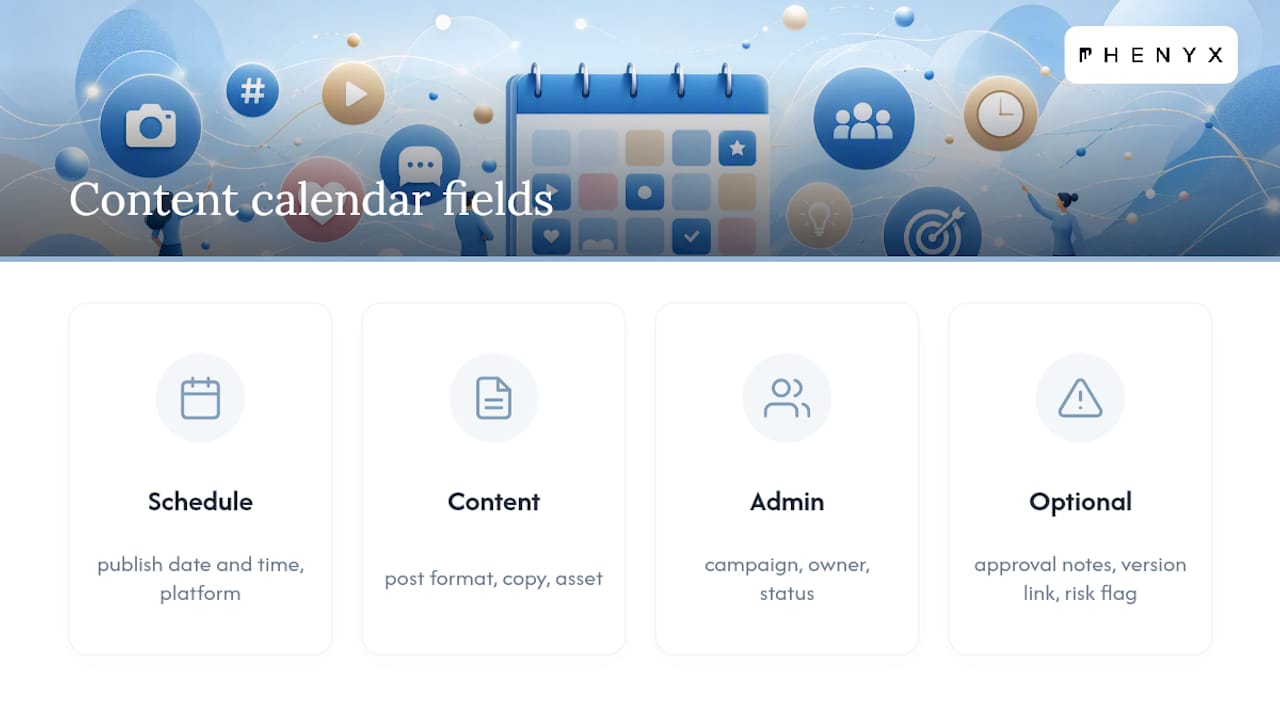
A few optional fields pay for themselves fast: approval notes (so feedback doesn’t live in a Slack thread nobody can find), a version link (so you’re never editing an outdated draft), and a risk level flag for anything touching a sensitive topic.
Pro Tip: Name your asset files with the publish date and platform up front (2026-03-12_IG_carousel_v2), and write alt text into the calendar row itself instead of leaving it for the person scheduling the post. Both habits eliminate the last-minute scramble that causes most missed posting windows.
Here’s the same idea adapted for two platforms in one row set: a LinkedIn variant runs as a text-first post with a data point in the first line, while the Instagram variant becomes a three-slide carousel with the data point as a bold graphic on slide one.
How Do You Build and Populate a Social Media Content Calendar?
Building a calendar from scratch feels harder than it is once you break it into a sequence. Hootsuite’s eight-step planning process offers a useful backbone: define content themes, brainstorm ideas, optimize timing, decide your content mix, assign responsibilities, write captions, create assets, and schedule in advance.
Here’s how that plays out in practice:
- Set a primary goal. Awareness, lead generation, and community building each demand different content mixes.
- Define three to five content pillars. These are your recurring themes, not one-off ideas.
- Build an idea backlog. Keep a running list longer than you need so you’re never scrambling.
- Batch production. Write and design a week or month of content in one sitting rather than daily.
- Assign owners. Every row needs one accountable person, not a shared responsibility that nobody owns.
- Create platform variants. Adapt one core idea for each channel’s format and audience.
- Run approvals. Move drafts through review states before anything gets scheduled.
- Schedule and monitor. Load approved content into your scheduler and watch early performance.
Lead time matters more than most teams plan for. Best practices for 2026 suggest planning core, routine content well ahead of the publish date, while larger campaigns need much longer lead times to allow for creative revisions and multi-stage sign-off. A typical product launch campaign benefits from a runway of several weeks for strategy, messaging, asset production, and approval scheduling buffer.
Batching is where the real time savings live. Storyflow’s content system recommends picking pillars, maintaining an idea backlog, batching production, and repurposing one idea across platforms rather than creating fresh content for every single post. One customer testimonial becomes a quote graphic, a video clip, and a LinkedIn story in a single afternoon.

Set your cadence by capacity, not ambition. A team that can realistically produce twelve pieces of content a month will burn out trying to hit thirty. Start where your production capacity actually sits, then grow it.
How Should You Organize a Calendar Across Different Platforms?
Each network has its own rhythm and format expectations, and your calendar should reflect that instead of treating every platform the same.
- Instagram rewards visual consistency and Reels; most brand accounts post several times a week with a mix of feed posts, carousels, and Stories.
- TikTok runs on trend velocity, so leave slots open for reactive content, not just planned posts.
- X (Twitter) works best with frequent, short-form updates and real-time engagement, often multiple times a day.
- LinkedIn favors fewer, higher-value posts, think thought leadership and company updates a few times a week.
- Facebook still performs well for community groups and event promotion, typically a handful of posts weekly.
- Pinterest operates on evergreen discovery, so pins can be scheduled well in advance and reused seasonally.
- YouTube needs the longest lead time of any platform given editing and thumbnail production.
One underwriting idea, say a customer success story, can become three calendar rows: a LinkedIn case study post, an Instagram Reel highlighting the transformation, and a Pinterest pin linking to the full write-up. Keep each platform variant as its own row rather than a toggle on one row. Toggles hide the fact that captions, hashtags, and file specs differ enough to need separate review and separate approval.
Which Calendar Format Fits Your Team?
Not every team needs the same tool, and picking the wrong format early creates rework later.
- Google Sheets costs nothing and is instantly shareable, but it lacks built-in approval states and gets unwieldy past a handful of contributors.
- Airtable adds structured views, linked records, and automation without the learning curve of enterprise software, making it a strong middle step.
- Trello or kanban boards visualize status well but struggle once you need detailed fields like UTM tags or asset versioning.
- Calendar views (weekly/monthly) help visualize cadence at a glance but often need to sit on top of a spreadsheet or database for the actual data.
- Dedicated scheduling platforms bundle calendar, approvals, and publishing into one system, which matters most once you’re managing multiple brands or clients.
A solo creator does fine in Google Sheets. A small in-house team usually graduates to Airtable once approvals multiply. A multi-brand agency or enterprise team typically needs a dedicated platform where permissions and publishing are unified. Watch for what one practitioner guide calls the grid fallacy: a calendar that looks organized visually but has no real approval states or validation rules underneath is not actually operational, it’s just a prettier mess.
Where Can You Get a Ready-Made Content Calendar Template?
You don’t need to build your schema from a blank sheet. Grab a Google Sheets or Airtable template, duplicate it into your own workspace, and adjust the pillar and platform columns to match your brand.
Here’s what filled rows look like in practice:
- B2B product launch: March 3, 2026, LinkedIn, thought leadership post, “How teams cut onboarding time,” Campaign: Q1_Launch, Owner: Content Lead, Status: Scheduled, UTM: utm_campaign=q1_launch.
- Product promo: March 5, 2026, Instagram, carousel, “3 features you’re not using yet,” Campaign: Feature_Awareness, Owner: Designer, Status: In Review.
- Evergreen educational post: March 8, 2026, Pinterest, pin, “5 email subject lines that actually get opened,” Campaign: Evergreen, Owner: Content Lead, Status: Approved.
PostPlanify’s framework for building these calendars recommends setting a primary goal, defining three to five pillars, choosing your tool by team size, and setting cadence by capacity before you fill a single row. If your team runs a CMS or a shared asset library, link those directly into your asset column so nobody hunts for files across five different tools.
Which Scheduling Tool Fits Your Team Size and Budget?
The right tool depends on team size, approval complexity, and how many platforms you’re managing at once. Here’s how the major players in this category stack up.
| Tool | Best For | Pricing Shape | Collaboration & Approvals | Platform Support |
|---|---|---|---|---|
| Google Sheets | Solo creators, tiny teams | Free | Manual, comment-based | Any (manual scheduling) |
| Airtable | Small teams needing structure | Free tier, paid plans scale with records | Linked views, custom statuses | Any (manual or via integration) |
| Buffer | Solo creators and small teams | Free tier, low-cost paid plans | Basic approval flags | Instagram, X, LinkedIn, Facebook, Pinterest, TikTok |
| Later | Visual-first small teams | Free tier, mid-tier paid plans | Client approval links | Instagram, TikTok, Pinterest, X, LinkedIn, Facebook |
| Hootsuite | Growing teams and agencies | Paid plans, no permanent free tier | Team approval workflows | All major networks including YouTube |
| Sprout Social | Mid-size teams and agencies | Higher-tier paid plans | Approval workflows, team permissions | All major networks including YouTube |
| Planable | Agencies managing client approvals | Paid plans with client seats | Built specifically around approval and feedback flows | Instagram, TikTok, X, LinkedIn, Facebook, Pinterest, YouTube |
| HubSpot | Teams wanting CRM-linked publishing | Bundled with marketing hub tiers | Workflow and team permissions | Instagram, X, LinkedIn, Facebook |
Real user feedback backs up where each tool shines. G2 reviewers of Planable consistently point to collaboration and approval workflows as the reason they picked it over spreadsheet-based systems, which tracks with what agencies managing multiple client sign-offs need most.
For a solo creator: start with Google Sheets or Buffer, both are free or nearly free and require no onboarding curve. For a small team: Airtable or Later gives you structure without enterprise pricing. For an agency: Sprout Social, Hootsuite, or Planable justify their cost through built-in client approval flows and multi-brand permissions.
The breakpoint for leaving a spreadsheet behind is usually the third recurring approval bottleneck, not a fixed team size. If reviewers keep losing track of which version is current, or a client keeps approving the wrong draft, that’s your signal to move to a dedicated platform.
What Approval Workflow Keeps Content Moving Without Bottlenecks?
Every calendar needs defined roles so nobody’s guessing who signs off on what.
- Creator drafts copy and requests assets.
- Editor reviews for voice, grammar, and brand fit.
- Approver signs off on strategy and legal or client requirements.
- Publisher schedules the final approved version.
- Account manager tracks deadlines and resolves conflicts between stakeholders.
A workable service-level agreement might look like: editors respond within one business day, approvers within two, and publishers schedule within four hours of final approval. Routine posts can skip straight to editor review, while campaign content should run through the full approver chain.
Pro Tip: Templated approval comments (“Approved as is,” “Approved with edits,” “Needs revision, see notes”) paired with version-linked drafts prevent what teams call the approval black hole, where feedback gets buried across five different threads and nobody knows which draft is current.
How Do You Use the Calendar to Track Performance?
Your calendar shouldn’t stop mattering once a post goes live. Tag each row with the metric that matches its goal:
- Awareness posts track reach and impressions.
- Engagement posts track comments, shares, and saves.
- Traffic posts track link clicks, using the UTM column you already built into the schema.
Record any experiment directly in the calendar, add a column or tag noting “Test: caption length” or “Test: post time,” then compare results against your normal baseline. Review performance monthly for quick wins, and quarterly for pillar-level decisions, like whether a content theme is still earning its slot.
When Should You Bring in an Agency to Run Your Calendar?
Some teams outgrow a self-managed calendar fast, especially once approvals span multiple stakeholders or clients. An agency-grade approach treats the calendar as an operating system rather than a to-do list, layering in approval states, platform-specific variants, and technical validation like checking aspect ratios before anything publishes.
Consider outsourcing when:
- Your team is managing more than three or four active platforms simultaneously.
- Approval chains involve external stakeholders or multiple client sign-offs.
- Production capacity can’t keep pace with your posting goals.
- You’re running campaigns across social, email, and blog content and need them synchronized.
Phenyx builds calendar-driven campaigns using multi-stage approval structures and shared asset libraries, aiming to ensure technical checks before publishing. Our approach to running these programs is outlined in more detail here.
Pro Tip: If your calendar has more than three people editing without a locked approval order, you’ve likely already hit the point where outsourcing the workflow saves more time than building it internally.
How Do You Protect a Shared Content Calendar From Security Risks?
A collaborative calendar is only as safe as its weakest permission setting. Once you have multiple contributors, freelancers, and possibly client stakeholders touching the same file, access control stops being optional.
Start with role-based permissions. Creators and editors typically need edit access, but approvers and clients often only need comment or view rights, not the ability to change a scheduled date or swap a final asset. Most spreadsheet and dedicated platforms support this distinction, but teams frequently skip setting it up until after something goes wrong.
Watch link-sharing settings closely. A calendar shared via “anyone with the link” is one forwarded email away from an unintended audience seeing unpublished campaign details or draft messaging. Restrict sharing to named accounts wherever your tool allows it.
Offboarding matters more than onboarding. When a freelancer or former team member’s access isn’t revoked promptly, they retain visibility into upcoming campaigns, pricing strategy, or unreleased product messaging. Build a habit of auditing access quarterly, not just when someone leaves.
For calendars connected to a scheduling platform with direct publishing rights, treat that connection like a set of keys. Anyone with publishing access can post to your live accounts, so limit that permission to a small, trusted group and use two-factor authentication on the connected accounts themselves.
Finally, keep a version history. Most modern tools log edits automatically, which matters when you need to trace who changed a caption or swapped an asset after a post goes out wrong.
What Do Growing Brands Get Wrong About Content Calendars?
The biggest failure Phenyx sees isn’t a missing template, it’s teams treating the calendar as a static document instead of a living system. Brands build a beautiful calendar in week one, then let it drift because nobody owns keeping it current.
The fix that actually works: assign one person as the calendar’s owner, not just the content’s owner. That person’s only job is making sure statuses stay accurate and stale drafts get flagged before they become missed posts.
We’ve seen a single workflow change save a team hours weekly: replacing open-ended feedback threads with a locked set of approval statuses. Draft, in review, approved, scheduled. Nothing skips a stage, and nothing gets published without a status change that everyone can see.
How Can Phenyx Help You Run a Content Calendar That Actually Works?
Building the calendar is the easy part. Running it consistently, across platforms, approvals, and a production schedule that doesn’t burn out your team, is where most in-house efforts stall out.
Phenyx handles this as one connected service instead of handing you off between separate vendors for strategy, content production, and publishing. We build the content pillars, produce the assets (including video production when a campaign calls for it), set up approval workflows that don’t bottleneck on one person, and support the actual publishing and reporting cadence. If your social calendar is driving traffic to a site that isn’t converting it, our SEO and AEO services make sure that traffic finds something worth clicking through to.
Every engagement scopes differently. Some teams need a one-time calendar build and training, others need an ongoing retainer that covers production and publishing every month. Pricing and scope vary by what your team already has in place, so the right first step is a conversation, not a quote sheet. Request a consultation with Phenyx and tell us where your current process is breaking down.
Sources
- Social Media Calendar Guide & Template | Sprout Social
- Content planning for social media in 8 steps 2026 guide
- Complete social media content calendar guide
- Content Calendar for Social Media: The Complete 2026 Guide
- How to Plan Social Media Content (2026 System) | Storyflow
Recommended
- Behind the Schedule: How PHENYX Builds Your SEO-Optimized Social Media Content Plan | PHENYX
- How to Prepare a Strong Marketing Campaign for 2026: Ideas and Tips Every Business Can Use | PHENYX
- 2026 Marketing Tips and Trends Every Local Business Should Know | PHENYX
- Holiday Marketing Tips Every Business Should Know for a Strong Season | PHENYX