

Fix Rankings Fast: Technical SEO Audit for SMBs' Top 20–30 Pages
A technical SEO audit checks the infrastructure behind your site, crawling, indexing, speed, and code, so search engines can find, render, and rank your pages correctly. If you’re starting today, verify your Search Console property first, then run a URL Inspection on your top pages and a full site crawl. Expect broad crawl and developer access, and expect the first quick wins within a week.
TL;DR:
- Running a full site crawl and checking coverage reports help identify crawling issues, errors, and duplicate URLs that split ranking signals.
- Validating structured data and ensuring the correct use of robots.txt, noindex, and canonical tags prevents indexing conflicts and content suppression.
- Prioritizing fixes on high-traffic pages, such as fixing 5xx errors and improving Core Web Vitals, delivers the fastest ranking improvements.
- Combining field data from CrUX with lab results from Lighthouse provides a complete picture of site speed and user experience.
- Business owners can handle most diagnostics in Search Console, but deep fixes or site migrations typically require professional technical expertise.
Table of Contents
- What Does a Technical SEO Audit Actually Cover?
- Step-by-Step Technical SEO Audit Workflow You Can Run Today
- Why Does Google Show Different Results for Indexed vs Live?
- How Do You Measure Core Web Vitals Correctly?
- Structured Data, Canonical Tags, and Index Directives: What’s the Difference?
- Which Fixes Should You Tackle First?
- What Should You Handle In-House vs Hand to an Agency?
- How Phenyx Can Take This Off Your Plate
- Sources
- FAQ
What Does a Technical SEO Audit Actually Cover?
A technical SEO audit covers the mechanics search engines use to find and evaluate your pages, not your keywords or your copy.
- Indexing status: which pages Google has crawled and added to its index
- Crawl health: redirect chains, server errors, and duplicate URL variants
- Core Web Vitals: loading speed, interaction responsiveness, and visual stability
- Structured data: whether your schema markup validates correctly
- Quick wins: getting important pages indexed, fixing 5xx errors, improving load speed on top landing pages
- Access you’ll need: Search Console, analytics, CMS login, and a developer for the actual fixes
Most business owners can run the diagnostic part alone. The fix part usually needs a developer or an agency, depending on how deep the problems run.
Step-by-Step Technical SEO Audit Workflow You Can Run Today
Here’s the order that produces results fastest, based on how Google’s own tools are built to be used together.
- Pull baseline metrics. Open Search Console’s Coverage and Performance reports, check your analytics traffic trends, and note your current Core Web Vitals scores from the CrUX data feeding Search Console.
- Run a full site crawl. Tools like Screaming Frog or Sitebulb will surface 4xx and 5xx errors, redirect chains, and parameter-based URL variants that split your ranking signals across duplicate pages.
- Spot-check with URL Inspection. Pick five to ten representative pages, homepage, top category page, a blog post, a product page, and compare the indexed view against the live test.
- Validate robots.txt and your XML sitemap. Confirm every sitemap entry returns a 200 status code and matches its canonical tag. Sitemaps are suggestions, not commands, so resubmitting an unchanged sitemap won’t speed anything up. Clean it instead.
- Audit structured data. Check your product, article, or local business schema for malformed JSON-LD on key templates.
- Gather performance data from both sides. Combine field data from CrUX with lab results from Lighthouse for the pages that carry your traffic.
Pro Tip: Don’t audit every page on your site with the same intensity. Run the full crawl everywhere, but reserve deep manual review, URL Inspection, schema checks, and speed testing, for the 20 to 30 pages that actually drive your traffic and conversions.
This order matters because each step feeds the next. Baseline metrics tell you where to look. The crawl tells you what’s broken. URL Inspection confirms whether Google actually sees what you think it sees.
Why Does Google Show Different Results for Indexed vs Live?
Google’s URL Inspection tool gives you two readings on the same page, and they often disagree.
- The indexed view shows what Google saw the last time it crawled the page, which could be days or weeks old.
- The live test checks the page’s current, renderable state right now.
- A mismatch between them usually means you made a fix that hasn’t been recrawled yet, or something is blocking the crawler that wasn’t there before.
Google’s own guidance confirms that after you request indexing, it can take anywhere from a few days to a couple of weeks for the change to register. That’s the number to set expectations around, both your own and your client’s, if you’re managing this for someone else.
Coverage reports group non-indexed pages by reason: crawled but not indexed, blocked by robots.txt, or marked noindex. Not every non-indexed page needs fixing. Thin tag pages or internal search results are often fine left out of the index. Save your effort for canonical pages that should be ranking and aren’t.
When Coverage and your crawl data disagree with what you observe in analytics, check your server logs. A page that Search Console says is indexed but that never shows Googlebot hits in your logs points to a caching or CDN issue, not a content problem.

How Do You Measure Core Web Vitals Correctly?
Speed audits fail most often because teams look at only one type of data. Web: real-user field data from CrUX or the web-vitals JavaScript library, and lab data from Lighthouse or WebPageTest run in a controlled environment.
- LCP (Largest Contentful Paint): a good score is within recommended thresholds for fast load times
- INP (Interaction to Next Paint): a good score is 200 milliseconds or less, measuring how fast your site responds to clicks and taps
- CLS (Cumulative Layout Shift): a good score is within recommended limits indicating stable visual content
Field data shows what real visitors actually experience across different devices and connections. Lab data lets you reproduce a problem on demand and test whether a fix worked before you ship it. Neither one alone gives you the full picture.
The fixes that move these numbers fastest, for most small business sites, are compressing your largest hero images, deferring render-blocking JavaScript, and putting a CDN in front of static assets. None of that requires a full rebuild.
Structured Data, Canonical Tags, and Index Directives: What’s the Difference?
Auditors mix these up constantly, and the mix-up causes real damage.
- Robots.txt controls what Googlebot is allowed to crawl. It doesn’t remove anything from the index.
- Noindex tells Google not to index a page it has already crawled.
- Canonical tags tell Google which version of a duplicate page to treat as the original.
Treating these as interchangeable is a common audit mistake. Blocking a page in robots.txt while also expecting a noindex tag on it to work is a contradiction. Googlebot can’t read the noindex tag if it never crawls the page. Validate your structured data through Search Console’s rich results testing, confirm your JSON-LD parses cleanly, then use the live test to check your rendering fix went live before requesting indexing.
Which Fixes Should You Tackle First?
Not every issue deserves the same urgency. Map problems to the traffic and revenue value of the page they sit on.
| Priority | Fix type | Why it matters |
|---|---|---|
| High | Get canonical, high-traffic pages indexed; fix 5xx server errors; improve Core Web Vitals on top landing pages | Directly blocks or slows your best-performing pages |
| Medium | Resolve redirect chains; strip non-indexable URLs from your sitemap; fix major schema errors | Wastes crawl budget and confuses ranking signals |
| Low | Meta description gaps; minor schema warnings; content duplicates to monitor | Rarely moves rankings on their own |
Start high, work down. A one to two week sprint focused on the high-impact row alone will outperform a scattered month spent chasing every warning a crawl tool flags.
What Should You Handle In-House vs Hand to an Agency?
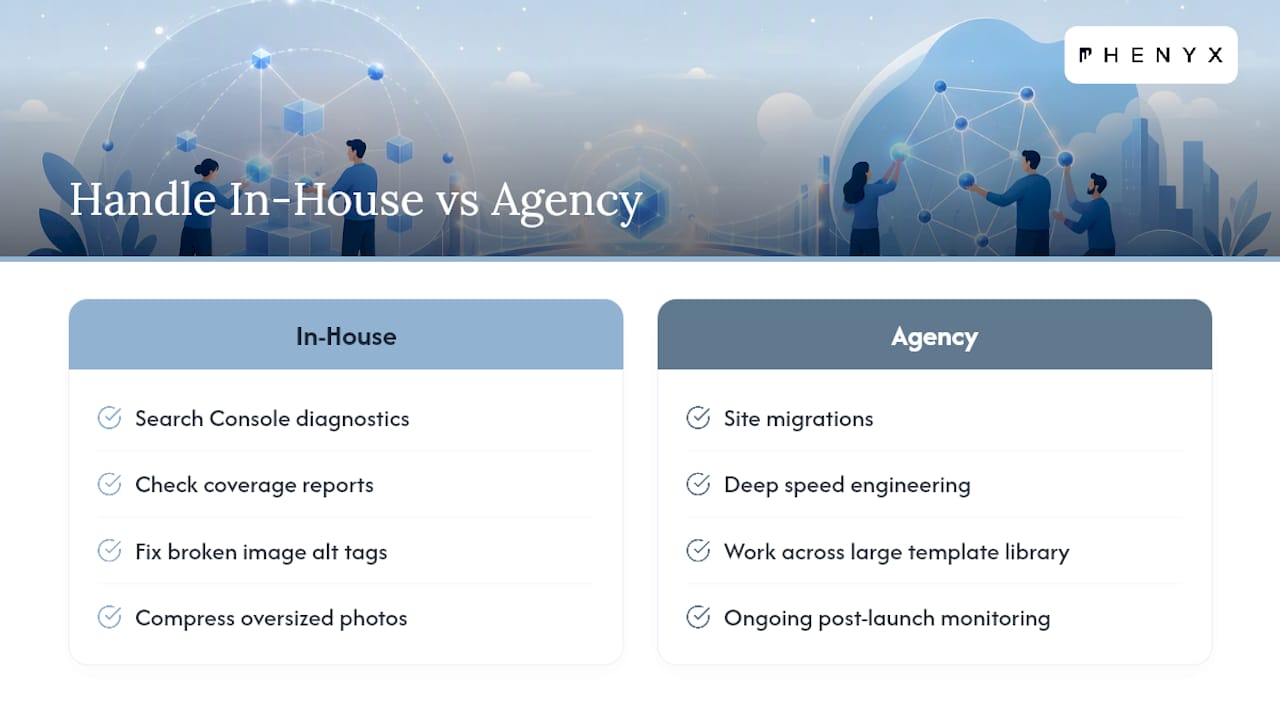
Most of the diagnostic work in this guide is well within reach for a business owner willing to spend an afternoon in Search Console. Checking coverage, fixing broken image alt tags, and compressing a few oversized photos are DIY territory.
Where it gets harder is site migrations, deep speed engineering across a large template library, and ongoing monitoring after launch. That’s usually where Phenyx gets called in, often through our SEO & AEO Services, sometimes as part of an ongoing MODS engagement once the initial fixes are live and someone needs to keep watching the dashboards.
— PHENYX
How Phenyx Can Take This Off Your Plate
Technical SEO audits run the same way this guide does, but some agencies have an in-house team that fixes what they find instead of handing you a report and walking away. This approach avoids waiting on a separate developer vendor while redirect chains remain broken for another billing cycle.

If your site needs structural work alongside the SEO fixes, whether that’s a slow template rebuild or a full redesign, our team handles website design under the same roof. Businesses working with our MODS retainer get audit findings turned into a prioritized fix plan and ongoing monitoring, so Core Web Vitals regressions get caught before they cost rankings. Reach out through our SEO & AEO Services page to scope a technical audit for your site, whether you’re in Denver, Tampa, Dallas-Fort Worth, or anywhere else your customers are searching.
Sources
FAQ
What Is a Technical Audit in SEO?
A technical audit in SEO examines the infrastructure behind a website, crawlability, indexing, site speed, structured data, and security, to find issues blocking search engines from properly accessing or ranking pages. It relies on tools like Search Console and a site crawler rather than reviewing content quality.
What Is an SEO Audit?
An SEO audit is a broader review that can include technical checks, on-page content quality, keyword targeting, and backlink profile analysis. A technical SEO audit is one component of it, focused specifically on the mechanical and infrastructure side.
What Is the Difference Between SEO and Technical SEO?
SEO covers everything that influences search visibility, including content, keywords, and links. Technical SEO focuses narrowly on how well search engines can crawl, render, and index your site, things like site speed, structured data, and Core Web Vitals.
Can ChatGPT Do an SEO Audit?
ChatGPT can help interpret crawl data, draft fix recommendations, or explain what a Coverage report reason means, but it cannot access your Search Console account, crawl your live site, or run a real URL Inspection test. Treat it as a research assistant, not a replacement for the actual tools.
How Often Should I Run a Technical SEO Audit?
Most sites benefit from a full technical audit once or twice a year, with lighter monthly checks on Core Web Vitals and Coverage reports in between. Sites going through a redesign or migration need one immediately before and after the change goes live.