

Scale to 20,000 Items: A Marketer's Webflow Dynamic CMS Playbook
Webflow’s CMS can absolutely boost your brand, but only if you build it with content and search visibility in mind from day one. The platform gives you on-brand dynamic pages, faster publishing, and structures that both Google and AI answer engines can read cleanly. Start with meta title templates, JSON-LD, and collections tested with real content, then follow the checklist and plan guidance below.
TL;DR:
- Proper collection modeling and real content testing from the start are crucial to ensure site consistency and prevent layout issues as content volume grows.
- Setting meta title and description patterns at the collection level and adding JSON-LD structured data early improves search visibility and AI answer engine compatibility.
- Monitoring search crawling and rendering after going live helps catch indexing issues early, especially on high-volume dynamic sites.
- Managing content workflows with clear roles, approvals, and staging environments maintains message consistency and reduces accidental errors.
- Scaling content operations may require an agency or enterprise-level plans if CMS item limits, localization, or custom Webflow Cloud apps surpass in-house capabilities.
Table of Contents
- Quick Summary
- Why Webflow’s Dynamic CMS Matters for Brand Growth
- How Do You Model Collections and Build Templates With Real Content?
- What SEO and AEO Settings Do Dynamic Webflow Pages Need?
- How Should Marketing Teams Manage Webflow Content Day to Day?
- What Changed With Webflow’s May 2026 Plan Update, and How Does It Affect Scaling?
- Implementation Checklist: From Content Model to Launch
- Should You Build Your Webflow CMS Site Yourself or Hire an Agency?
- Get a Webflow Site Built to Grow Your Brand, Not Just Launch It
- Sources
- FAQ
Quick Summary
- Webflow’s CMS keeps design consistent across hundreds of pages without a developer touching each one.
- Dynamic, well-structured pages publish faster and cover more topics, which helps both SEO and AEO.
- Set meta title and description templates at the collection level before you create content in bulk.
- Add JSON-LD structured data to key templates like articles, products, and organization pages.
- Model your collections with SEO fields (title, description, schema type) built in from the start.
- Watch CMS item limits, Webflow Cloud usage, and the May 2026 plan changes as you scale.
- Bring in an agency when volume, localization, or custom Webflow Cloud apps outgrow your team’s bandwidth.
Why Webflow’s Dynamic CMS Matters for Brand Growth
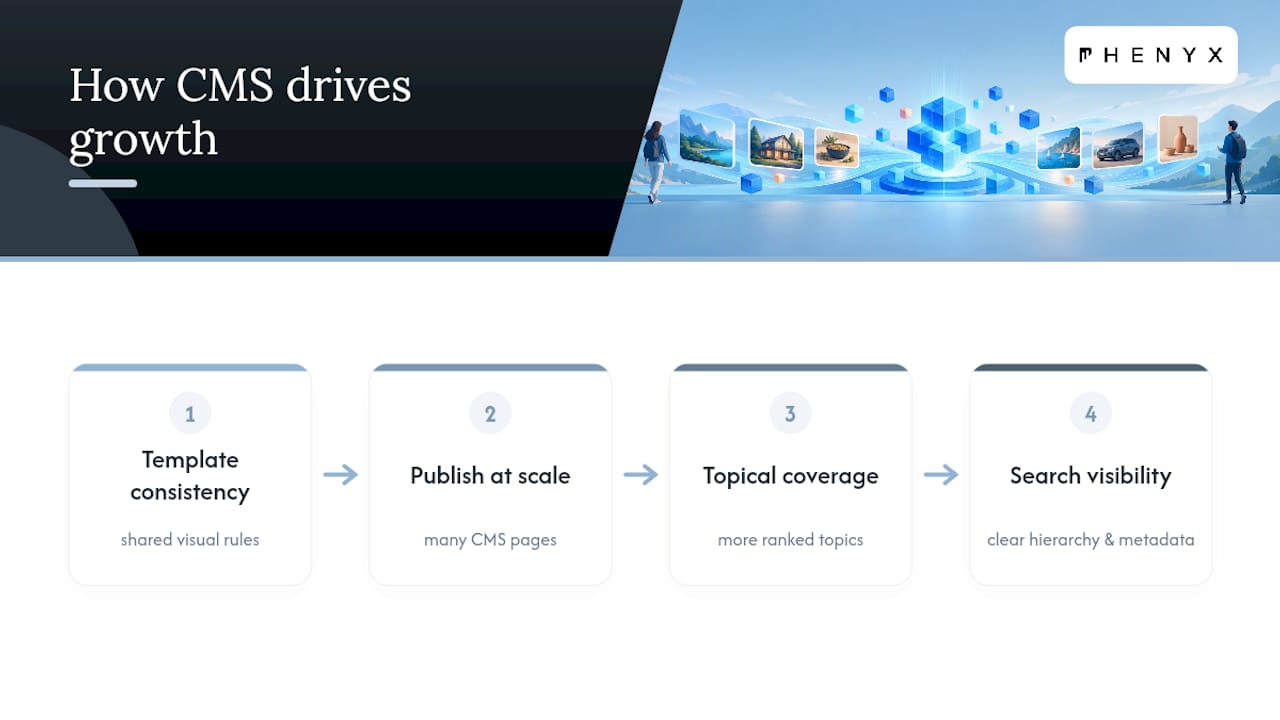
A dynamic CMS solves a problem static pages create: inconsistency. When every landing page is hand-built, fonts drift, spacing shifts, and calls to action wander off-brand one page at a time. Webflow’s CMS ties every collection item to a shared template, so a blog post, a case study, and a product page all inherit the same visual rules automatically.
That consistency compounds once you start publishing at volume. More CMS-driven pages mean more topical coverage, and more topical coverage means more chances to rank for the searches your customers actually type. Structured, well-organized content also matters for how answer engines surface brand content, since AI search tools favor pages with clear hierarchy and consistent metadata over pages assembled ad hoc. A brand that publishes with structure wins visibility that a scattered site simply can’t reach.
How Do You Model Collections and Build Templates With Real Content?
Skipping the modeling step is the most common reason Webflow sites end up looking beautiful on the homepage and thin everywhere else. Before you open the Designer, decide what content types you actually need and what fields each one requires.
- Define your collection types first. Blog posts, case studies, locations, and products each need their own structure, not a single catch-all collection stretched to fit everything.
- Add SEO fields to every collection. Build in a meta title field, a meta description field, and an image alt field before anyone writes a single page.
- Design templates against real content, not lorem ipsum. A headline that looks great at eight words often breaks at twenty. Pull in your longest actual title and your shortest actual image before locking the layout.
- Build reusable components for repeating elements. Buttons, cards, and CTAs pulled from a shared component library enforce brand rules automatically, even when five different people are adding pages.
- Lock global styles for color, type, and spacing. This is what keeps a 400-page site looking like one brand instead of four.
This groundwork is also where a lot of brand-focused site rebuilds succeed or stall, and it’s worth reviewing established website design best practices before you commit to a structure you’ll be stuck with for a year.
What SEO and AEO Settings Do Dynamic Webflow Pages Need?
Metadata is the first thing to scale, and the easiest to get wrong at volume. Webflow lets you auto-generate meta titles and descriptions from CMS fields, which means you set the pattern once and every new collection item inherits it correctly.
A workable pattern looks like this:
- Meta title:
{{Item Name}} | {{Category}} | Your Brand - Meta description: pull from a dedicated CMS field, capped around 155 characters, written for the human reader first.
- Open Graph image: default to a branded template image, override per item when it matters.
Structured data is the other half of the equation. Webflow supports JSON-LD for dynamic content, and adding Article, Product, or Organization schema where relevant gives search engines and AI tools a machine-readable summary of the page, not just a visual one. If you’d rather not hand-code every schema block, a JSON-LD schema generator can produce clean snippets you drop straight into a custom code embed.
Statistic Callout: Google’s own JavaScript SEO guidance confirms that rendered HTML matters as much as source code for indexing, which is exactly why testing dynamic pages after publish, not just before, is non-negotiable.
Once pages are live, run them through the Rich Results Test and check Search Console’s coverage report weekly during the first month. Crawl stats and rendering behavior can quietly become a ranking factor on high-volume dynamic sites, and catching a rendering gap early saves months of lost indexing.
How Should Marketing Teams Manage Webflow Content Day to Day?
Fast publishing only helps your brand if what goes live stays on message. That means workflow, not just tooling.
- Assign clear roles: who drafts, who reviews, who has publish permissions.
- Use staging environments and activity logs so nothing goes live without a paper trail.
- Require sign-off before anything hits production, even for minor edits.
- Use Edit mode and single-page publishing for small copy fixes, so you’re not pushing the entire site live for one typo.
- Reserve page branching for larger rewrites, letting a bigger change get reviewed without freezing the live page.
Webflow’s Edit mode and CMS structure are built specifically to reduce how often marketers need a developer just to update a headline or swap an image, which is where a lot of the platform’s speed advantage actually comes from. If your site serves multiple languages, plan locales when you create CMS items. Webflow’s localization setup through the API is far easier to get right at creation than to retrofit later.
What Changed With Webflow’s May 2026 Plan Update, and How Does It Affect Scaling?
Webflow simplified its pricing structure in May 2026, folding the CMS and Business tiers into a single Premium Site plan and raising the ceiling on how much content a site can hold. CMS item limits rose to 20,000 items and 40 collections on the updated plans, a new Team plan appeared for multi-site agencies, and Workspace plans now include AI credits.
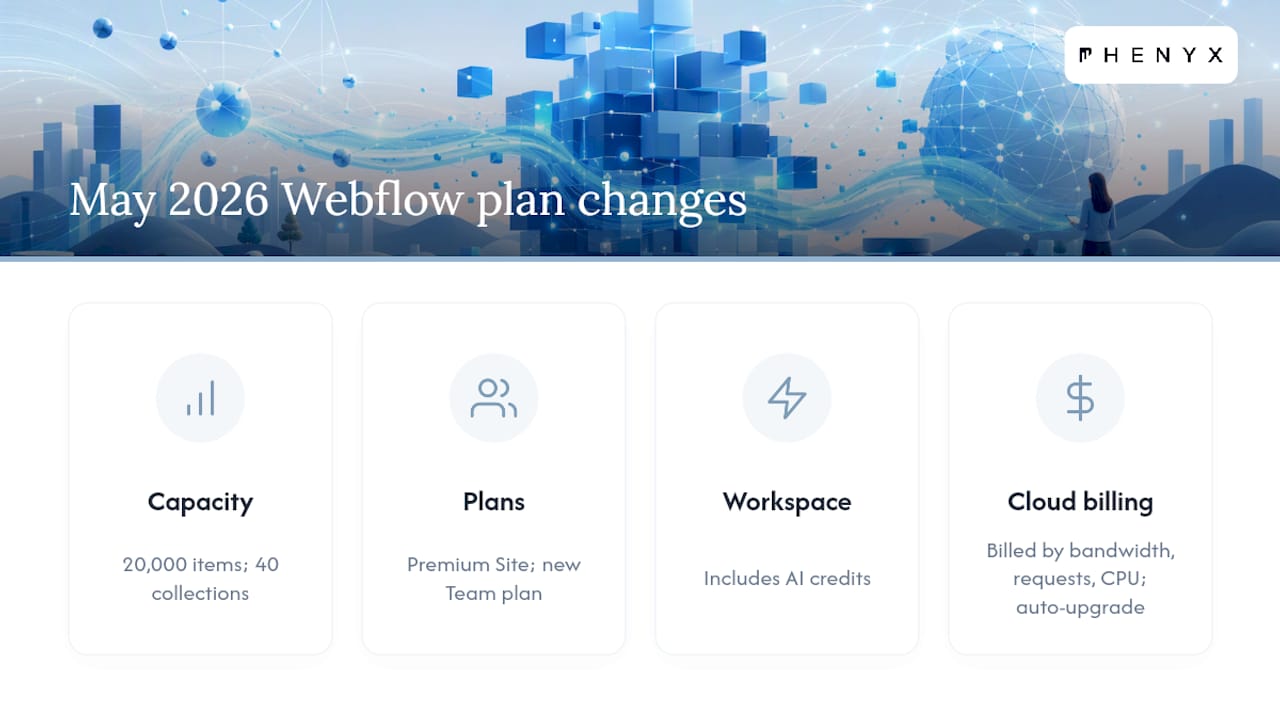
If you’re running Webflow Cloud apps alongside your CMS, cost tracks usage: bandwidth, request volume, and CPU minutes all factor into your bill as traffic grows, and Webflow will automatically upgrade a site’s plan if those thresholds get exceeded consistently. That’s worth monitoring rather than discovering on an invoice.
For genuinely large content operations, Webflow’s next-gen CMS architecture, now available to Enterprise customers, supports far deeper nesting and item counts than standard plans. If your brand runs multiple locations, product lines, or a content library that keeps outgrowing its collection limits, that’s your signal to evaluate Enterprise or a more custom architecture.
Implementation Checklist: From Content Model to Launch
Treat this as the order of operations, not a menu to pick from.
- Map your content model. List every collection type, every required SEO field, and every structured data type you’ll need before opening the Designer.
- Build templates with sample real content. Use your longest and shortest actual examples, not placeholder text, to catch layout breaks early.
- Set your meta title and description patterns. Lock these at the collection level so every new item inherits correct metadata automatically.
- Add JSON-LD snippets to key templates. Article, Product, and Organization schema cover most brand sites’ needs.
- Define your publishing workflow. Decide who drafts, who approves, and how staging works before your first content cluster goes live.
- Schedule your first content clusters. Group launches by topic rather than publishing everything at once, so you can measure what’s working.
- Monitor Search Console and analytics from week one. Watch indexing status, crawl errors, and early ranking movement, not just traffic totals.
Pro Tip: Publish your first content cluster in a single topic area, like one product category or one service line, and watch how it indexes before scaling to the next ten. It’s far cheaper to fix a metadata pattern on twenty pages than on two thousand.
Should You Build Your Webflow CMS Site Yourself or Hire an Agency?
Most marketing teams can absolutely handle the collection modeling and template design described here. Where it gets harder is scale: once you’re managing thousands of CMS items, multiple localized regions, or a custom Webflow Cloud app tied into other systems, the coordination overhead grows faster than most in-house teams expect.
That’s the point where an in-house, integrated team pays for itself, because design, SEO, and content don’t get handed off between three different vendors with three different priorities. Watch for these signals specifically: CMS volume climbing past a few hundred items, localization requirements stacking up, custom app development on Webflow Cloud, or a launch deadline that doesn’t leave room for trial and error.
— PHENYX
Get a Webflow Site Built to Grow Your Brand, Not Just Launch It
A unified team handling website design, SEO and AEO, branding, and video production can prevent your Webflow CMS build from getting delayed by coordination between separate vendors.
That matters most right after launch, when meta patterns need adjusting, a collection needs restructuring, or your first content cluster needs an SEO push to actually rank. A Website Design engagement covers the build itself, while SEO & AEO Services keep your dynamic pages visible in both traditional search and AI answer engines as your content library grows. For businesses that want ongoing coverage across design, content, and search without managing separate contracts, Phenyx’s MODS plan starts at $4,000 per month and bundles that work into one relationship.
If you’re weighing a Webflow rebuild or a first CMS launch, request a project consult through Phenyx and get a straight answer on scope and timeline before you commit to a structure.
Sources
- All the power you need, without plugins — Webflow SEO features
- Updated pricing and simplified plans for May 2026 – Webflow Help Center
FAQ
Does Webflow Have a CMS?
Yes. Webflow’s CMS lets you create structured content collections, like blog posts or products, and connect them to visual templates so every page inherits consistent branding. It also supports auto-generated meta titles and JSON-LD structured data for scaling SEO across many pages.
Is Webflow the Best CMS for a Brand-Focused Website?
Webflow is one of the strongest options for teams that want design control paired with content structure, especially for brands publishing at volume. Whether it’s the best fit depends on your team’s technical comfort and how much custom functionality you need beyond content and design.
Is Webflow Better Than WordPress in 2026?
Webflow and WordPress solve similar problems differently: Webflow bundles visual design and CMS structure natively, while WordPress relies more heavily on plugins for the same functionality. Following Google’s JavaScript SEO guidance matters on either platform, since rendering and indexing behavior depends more on implementation than the platform itself.
Do Marketing Professionals and Agencies Actually Use Webflow?
Yes, Webflow is widely used by marketing teams and agencies specifically because it reduces developer dependence for day-to-day content updates. Its Edit mode and collection-based CMS let non-technical staff publish and update pages without breaking the design.
What Does Phenyx Charge for a Webflow CMS Project?
Phenyx’s ongoing marketing support, including Webflow builds, is available through the MODS plan starting at $4,000 per month. Standalone services like Website Design and SEO & AEO Services don’t list published pricing, so current rates are available by request through the Phenyx site.