


Video Marketing for Small Business: The Short-Form Playbook
The highest-ROI way to start video marketing for small business is simple: publish short-form video consistently, and pull every clip from one longer recording instead of filming from scratch each time. Aim to publish several short clips a week, maintain minimum viable production quality, and focus on one key metric such as completion rate on your clips or click-throughs to your site.
- Batch record once, edit into 5+ short pieces
- Track completion rate weekly, not follower count
- Low production value with high frequency beats one polished video a quarter
Key Takeaways
Consistent short-form video, produced through weekly batching and repurposed from one longer recording, delivers stronger ROI for small businesses than occasional high-budget productions.
| Point | Details |
|---|---|
| Prioritize cadence over polish | Post 3 to 5 short clips weekly rather than one expensive production per quarter. |
| Batch and repurpose | One weekly recording session can produce 5 to 7 clips and feed a month of content. |
| Track one KPI closely | Watch completion rate or click-through rate before chasing follower counts. |
| Caption everything | Auto-caption tools cover most of the work since most viewers watch on mute. |
| Scale with Phenyx when ready | Phenyx’s in-house video production connects clips directly to landing pages once DIY output hits its limit. |
How often should a small business post videos?
Aim for at least three short clips per week. Consistency matters more than perfection, and platforms tend to favor accounts that post on a predictable rhythm rather than in occasional bursts.
What’s the cheapest way to start video marketing for small business?
Use the smartphone you already own, a clip-on microphone under $40, and natural window light. Skip expensive gear until you’ve proven a format works and posting consistency itself has become the bottleneck.
Which platform should I focus on first?
Pick one primary platform based on your audience. Instagram Reels or YouTube Shorts work well for consumer businesses, while LinkedIn tends to perform better for B2B services.
How long should small business videos be?
Short-form clips should run 15 to 60 seconds. Explainers can run up to 90 seconds, and demos or webinars can run longer since they serve buyers further along in their decision.
Do I need captions on every video?
Yes. Most viewers watch with sound off, and built-in auto-captioning on Instagram, TikTok, and YouTube covers most of the work in seconds, with a quick manual check for accuracy.
Table of Contents
- Quick Summary: Video Marketing Ideas for Small Business
- What Types of Videos Should a Small Business Make?
- Video Ideas and a Simple Content Calendar
- How to Build a Lean Video Production Workflow
- Which Platforms Should Small Businesses Use?
- How Do You Repurpose One Video Into Many?
- What Metrics Actually Prove Video ROI?
- Low-Cost Tools for Shooting, Editing, and Captioning
- How Phenyx Approaches Video Production for Small Businesses
- Captions and Calls to Action: The Two Things Every Video Needs
- Setting Video Marketing Goals That Match Your Business Goals
- Who Is Your Video Actually For?
- Legal Basics: Copyright, Permissions, and Privacy in Small Business Video
- Storytelling Techniques That Fit Small Business Branding
- The Real Verdict on Small Business Video Marketing
- When to Bring In Phenyx for Video Production
- Sources
Quick Summary: Video Marketing Ideas for Small Business
Short-form video delivers the highest ROI of any media format, and small businesses that batch-record win on consistency without burning out.
- Post several short clips per week
- Record once, edit into many pieces (one interview becomes 8+ clips)
- Start on two platforms only: Instagram Reels and YouTube Shorts, or LinkedIn for B2B
- Gear needed: a smartphone, a $20 clip-on mic, and natural light
- Watch one KPI closely: completion rate or click-through rate
- 82% of marketers say video marketing gives them good ROI
- Use Phenyx’s structured production approach if DIY becomes unsustainable
What Types of Videos Should a Small Business Make?
Different videos do different jobs. Matching the format to the goal saves you from wasting a shoot on the wrong outcome.
- Short-form reels and Shorts (15 to 60 seconds). Best for awareness and reach on Instagram, TikTok, or YouTube Shorts. Idea: a 20-second “day in the life” at your shop. Low production complexity, phone only.
- Explainer videos (60 to 90 seconds). Best for mid-funnel education, embedded on your homepage or product pages. Idea: “How our service works in three steps.” Can be built with slides and voiceover, no camera required.
- Product demos (2 to 4 minutes). Best for bottom-funnel buyers comparing options. Idea: screen-record your software or film a physical product in use. Moderate complexity.
- Customer testimonials (30 to 90 seconds). Best for trust-building on landing pages and social proof ads. Idea: a quick phone interview with a happy client. Requires permission but little editing.
- Behind-the-scenes and how-to clips (30 to 60 seconds). Best for engagement and building familiarity. Idea: a quick tip related to your industry. Very low complexity.
- Webinars or live Q&As (20 to 40 minutes). Best for lead generation and repurposing raw material. Idea: a recorded customer FAQ session. Higher complexity, but it feeds months of short clips.
Pro Tip: If you’re camera-shy or short on time, screen capture with a voiceover produces a perfectly credible explainer. Nobody expects a small business demo to look like a Super Bowl ad.
Video Ideas and a Simple Content Calendar
You don’t need fifty original concepts. You need five reliable buckets you can rotate through every month.
- Product/service: quick feature spotlights, unboxings, before-and-afters
- Social proof: client testimonials, reviews read aloud, results screenshots
- Tips: one common customer question answered in under 30 seconds
- Founder/team: a face behind the business, a workspace tour
- Seasonal: holiday promos, local events, industry news reactions
Sample 7-day week:
- Monday: Film one tip clip and one behind-the-scenes clip in a single 20-minute session
- Wednesday: Post product spotlight
- Friday: Post client testimonial or review readout
30-day pattern: repeat that weekly rhythm four times, swapping in one seasonal clip and one founder clip per month. No camera? Use free idea templates built around slides, screen recordings, or stock footage with text overlays.
How to Build a Lean Video Production Workflow
Batching is what makes consistent output possible without hiring a crew; for practical tips, see this Corporate Video Production: A Practical Guide for Marketing Teams.
- Batch one session weekly. Block 60 to 90 minutes, film 5 to 7 clips back to back using the same lighting and setup.
- Script in three lines. Context (what’s the problem), value (what’s the fix), CTA (what to do next). Example: “Struggling to keep leads warm? Send a follow-up video instead of an email. Tap the link to see how.”
- Keep gear minimal. A smartphone, a $20 to $40 clip-on mic, and a window for natural light beat expensive kits nobody has time to set up.
- Use AI for the boring parts. Auto-captioning apps and AI-assisted cutting tools trim editing time significantly, which matters since demand for video is rising while budgets stay flat.
Pro Tip: Film your intro and CTA lines separately from your main content. You can swap them onto multiple clips without re-recording the middle.
Which Platforms Should Small Businesses Use?
Pick one or two platforms rather than spreading thin across five.
- YouTube: best for long-term search visibility and housing your explainer/demo library
- Instagram Reels and TikTok: best for short-form discovery, vertical 9:16, 15 to 30 seconds, hook in the first 3 seconds
- LinkedIn: best for B2B, native uploads outperform links, 30 to 90 seconds
- Promotion: embed clips on landing pages, drop into email newsletters, and boost your top-performing clip with a small paid budget rather than guessing which one to promote
Salesforce recommends product explainers and customer stories as the formats that convert best across these channels.
How Do You Repurpose One Video Into Many?
One recording session should generate a month of content, not a single post.
- Chapter your long recording into topic segments
- Pull the 3 to 5 strongest moments as standalone highlights
- Crop each highlight to vertical for social, add captions
- Schedule across the week instead of dumping everything at once
A 10-minute customer interview can realistically become 8 social clips and 3 email snippets. Repurposing is now one of the highest-leverage tactics for teams with limited time, since new filming eats hours that editing doesn’t.
What Metrics Actually Prove Video ROI?
Skip vanity metrics. Track completion rate on short clips, click-through rate on CTAs, leads attributed to video, and any lift in landing page conversion after adding video.
Set a simple benchmark: by day 30, know your average completion rate; by day 60, compare click-throughs across your top three clips; by day 90, tie at least one lead to a specific video.
75% of video software users report ROI within six months, and 82% of marketers call their video ROI good. (G2)
- A/B test one thumbnail against another
- A/B test two different opening hooks
- A/B test a hard CTA versus a soft one
Low-Cost Tools for Shooting, Editing, and Captioning
You don’t need an editing suite. You need three or four tools that cover the whole workflow.
- Ideation: AI writing assistants for quick script drafts and hook variations
- Recording: your smartphone camera, no separate camera purchase needed
- Editing: mobile apps built for vertical video, or free desktop editors for longer cuts
- Captioning: built-in auto-caption features on Instagram, TikTok, and YouTube, cleaned up manually
- Scheduling: any social scheduler that supports video uploads across platforms
Solo operators should lean on mobile-first apps; small teams with a designated marketer benefit more from desktop editing plus a scheduler. Always add captions. Most viewers watch with sound off.
How Phenyx Approaches Video Production for Small Businesses
DIY works until volume outpaces your time. Phenyx handles video production in-house alongside web design and SEO, so a clip you film gets edited, captioned, and connected to a landing page built by the same team, not four separate vendors.
- Best for: businesses past the “one person doing everything” stage
- DIY still works for: single-location businesses testing formats before investing
- A structured production process replaces guesswork with a repeatable system
Captions and Calls to Action: The Two Things Every Video Needs
Captions aren’t optional anymore. Most social platforms report the majority of video is watched muted, and viewers with hearing loss or those watching in a quiet office both rely on text. Spend an extra minute correcting misheard words, especially brand names or industry terms the auto-captioner won’t recognize.
Beyond compliance, captions boost watch time. A viewer scrolling with sound off will keep watching if the first line of text makes sense on its own, so front-load your hook into the caption, not just the audio.
Every video needs a clear next step, but it doesn’t need to be a hard sell. A soft CTA like “comment below” or “save this for later” works for top-of-funnel awareness clips. A direct CTA like “tap the link to book a call” belongs on testimonial and demo videos where the viewer is already closer to buying.
Keep the CTA to one action. A clip asking viewers to follow, comment, visit a website, and sign up for a newsletter all at once gets none of them done. Match the CTA to where that specific video sits in the buyer journey: awareness content earns attention, and bottom-funnel content earns clicks.
Text overlays reinforcing your spoken CTA in the final three seconds catch viewers who dropped the audio or skimmed past the beginning. That overlap between what you say and what appears on screen is what actually drives action, not just impressions.
Setting Video Marketing Goals That Match Your Business Goals
A video without a goal is just content. Before filming anything, decide what business outcome the video is meant to move: brand awareness, lead generation, customer retention, or direct sales.
Awareness goals call for reach-focused metrics like views and shares, and short-form platforms like Reels and TikTok Shorts serve that goal well because of their built-in discovery algorithms. Lead generation goals call for a different setup entirely: gated webinars, demo videos with a booking link, or testimonials embedded near a contact form.
Tie each goal to a number you can actually track. “Get more visibility” isn’t measurable. Small businesses that skip this step often end up producing videos that look good but don’t move any needle they actually care about.
Revisit your goal every 30 days. If a format isn’t contributing to the business outcome you set, whether that’s leads, bookings, or sales, either change the format or change the CTA before assuming video itself isn’t working. Often the fix is smaller than starting over: a sharper hook, a clearer CTA, or a shift in which platform gets your best clips first.
Who Is Your Video Actually For?
Video marketing without a clear audience produces generic content that doesn’t land with anyone. Before scripting your next clip, get specific about who’s supposed to watch it.

Start with your existing customers. What questions do they ask most often before buying? What objections come up in sales calls or at the counter? Those questions are your best video topics, because they’re proven to matter to real buyers, not guesses about what might be interesting.
Build one or two simple buyer personas, not a dozen. A local HVAC company might split its audience into homeowners needing emergency repairs versus property managers scheduling routine maintenance. Those two groups want different videos: the homeowner wants reassurance and speed, the property manager wants reliability and pricing clarity.
Age, location, and platform habits matter too. A younger audience is more likely to discover you on TikTok or Reels; a B2B buyer is more likely to see your content on LinkedIn. Filming a casual, fast-cut clip for a LinkedIn audience that expects a more measured tone can undercut credibility, even if the same clip performs well on Instagram.
Once you know who you’re filming for, write your script in language that person actually uses. Skip industry jargon unless your audience is industry insiders. The goal is a viewer thinking “that’s exactly my situation,” not admiring your production values.
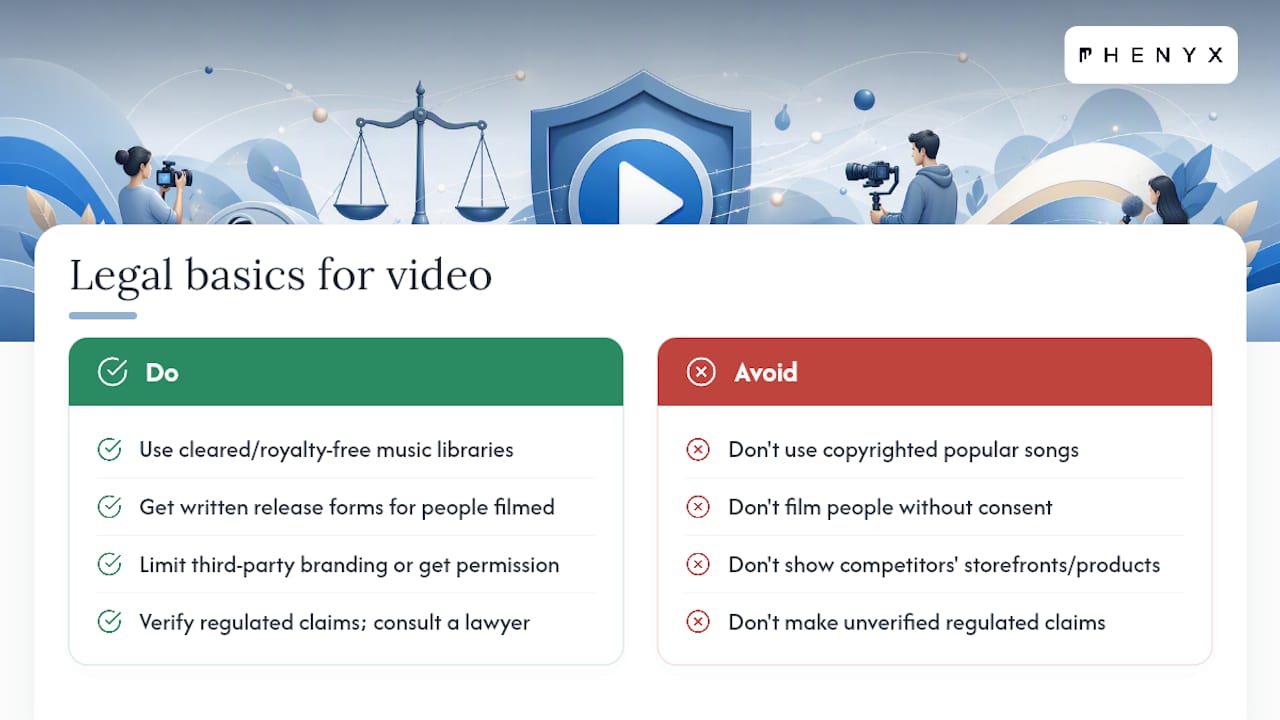
Legal Basics: Copyright, Permissions, and Privacy in Small Business Video
A few legal missteps show up constantly in small business video, and they’re easy to avoid with a little upfront care.
Music is the most common one. Popular songs you recognize from the radio are copyrighted, and using them without a license can get your video muted or taken down, sometimes with a strike against your account. Stick to royalty-free music libraries or the audio libraries built into platforms like Instagram and YouTube, which are cleared for use.
Get written permission before filming customers, employees, or anyone recognizable in your videos, especially testimonials. A quick release form, even a simple one, protects you if that person later asks you to take the video down. This matters more once a video starts running as a paid ad, since ad platforms hold advertisers to a higher standard on consent.
Be careful with third-party logos, trademarks, and other businesses’ branding appearing in the background of your shots. Filming inside your own store is fine; filming a competitor’s storefront or another brand’s product without permission can create problems.
If your business operates in a regulated industry (health, legal, financial services), check that any claims made on camera match what your industry allows in advertising. A casual comment in a testimonial can cross into a regulated claim without anyone intending it to. When in doubt on any of this, a quick conversation with a lawyer familiar with advertising law beats guessing.
Storytelling Techniques That Fit Small Business Branding
The businesses that stand out on video aren’t the ones with the biggest budgets. They’re the ones that tell a story instead of listing features.
Start with a real problem, not your product. Open with the frustration your customer feels before they found you: the leaky faucet at 11pm, the spreadsheet nobody can find, the inventory that never matches the shelf. That’s the hook, not your logo.
Use a simple three-act shape even in a 30-second clip: the problem, the moment things changed, and the result. A testimonial that follows “I was stuck, then I tried this, and now here’s what’s different” outperforms a testimonial that just says a product is great.
Let your team be the characters. Small businesses have an advantage big brands don’t: real people customers can recognize by name. A quick clip of the actual technician, chef, or designer talking through their work builds more trust than a polished voiceover ever will.
Keep your visual style consistent across videos, same intro style, same caption font, same tone, so viewers recognize your business within the first second of a clip, even on mute. Consistency over months builds the kind of recognition that no single viral video can replace.
The Real Verdict on Small Business Video Marketing
Most advice on small business video marketing overcomplicates the entry point. Business owners get told to build a “content strategy” before they’ve filmed a single clip, and that advice kills momentum before it starts. The businesses that actually win at this start filming in week one, badly, and improve from there.
The conventional wisdom that you need better equipment is mostly wrong. What separates businesses that stick with video from those that quit after a month is workflow, not gear. A batching habit that produces five clips in one sitting will outperform a business that waits for the “right” camera and never films anything.
If you take one thing from this guide, prioritize the repurposing habit over new ideas. Most small businesses run out of ideas within a few weeks. Businesses that treat every long recording as raw material for a dozen shorter pieces never run dry, because repurposing consistently outperforms constant fresh production for teams without a dedicated content staff.
When to Bring In Phenyx for Video Production
DIY video gets you started, but scaling past a few clips a week without dedicated hands often stalls momentum right when it’s building. Phenyx runs video production in-house alongside web design, SEO, and branding, so your videos aren’t an isolated project. They connect directly to the landing pages and campaigns already built to convert.
That in-house setup means one team handles the full loop: script, shoot, edit, caption, and publish to a page designed to capture the click. If your business has outgrown the “film it yourself between customers” phase and needs a steady output without hiring a full video team, that’s exactly where Phenyx fits. Start with a website redesign or a dedicated video production conversation to see what a structured production schedule could look like for your business this quarter.