
Webflow vs Squarespace: Which Fits Your Business?
Squarespace is the faster, simpler choice when you want a polished site live with little technical effort and built-in business tools. Webflow is the better fit when design control, a scalable CMS and technical SEO matter more than speed of setup, and when you have a designer or an agency to build on it. Most small businesses can succeed on either. The right pick depends on who will build the site, how much content you plan to publish and how much custom behavior you need.
Below, we compare the two on ease of use, design, content management, SEO, ecommerce and cost, using current US pricing from each company’s own pages.
TL;DR
- Squarespace wins on ease of use, bundled business tools and a lower learning curve.
- Webflow wins on design freedom, CMS depth and granular SEO controls, but it expects a designer’s mindset.
- Webflow’s entry paid plan costs less per month than Squarespace’s, but selling online or running a CMS pushes you to higher tiers on both.
- Choose Squarespace for a simple site you manage yourself. Choose Webflow for a growth-focused site built by a professional team.
Table of Contents
- Quick Summary
- The main differences at a glance
- Which is easier to use?
- How do design flexibility and templates compare?
- Content management: blog, collections and scale
- SEO: fundamentals versus fine control
- Ecommerce and business tools
- What each platform costs in the US
- Which should you choose?
- Our perspective
- Let us build it right the first time
- FAQ
- Sources
Quick Summary
- Squarespace is built around templates, and its editor guides you toward a clean result.
- Webflow is a visual development environment: you control layout, interactions and structure.
- Reviewers on G2 rate Squarespace higher for ease of use and setup.
- Squarespace includes a store, blog and SEO tools on every plan.
- Webflow needs a paid site plan for a custom domain, and a higher one for the CMS.
- Both can rank well. Webflow gives specialists more levers for competitive terms.
- The cost of the platform is often smaller than the cost of building and maintaining the site well.
The main differences at a glance
The two platforms start from different ideas. Squarespace describes itself as a design-driven website builder that bundles templates, domains, professional email, payments, scheduling, blogging, ecommerce, marketing and SEO in one subscription. You pick a template, swap in your content and publish.
Webflow describes itself as a visual, hosted web platform for teams to design, build, manage and grow professional websites. Its toolset covers responsive layouts, a CMS, hosting, interactions and animations, forms, SEO, localization and integrations. It behaves less like a template tool and more like a design application that outputs clean, production-ready pages.
Here is the comparison in one table.
| Factor | Squarespace | Webflow |
|---|---|---|
| Best for | Owners who build and edit their own site | Businesses with a designer, developer or agency |
| Learning curve | Gentle | Steeper |
| Design approach | Template-led, structured | Blank canvas, full layout control |
| CMS | Built-in blog and basic content | Flexible collections for large, structured content |
| Ecommerce | Included on every plan | Requires an Ecommerce plan |
| SEO | Solid fundamentals handled for you | More granular technical controls |
| Entry paid price (annual billing) | $19/month | $15/month |
Which is easier to use?
Squarespace is easier, and the gap is not subtle. TechRadar says Webflow occupies the middle ground between simple builders and full coding, while Squarespace clearly wins for beginners.
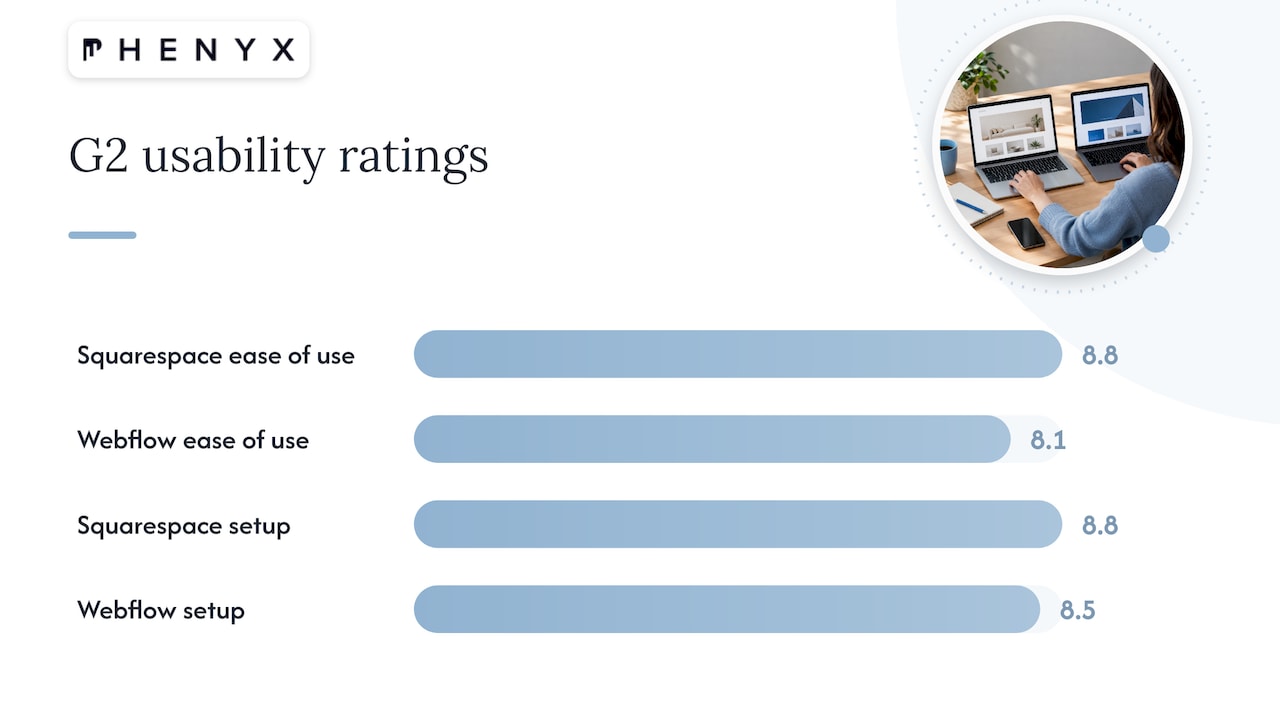
Reviewer data points the same way. On G2, users rate Squarespace 8.8 for ease of use and 8.8 for ease of setup, against 8.1 and 8.5 for Webflow. These are review-platform ratings, not controlled usability tests, but they match the common experience.
The practical difference shows up on day one. In Squarespace, you edit a page and the template keeps it looking balanced. In Webflow, you decide how every box, spacing value and breakpoint behaves. That is power if you know what you are doing. It is a lot of decisions if you do not.
So ask who will maintain the site. If it is you, between client calls, Squarespace removes friction. If a marketing team or agency handles updates, Webflow’s learning curve stops mattering.
How do design flexibility and templates compare?
Squarespace templates are polished and cohesive, and that is the point: they protect you from design mistakes. The tradeoff is that your site sits inside the template’s structure. You can adjust fonts, colors, sections and spacing, and add code for finer changes, but the underlying layout logic stays.
Webflow starts from a blank canvas. You build your own grid, define reusable styles and classes, and layer in interactions such as scroll effects, hover states and micro animations. Because layouts are responsive by design at every breakpoint, a brand with a distinctive visual identity can translate it to the screen without compromise.
This matters most when your brand is a competitive asset. A local service company with a clear offer may do very well with a clean template. A startup trying to stand apart, or an established company with a refined brand system, will usually feel boxed in by templates sooner than it expects. If you are still shaping that identity, getting branding right before choosing a platform makes the design decision much easier.
Content management: blog, collections and scale
Both platforms include a blog. The difference appears when your content becomes structured data: service pages by city, team profiles, case studies, resource libraries, product catalogs or location pages.
Webflow’s CMS lets you define your own content types with custom fields, then design templates that pull from them. That makes large, organized sites far easier to manage. One analyst view holds that for businesses with a multi-channel content strategy or large knowledge bases, Webflow’s headless-capable CMS is the stronger long-term infrastructure. We cover how to push this further in our Webflow dynamic CMS playbook.
On the Webflow side, CMS access comes with a plan requirement. Its pricing page shows that the free Starter site has limited CMS, while the Premium plan adds the full CMS, code components, site search and form file upload.
Squarespace’s blog is simpler and perfectly adequate for a company that publishes a few articles a month. If your content plan is modest, you will not miss the extra structure.
SEO: fundamentals versus fine control
Both platforms can rank. Neither will rank a site by itself, because rankings depend on content quality, relevance, links and a sound technical setup.
Squarespace states that its sites include responsive design, search-friendly URLs, Google and Bing integrations and AI SEO tools that scan for missing site details and suggest copy. For a typical small business site, that covers the essentials without any configuration.
Webflow gives you more levers. Its pricing documentation lists controls for page titles and meta descriptions, image alt text, Open Graph settings, CMS-item indexing, canonical tags, XML sitemaps, crawler access, robots.txt, schema markup and 301 redirects, with some controls restricted by plan or workspace. Those controls matter when you are competing for crowded terms, running programmatic pages or managing a redesign migration.
Search is also changing. AI assistants now summarize and recommend businesses, and structured content helps them understand yours. If you want to go deeper, read how AI search engines decide what to recommend. Whichever platform you choose, clean page structure, clear headings and schema give you a head start, and Webflow makes that kind of precision easier to implement.
Ecommerce and business tools
Squarespace is the more complete all-in-one for service and small retail businesses. According to one side-by-side test, Squarespace includes a store and blog on every plan, plus SEO tools, newsletter blocks and a contacts panel, while promotional pop-ups and Mailchimp and Zapier integrations start on the Core plan. Squarespace also says its built-in tools include native payments, unlimited products, appointment booking, in-person POS, subscriptions and invoicing.
Webflow takes a more modular approach. You need an Ecommerce plan to sell, and a Premium plan for the CMS. Many brands that outgrow a bundled store pair a custom Webflow front end with a dedicated commerce engine, which we explain in combining Webflow and Shopify.
A simple rule helps. If you need to book appointments, take payments and send a newsletter this month with no developer, Squarespace gets you there. If you need a custom shopping or lead-generation experience tied to a larger marketing system, Webflow gives you more room.
What each platform costs in the US
Prices below come from each company’s own pages and apply to US customers. Platforms change pricing, so confirm on the official page before you buy.
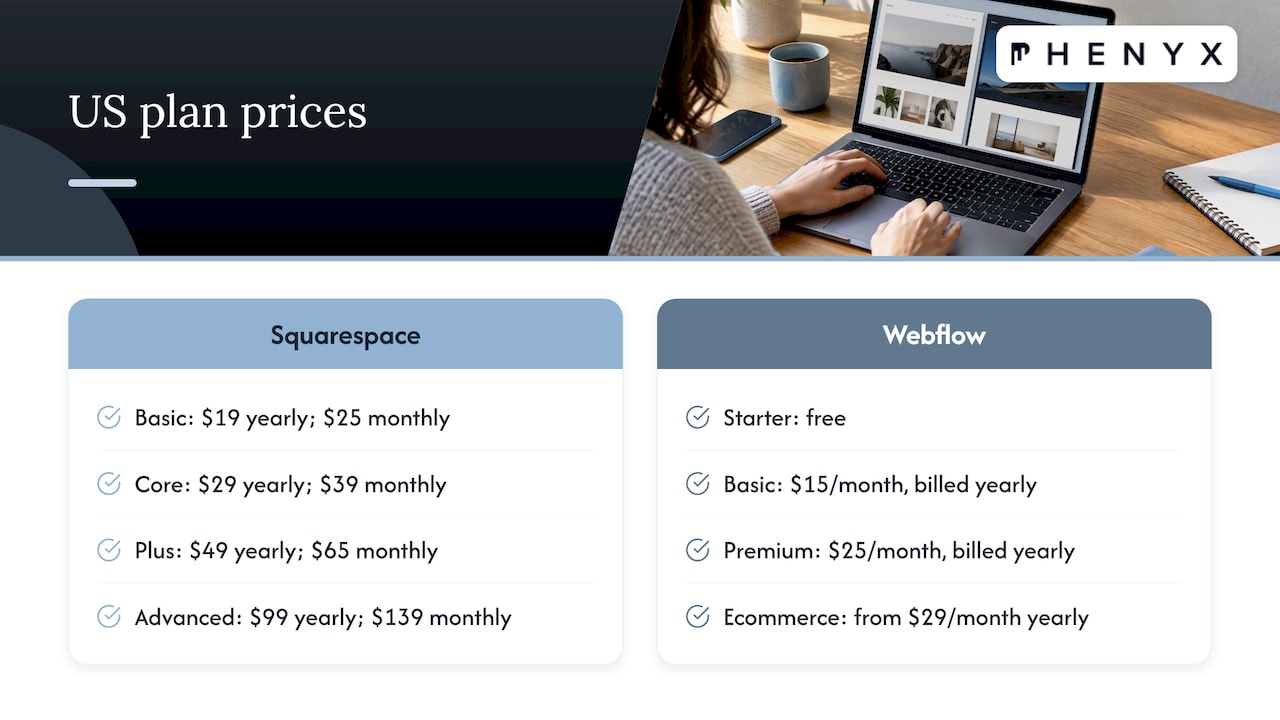
Squarespace lists four website plans on its pricing page. With annual billing they are Basic at $19/month, Core at $29/month, Plus at $49/month and Advanced at $99/month. Paying monthly costs more: $25, $39, $65 and $139 respectively. All plans include mobile-optimized sites, SEO tools, 24/7 support, unlimited bandwidth, SSL, Squarespace Payments and basic code blocks. Annual plans include a free domain for the first year on available domains, subject to stated conditions.
Webflow prices per site. Its official pricing page lists Starter as free, Basic at $15/month billed yearly and Premium at $25/month billed yearly, in USD plus applicable taxes. The free Starter site includes a Webflow.io domain, two static pages, 1 GB bandwidth and 50 form submissions. Basic adds a custom domain, up to 300 static pages, 10 GB bandwidth, unlimited form submissions and password protection. Ecommerce sits on separate plans, listed from $29/month billed yearly in one independent comparison.
Webflow also restructured its site plans in 2026. Its pricing change calculator explains that the new pricing took effect on May 13, 2026, that existing sites move over at renewal or a billable change, and that the CMS and Business plans combine into Premium.
As Squarespace’s own comparison notes, its least expensive plan supports payments and invoices, whereas Webflow’s lowest-priced plan does not provide built-in payment processing or ecommerce tools. Compare like for like: a Webflow site with a CMS and a Squarespace site with a store are closer in price than the entry tiers suggest.
The subscription is only part of the bill. Design, copywriting, photography, video, SEO and maintenance usually cost more than the platform. That is why the people you build with matter as much as the tool.
Which should you choose?
Work through these questions in order.
- Who will build and update the site? If it is you or a non-technical team member, lean Squarespace. If a designer or agency will own it, Webflow becomes practical.
- How distinctive does the design need to be? A clean, professional presence points to Squarespace. A branded experience with custom interactions points to Webflow.
- How much structured content will you publish? A handful of pages and a blog fit Squarespace. Hundreds of location, service or resource pages fit Webflow’s CMS.
- Is selling online central to your business? For quick, simple selling, Squarespace’s built-in store is hard to beat. For a custom storefront experience, Webflow, often paired with a commerce platform, offers more control.
- How competitive is your search market? In crowded niches, Webflow’s technical SEO controls and clean structure give specialists more to work with.
- Where will the business be in three years? If you expect to grow into complex content, multiple regions or integrations, starting on Webflow can spare you a rebuild.
Wired’s review sums up Squarespace’s appeal as a balance of power and usability for owners who want a professional presence without technical oversight. That is a fair reason to choose it, and there is no shame in picking the simpler tool when it fits the job.
Our perspective
We build sites on Webflow every week, so we know where it shines. When a growing business asks us which platform to pick, we start with the question underneath: what is this website supposed to do for revenue?
If the answer is lead generation, visibility in competitive search and a brand that looks like no one else’s, Webflow gives our in-house team the control to design, structure and optimize every page. We can shape the CMS around your services, build the technical SEO foundation, and prepare content for AI-driven search, all without fighting a template.
The platform is only half the equation. A site performs when design, copy, video, SEO and ongoing support share one strategy. Because our team handles each of those under one roof, the site launches with a consistent message and keeps improving after launch, instead of stalling between vendors.
Our approach is structured and customized to each client’s goals rather than a rigid template. That is how we decide whether Webflow is the right foundation for you, and it is why we rarely recommend a platform before we understand the business.
PHENYX
Let us build it right the first time
If you are leaning toward Webflow, or still weighing both, our team can review your goals and recommend a platform with no pressure. We handle website design, SEO and AEO, branding and video in one in-house team, so your site launches as part of a complete marketing system. Our MODS subscription for ongoing, all-inclusive marketing support starts from $4,000 per month, and you can see how it works on our homepage.
We work with businesses in Denver and Lafayette, Tampa and Dallas-Fort Worth, and with teams across the US.
FAQ
Is Webflow better than Squarespace for SEO?
Webflow offers more technical SEO controls, including canonical tags, schema markup, robots.txt and redirects. Squarespace handles the fundamentals automatically, which suits many small business sites. Either platform can rank when the content is strong and the site is well structured.
Is Webflow harder to learn than Squarespace?
Yes. Reviewers rate Squarespace higher for ease of use and setup, and Webflow expects you to think like a designer. Many businesses solve this by having an agency build the site and then training their team to edit content.
Which is cheaper, Webflow or Squarespace?
Webflow’s Basic plan is listed at $15/month billed yearly, below Squarespace’s Basic at $19/month on annual billing. The total depends on features: selling online or using the CMS moves you to higher tiers on both platforms, so compare the plans you will actually need.
Can I sell products on Webflow and Squarespace?
Yes. Squarespace includes a store on every plan. Webflow requires an Ecommerce plan, and some brands pair a Webflow front end with a dedicated commerce platform for more flexibility.
Can I move from Squarespace to Webflow later?
Yes, though it is a rebuild rather than a one-click transfer, because the design and structure are recreated in Webflow. Plan redirects from old URLs to new ones so you keep your search visibility. Our technical SEO audit guide shows how to check the pages that matter most after a move.
Sources
- Squarespace FAQs
- Webflow: Build for what’s next
- TechRadar: Squarespace vs Webflow
- G2: Compare Squarespace and Webflow
- Webflow vs Squarespace: My Verdict for 2026
- Webflow plans and pricing
- Webflow pricing and SEO controls
- Squarespace vs Webflow: Full 2026 Comparison
- Webflow vs. Squarespace: Tested Side by Side
- Squarespace pricing plans and features
- Webflow pricing change calculator
- WIRED: 4 Best Website Builders