


WordPress Maintenance Cost: What You Should Budget in 2026
Expect to pay somewhere between $0 and $50 a month for a personal WordPress site, $100 to $300 a month for a small business or lead-generation site, and $300 to $1,000 or more a month once you’re running a WooCommerce store. Those ranges hold up across most market pricing guides, and the gap between the low end and the high end almost always comes down to one thing: how much human review is baked into the plan versus how much is just automated scripts running in the background.
Maintenance itself covers a fairly consistent set of tasks no matter your budget: core and plugin updates, backups, uptime monitoring, basic security hardening, and some amount of developer time for fixing what breaks. What changes as the price climbs is whether a person actually tests those updates before they go live, and whether anyone is on the hook when something goes wrong.
Here’s what you need to know before you pick a number:
- Personal or hobby sites can often get by on $0 to $50 a month, sometimes free if you’re comfortable running updates yourself.
- Professional blogs with some traffic typically land in the $30 to $100+ a month range for a basic care plan.
- Small business and lead-gen sites usually run $100 to $300+ a month once you add human-reviewed updates and monitoring.
- WooCommerce and membership sites commonly need $300 to $1,000+ a month because downtime and bugs cost real revenue.
- Maintenance plans often exclude costs for hosting, premium plugin licenses, domain renewals, and email; these should be budgeted separately.
- Classify your site type first (personal, blog, business, or store) before you shop for a plan.
- Add an incident buffer of 10-20% to whatever base plan you choose, since something eventually breaks.
- The rest of this guide breaks down exact price bands, what drives your bill up or down, and three worked budget scenarios you can copy.
Pro Tip: Before requesting any quote, write down your site type, your monthly traffic, and how many plugins you’re running. Providers price almost entirely off those three inputs, and knowing them upfront gets you a faster, more accurate quote.
Key Takeaways
The right WordPress maintenance budget depends on matching your site archetype to a specific price band, then adding hosting, licenses, and an incident buffer on top of the plan fee itself.
| Point | Details |
|---|---|
| Match plan to site type | Personal sites run $0–$50/mo, small business $100–$300+/mo, eCommerce $300–$1,000+/mo. |
| Human review drives price | Staging-tested, human-reviewed plans cost more than automated-only plans but catch problems earlier. |
| Budget beyond the plan fee | Add hosting, plugin licenses, domain/email, and ad-hoc dev hours to get a real total. |
| Build in an incident buffer | A 15–20% buffer protects against the few hundred- to several thousand-dollar cost of a bad breach. |
| Consider a single-vendor retainer | Phenyx bundles maintenance with design, SEO, and other services under one in-house team and one invoice. |
How much should I budget monthly for WordPress maintenance?
Most small business sites should budget $100 to $300 a month for a human-reviewed care plan, plus hosting and licenses on top. Personal sites can often get by on $0 to $50 a month, while WooCommerce stores typically need $300 to $1,000+ a month once staging tests and priority support get factored in.
Is WordPress maintenance really necessary if my site rarely changes?
Yes, because WordPress core, plugins, and themes all receive security updates whether or not your content changes, and skipping those updates is one of the most common ways sites get compromised. Even a static site needs someone checking for update compatibility on a regular basis.
What’s included in a typical WordPress maintenance plan?
Most plans cover core and plugin updates, automated or manual backups, uptime monitoring, and some level of security scanning. Higher-tier plans add staging environments for testing updates before they go live, plus a set number of included developer hours for fixes.
Does hosting cost count as part of my maintenance budget?
Hosting is almost always billed separately from your maintenance plan fee. Managed WordPress hosting commonly adds $20 to $200+ a month depending on the provider and resources, so your real monthly total is your plan fee plus hosting plus any licenses.
Is it cheaper to hire a freelancer or an agency for WordPress maintenance?
Freelancers typically charge $35 to $150 an hour, which can be cheaper for occasional work but less predictable for ongoing needs. Agency retainers commonly start at $200 to $500 a month for small sites and often include broader support beyond pure maintenance, which can be worth the higher baseline if you value one point of contact.
Table of Contents
- How Much Does WordPress Maintenance Cost by Site Type?
- What Actually Drives Your WordPress Maintenance Bill Up or Down?
- Which WordPress Maintenance Service Model Fits Your Budget?
- Should You Do WordPress Maintenance Yourself or Hire Help?
- How Do You Calculate Your Total WordPress Maintenance Budget?
- When Does an Agency Retainer Make More Sense Than a Maintenance Plan?
- Scenario Budgeting Beats a Single Price Range
- Get a Maintenance Quote Built Around Your Actual Site
- Sources
How Much Does WordPress Maintenance Cost by Site Type?
The single biggest mistake people make when budgeting for WordPress maintenance is treating it as one number instead of a range tied to what their site actually does. A five-page portfolio site and a 200-product WooCommerce store have almost nothing in common when it comes to risk, so they shouldn’t have the same maintenance bill.
Personal or hobby sites generally cost $0 to $50 a month. If you’re the only one editing the site and downtime for a day wouldn’t hurt anyone, a free security plugin and manual monthly updates might be all you need. Some hosts throw in basic backups at no extra charge.
Professional blogs with regular content and some ad or affiliate revenue usually run $30 to $100+ a month. At this tier you’re typically paying for automated backups, scheduled plugin updates, and basic malware scanning, but not necessarily a human checking your site after every update.
Small business and lead-generation sites land in the $100 to $300+ a month range. This is where human review starts to matter. A broken contact form or a plugin conflict that hides your phone number for three days is a real cost, not just an inconvenience, so plans at this level typically include staging environments, monthly reporting, and a handful of included developer hours.
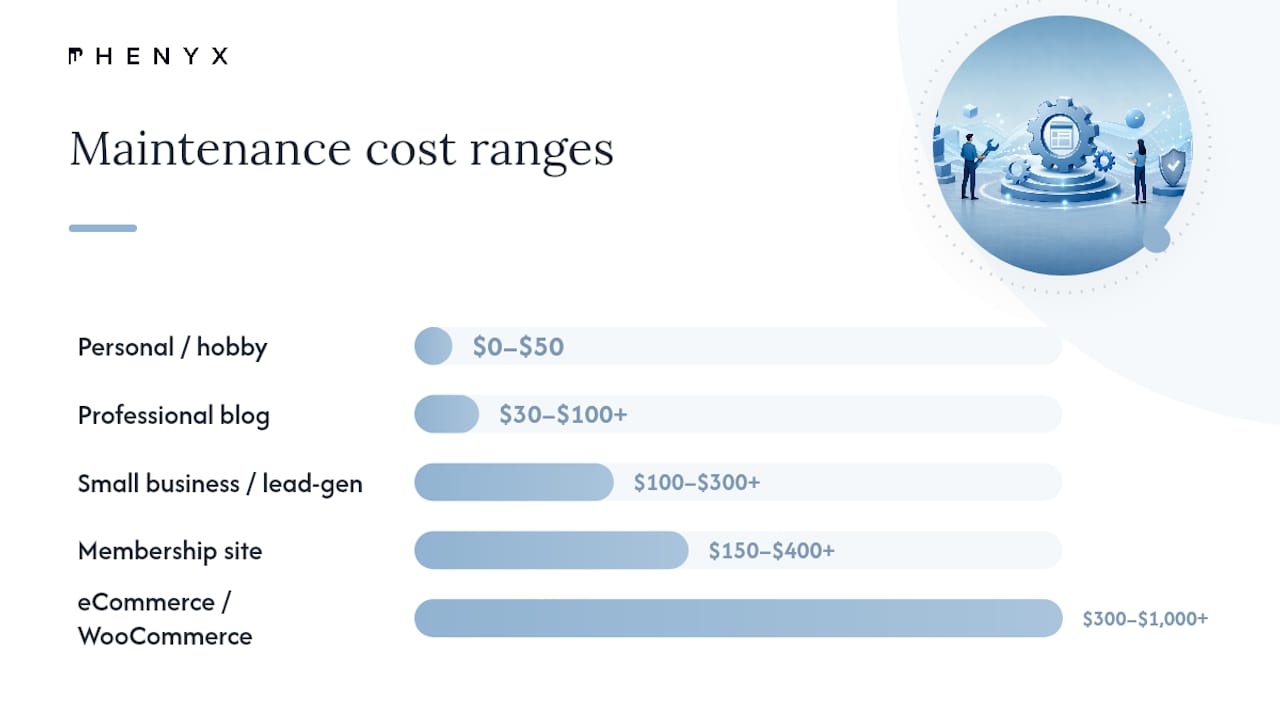
Membership and content-gated sites often fall in a similar $150 to $400 a month bracket, sometimes higher depending on the complexity of the membership plugin and payment integrations involved. These sites carry more moving parts than a standard brochure site, and a broken login flow directly blocks paying members.
eCommerce and WooCommerce stores run $300 to $1,000+ a month. Codeable’s tiered pricing structure is a useful way to see why: a basic automated plan might run around $240 a month, an advanced plan with staging-tested updates and regression checks lands closer to $590 a month, and enterprise-level support with guaranteed response times and dedicated dev hours can exceed $1,000 a month.
| Site type | Monthly range | Typically included |
|---|---|---|
| Personal / hobby | $0–$50 | Basic backups, manual updates |
| Professional blog | $30–$100+ | Automated updates, backups, scanning |
| Small business / lead-gen | $100–$300+ | Staging tests, monitoring, some dev hours |
| Membership site | $150–$400+ | Update testing, integration checks, support |
| eCommerce / WooCommerce | $300–$1,000+ | Staging, regression testing, priority support |
A few things almost never show up inside these plan fees, no matter the tier:
- Hosting itself, which usually runs separately even on a bundled plan.
- Premium plugin and theme license renewals.
- Domain registration and business email hosting.
- SSL certificates, though most managed hosts now provide these free through Let’s Encrypt, so this one rarely needs its own line item.
The distinction between entry-level and human-reviewed plans matters more than the dollar figure alone. A $50 a month plan that only runs automated updates with no one checking the results afterward carries more risk than the price tag suggests. If an update breaks your checkout page overnight, nobody notices until a customer complains or your revenue dips.
What Actually Drives Your WordPress Maintenance Bill Up or Down?
Plugin count is usually the biggest lever you control directly. Every plugin you add is another piece of code that has to stay compatible with WordPress core, your theme, and every other plugin installed. A site running 8 plugins is meaningfully easier to maintain than one running 35, even if both sites look similar to a visitor.

Custom code changes the math entirely. If your developer built a custom function, a bespoke integration with your CRM, or a modified checkout flow, that code doesn’t get tested by a plugin’s own QA team. Someone on your maintenance team has to manually verify it still works after every core or plugin update, which eats into the included dev hours faster than most people expect.
Traffic and uptime economics matter more for stores than for blogs. A content site that goes down for two hours loses some pageviews. An eCommerce site that goes down for two hours during a sale loses actual orders, which is exactly why Codeable’s pricing analysis points to human oversight, not automation, as the line item that explains most of the price jump from budget plans to enterprise tiers.
Other factors that move your number:
- Support SLA and response time guarantees. A plan promising a 4-hour response for critical issues costs more than one with no stated timeline at all.
- Included dev hours per month. Plans bundling 2-5 hours of developer time cost more upfront but save you from hourly billing later.
- Hosting tier. Managed WordPress hosting commonly adds $20 to $200+ a month depending on resources and provider, separate from your care plan fee.
- Premium plugin and theme licenses. These renew annually or monthly and add up quietly if you’re running several.
Statistic Callout: Incident recovery from malware or a botched update can range from a few hundred to several thousand dollars depending on how deep the damage goes and how long it takes to catch. That’s the number that makes a $200 a month human-reviewed plan look cheap by comparison.
Which WordPress Maintenance Service Model Fits Your Budget?
Not every maintenance dollar buys the same thing, and the four common service models split responsibility very differently.
- Managed hosting with built-in maintenance. Providers like WordPress.com now bundle hosting, backups, security, and updates into one predictable monthly price. This works well if you want one bill and one point of contact, though the depth of human review varies by provider and plan tier.
- Maintenance-only care plans. These sit on top of whatever host you’re already using and typically run $50 to $150 a month for basic automated tiers, climbing toward $300+ for staging-tested, human-reviewed plans.
- Full-service agencies. Agencies commonly start maintenance retainers at $200 to $500 a month for small sites, and this figure often includes strategic support beyond pure technical upkeep, like reporting or minor design updates.
- Freelancers. Rates commonly fall in the $35 to $150 an hour range, which works if your site needs occasional attention rather than ongoing monitoring.
A few gotchas worth knowing before you sign anything:
- Host-provided backups aren’t always tested for restoration, so “we back up your site” doesn’t guarantee a clean recovery when you need one.
- Not every plan tests updates on staging before pushing to your live site, which is exactly the gap that causes most maintenance-related downtime.
- Higher prices are justified when they buy a real SLA, guaranteed remediation if something breaks, and dev hours you’d otherwise pay for hourly.
Should You Do WordPress Maintenance Yourself or Hire Help?
The honest math on DIY maintenance rarely gets talked about the right way. It’s not free just because you’re not writing a check. The real cost of DIY is your own time, multiplied by what that time is worth to you, plus the risk of an incident you’re not equipped to fix quickly.
If you bill your own hours at $75 and a monthly update-and-check routine takes three hours, that’s $225 a month in opportunity cost before you’ve fixed a single bug. Compare that against a freelancer at $35 to $150 an hour, or an agency retainer starting around $200 to $500 a month, and DIY often isn’t the bargain it looks like on paper.
A short decision checklist helps here:
- How much revenue does downtime actually cost you per hour or per day?
- How often do you make edits, and do you trust yourself to test them properly?
- Do you need guaranteed uptime, or can you tolerate the occasional multi-hour outage?
- Is your time better spent running your business than debugging a plugin conflict?
Pro Tip: Track how many hours you actually spend on WordPress upkeep for one month before deciding. Most site owners underestimate this number by half, which skews the DIY-versus-hire math in the wrong direction.
How Do You Calculate Your Total WordPress Maintenance Budget?
A repeatable formula beats guessing every time. Add up: plan fee + hosting + premium plugin and theme licenses + domain and email + expected ad-hoc developer work + an incident buffer, and you get a realistic monthly number instead of a single plan price that quietly ignores everything else.
- Micro site (personal blog, low traffic): $0 plan fee + $10 hosting + $0 licenses + $2 domain/email + $0 ad-hoc + $5 buffer = roughly $17 a month, or about $200 a year.
- Small business lead-gen site: $150 care plan + $40 managed hosting + $20 premium plugin licenses + $10 domain/email + $30 expected ad-hoc dev + $50 incident buffer = roughly $300 a month, or about $3,600 a year.
- WooCommerce store: $500 advanced care plan + $100 managed hosting + $50 licenses + $15 domain/email + $75 ad-hoc dev + $150 incident buffer = roughly $890 a month, or about $10,680 a year.
| Scenario | Plan fee | Hosting | Licenses | Domain/email | Ad-hoc dev | Buffer | Monthly total |
|---|---|---|---|---|---|---|---|
| Micro site | $0 | $10 | $0 | $2 | $0 | $5 | $17 |
| Small business | $150 | $40 | $20 | $10 | $30 | $50 | $300 |
| WooCommerce store | $500 | $100 | $50 | $15 | $75 | $150 | $890 |
A 15-20% incident buffer is worth building in from the start. Framing it as probability times cost, the small chance of a costly breach or botched update almost always makes a slightly higher monthly spend worth it for any site earning real revenue. Before accepting a quote, ask exactly how many dev hours are included, whether remediation after an incident is covered or billed separately, and whether updates get tested on staging first.
When Does an Agency Retainer Make More Sense Than a Maintenance Plan?
Phenyx runs maintenance and support as part of an in-house model, which means the same team handling your updates and backups can also touch your SEO, your site speed, or a design fix without looping in a second vendor. That consolidation matters more than it sounds. A lot of small business owners juggle a hosting company, a plugin developer, and a freelance fixer, and none of the three talk to each other when something breaks.
An agency retainer tends to earn its price when your site directly drives revenue, when you’ve been burned by a plugin update that broke checkout at the worst possible time, or when you’d rather have one monthly invoice than three. It’s less obviously worth it for a low-traffic personal blog where the stakes of a few hours of downtime are genuinely low.
When comparing an agency quote against a standalone maintenance plan, look past the sticker price and check what’s actually inside: included dev hours, staging-tested updates, and a stated remediation policy if something breaks. A cheaper plan with no remediation coverage can end up costing more the first time you need it.
A few situations where the math tips toward an agency:
- You’re already paying separately for design, SEO, and a maintenance plan and want one team instead of three.
- Your site generates leads or sales directly, so downtime has a measurable dollar cost.
- You’ve had a bad experience with an unmonitored update breaking something important.
Scenario Budgeting Beats a Single Price Range
Most guides hand you one giant range, something like “$5 to $1,000 a month,” and call it a day. That’s technically true and practically useless. The better approach is what this guide leads with: figure out your site archetype first, then build a line-item budget around that specific profile instead of anchoring on a number that has nothing to do with your situation.
The conventional advice to “just get a maintenance plan” also undersells how much hosting, licenses, and ad-hoc dev work add on top of whatever plan fee you’re quoted. Readers who budget only for the plan itself are almost always surprised by the real monthly total once everything else lands on the invoice.
If there’s one thing to prioritize first, it’s figuring out your incident exposure. A personal blog with no revenue can tolerate a DIY approach and occasional downtime. A lead-gen or WooCommerce site can’t, and that single fact should drive most of the budgeting decisions that follow.
Get a Maintenance Quote Built Around Your Actual Site
If juggling a hosting company, a plugin fixer, and a design freelancer sounds like exactly the kind of vendor sprawl you’d rather avoid, Phenyx runs website design, maintenance, and support under one in-house team, so your monthly bill and your point of contact stay the same no matter what needs fixing.

Phenyx can cover ongoing WordPress maintenance and pair it with broader support like SEO, video, or a full website redesign when your site needs more than upkeep. Reaching out makes the most sense once you know your site type, your rough traffic numbers, and whether you’re chasing leads, sales, or just keeping content live. Bring those details and Phenyx can put together a quoted plan that matches your actual risk instead of a generic tier. Get in touch through the website design services page to start that conversation.
Sources
- WordPress Maintenance Costs – How Much Should You Pay? - WPBeginner
- WordPress Maintenance Pricing for 2026: What Most Site Owners Actually Pay - Codeable
- What Website Maintenance Really Costs in 2026 | ShiftPress
- Wordpress
Recommended
- How Much Does a Roofing Website Cost in 2026? (Pricing Breakdown + ROI Calculator) | PHENYX
- 2026 Marketing Tips and Trends Every Local Business Should Know | PHENYX
- Is Your Website Dated? 2023 Trends | PHENYX
- How to Prepare a Strong Marketing Campaign for 2026: Ideas and Tips Every Business Can Use | PHENYX