


Get Local Calls on a Small Budget With YouTube Ads Using Geo + Intent
YouTube Ads work for local businesses when you run them through Google Ads with tight geo targeting and custom intent audiences layered on top. Start with a Demand Gen campaign or skippable in-stream ad, set a modest daily budget, and allow a few weeks of running before judging results. The single biggest lever isn’t budget or targeting. It’s whether your first 5 seconds earn attention.
TL;DR:
- Only use tight geo targeting combined with custom intent audiences based on your search terms to optimize local conversion results.
- Focus on creating an attention-grabbing first 5 seconds in your videos, especially with sound off, to reduce costs and improve viewer engagement.
- Separate and test different ad formats, like Shorts, bumper ads, and in-stream, to identify which best drives calls and bookings for your business.
- Track specific actions such as calls, bookings, and directions, and ensure conversion and call tracking are properly set up before running campaigns.
- Regularly review placement performance, creative effectiveness, and local SEO alignment to maximize your campaign’s ROI and local impact.
Table of Contents
- Quick Summary: YouTube Advertising for Small Business
- What Are the Best YouTube Ad Formats for Local Business?
- How Do You Target Local Customers on YouTube?
- Creative Rules That Cut Your Cost Per View
- How Should You Structure Campaigns and Budgets?
- What Should You Measure to Prove Local Impact?
- Should You Run YouTube Ads Yourself or Hire an Agency?
- Legal and Compliance Rules for Local Video Ads
- Optimizing YouTube Ads for Mobile Viewers
- Connecting YouTube Ads to Google Business Profile and Local SEO
- Using Reviews and Testimonials in Your Ads
- Partnering With Local Influencers to Extend Reach
- What Phenyx Sees Working for Local Clients
- Get Your Local Video Campaign Built and Managed
- Where to Go Deeper on Setup and Formats
- Sources
Quick Summary: YouTube Advertising for Small Business
- Launch one Demand Gen or skippable in-stream campaign with city/radius geo targeting and a custom intent audience built from your top search terms.
- Send traffic to a landing page with one clear call to action: call, book, or get directions.
- Start with a daily budget you can sustain for at least 2 to 4 weeks without touching it.
- Build creative around a hook that works in the first 5 seconds, with captions and the right aspect ratio for each placement.
- Set up conversion tracking and call tracking before you spend a dollar.
- Watch calls, bookings, and branded search lift, not just view counts.
- If setup feels like a second job, Phenyx’s video production team can build the creative and manage the account.
What Are the Best YouTube Ad Formats for Local Business?
Skippable in-stream, bumper ads, Shorts, and Demand Gen campaigns each play a different role, and picking the wrong one for your budget is where most local business advertising money gets wasted.
Skippable in-stream is your workhorse for consideration. Viewers can skip after 5 seconds, so that opening window has to state who you are and why they should keep watching. These run 15 to 30 seconds well, though YouTube allows longer. Use this format when you want to explain a service, not just flash a logo.
Bumper ads are 6 seconds, unskippable, and cheap to run at scale. They’re built for repetition, not explanation. A local HVAC company might use bumpers to remind past website visitors “Same-day repairs, Fort Worth” after the main campaign has already told the fuller story. Think remarketing, not first introduction.
Shorts placements put your ad inside YouTube’s vertical short-form feed, competing with organic content for attention. They demand a 9:16 vertical cut, feel native rather than polished, and often deliver cheaper reach than standard in-stream inventory. If your business already posts casual video content, Shorts ads are the cheapest on-ramp to paid YouTube advertising for small business owners.
Demand Gen campaigns run across YouTube, Discover, and Gmail from a single setup, and Google’s system automatically finds efficient placements across that inventory. Pairing Demand Gen with a placement-separated funnel, meaning a distinct campaign for awareness reach, another for mid-funnel Demand Gen, and remarketing bumpers layered on top, tends to outperform one blended campaign trying to do everything at once.
On cost: CPMs across many categories run roughly $5 to $10, with Shorts and bumper inventory often landing at the lower end. That means a modest starter budget can still buy real local reach if the targeting is tight.
How Do You Target Local Customers on YouTube?
Geographic precision is what separates a local business video campaign that converts from one that just burns budget on viewers three states away.
- Set location targeting to your service area. Google Ads lets you target by city, county, postal code, or a radius drawn around your business address, and combining geo control with custom intent audiences is one of the higher-performing setups for local conversions.
- Know the radius floor. Google Ads radius targeting has a minimum radius around 1 kilometer, roughly 0.6 miles. You can’t target tighter than that with a circle alone, so pair a small radius with specific postal codes to approximate a narrower footprint.
- Build custom intent audiences from your own search terms. Pull the exact phrases people type before calling you, plus the names of competitors, and load them into a custom intent audience. A local plumber might build one around “water heater repair near me” and a competitor’s brand name. That audience is shown your video when Google detects intent signals matching those searches.
- Layer in this order: geo, then intent, then first-party lists, then remarketing. Start broad geo, narrow with intent audiences, add your customer list or site visitors for a warmer layer, and finish with remarketing bumpers for anyone who watched but didn’t convert.
- Exclude placements that don’t fit your brand. Broad expansion into every available placement is one of the fastest ways small business budgets disappear. Review the placement report weekly and cut anything irrelevant.
This layered approach turns YouTube from a passive branding channel into a targeted YouTube ads engine built for one goal: getting local people who already have intent to notice you first.
Creative Rules That Cut Your Cost Per View
YouTube’s auction rewards watch time, so a stronger first 5 seconds directly lowers your cost because the algorithm treats high watch-through as a signal worth rewarding with cheaper impressions.
Build the hook to work with the sound off
Most viewers scroll with volume muted. Open with a visual that makes sense without audio: a before-and-after shot, a bold text overlay stating the offer, or a face reacting to something. Save your voiceover explanation for seconds 6 through 15, once you’ve earned the extra attention.
Shoot once, cut many ways
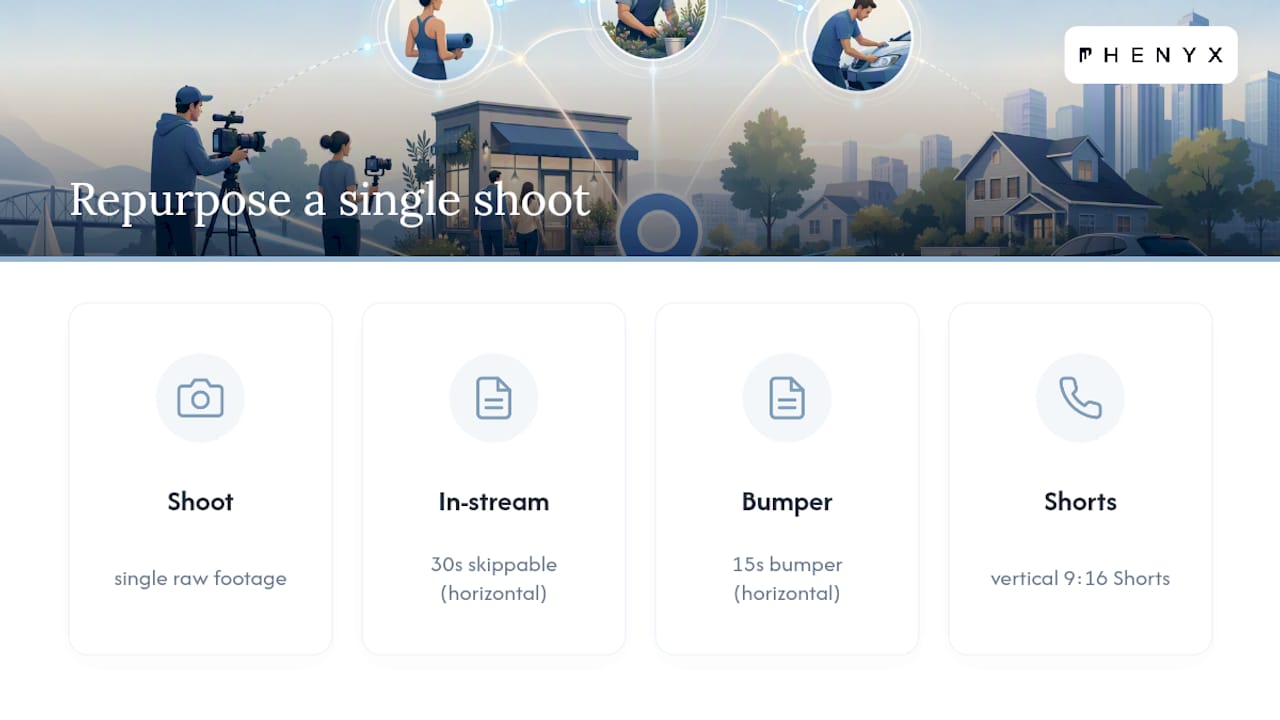
A single shoot can supply a 30-second in-stream cut, a 15-second bumper, and a vertical 9:16 Shorts version, all from the same raw footage. This is the most underused cost-saving move in local video advertising. Phenyx’s guide on vertical video specs and testing walks through exactly how to plan a shoot that serves both orientations without reshooting.
Keep production simple
Natural window light, a phone camera, and a lavalier mic will outperform a polished ad with a weak hook. Repurpose footage you already have: customer walk-throughs, before-and-afters, a team member explaining a service. Add burned-in captions since most viewers watch muted, and put your call to action as a text overlay in the final 3 seconds, not just in a voiceover that plays once.
Test in pairs, not in isolation
Run two openings against the same middle and end, and compare view-through rate after the first week. Early signals show up fast: if one hook is getting skipped at double the rate of the other by day 4 or 5, you have your answer without waiting out the full test window.
Pro Tip: Film your CTA overlay as a separate short clip you can swap in and out. That way you can test three different offers against the same hook footage without re-editing the whole ad.
How Should You Structure Campaigns and Budgets?
Structure comes before budget. Running Shorts, in-stream, and Demand Gen inventory inside one blended campaign lets the algorithm gravitate toward whichever placement is easiest to fill, which is rarely the placement that converts best for a local business.
- Run Shorts as its own campaign, separate from in-stream and Demand Gen, so you can compare performance and budget cleanly between them.
- Start with a daily budget you’re comfortable sustaining for a full 2 to 4 week test window. This is the minimum time YouTube’s system needs to exit its learning phase and stabilize delivery.
- For a first split, put roughly 60% toward prospecting placements reaching new local viewers, 30% toward remarketing bumpers targeting people who already watched or visited your site, and 10% toward creative tests running new hooks against your control.
- Judge success by assisted impact, meaning branded search lift and view-through conversions, not only last-click attribution, since video’s contribution often shows up indirectly rather than as a direct click-to-call.
- If results are flat after the test window, diagnose before you cut spend: check whether the creative is getting skipped early (a hook problem) or getting watched but not converting (a landing page problem). Those require different fixes.
- Scale by adding budget to the placement campaign already producing calls or bookings, rather than raising the blended total across everything at once.
Separating placements this way also makes A/B testing meaningful. You’re comparing a Shorts hook against another Shorts hook, not against an apples-to-oranges in-stream result.
What Should You Measure to Prove Local Impact?
Views and impressions tell you almost nothing about whether YouTube advertising for small business is actually working. Calls, bookings, form fills, and direction requests are the metrics that matter, and each one needs to be set up as a tracked conversion inside Google Ads before you judge a campaign.
- Set calls, appointment bookings, form submissions, and “get directions” clicks as your primary conversion actions.
- Track view-through rate, average view duration, CPV, CPM, and frequency as secondary signals that explain why the primary numbers move.
- Configure conversion tracking and call tracking first. Phenyx’s guide to conversion tracking setup covers the account-level steps most local businesses skip.
- Watch for branded search lift. A jump in people searching your business name during a campaign is a real signal video is working, even if it never shows up as a direct click.
- Review placement performance weekly and cut anything underperforming.
- Make creative decisions on a two-week cadence, since that’s roughly how long it takes watch-through data to stabilize per variant.
- Step back monthly and ask whether the whole strategy, not just one ad, needs to shift.
This cadence keeps you from overreacting to a single bad week while still catching a genuinely broken creative or landing page before it burns through your test budget.
Should You Run YouTube Ads Yourself or Hire an Agency?
Running this in-house works if you have three things: a few hours a week, a person who can shoot and edit simple video, and someone willing to check the Google Ads dashboard on a set schedule rather than ignoring it for a month.
Hiring help makes sense once any of these show up:
- You need to scale past a single test campaign into multiple ongoing placements.
- Your landing page is the actual bottleneck, not the ad.
- You’re trying to coordinate YouTube with search, social, and local SEO and it’s eating more time than running the business.
- Nobody on the team has produced video before, and the learning curve is competing with everything else on your plate.
Phenyx bundles video production, Google Ads account management, and landing page and tracking setup into one engagement rather than three separate vendor relationships. A typical first engagement starts with a production shoot, moves into campaign build and launch, and settles into monthly reporting once the test window closes.
Legal and Compliance Rules for Local Video Ads
Local advertising carries obligations beyond Google’s own ad policies, and skipping this step can cost more than a rejected ad.
Claims about pricing, guarantees, and results need to be accurate and provable. The Federal Trade Commission enforces truth-in-advertising standards that apply regardless of platform, meaning a “lowest price guaranteed” claim in a YouTube ad needs the same backup you’d need for a print ad or a website claim. Industries with their own regulators, like medical practices, legal services, financial services, and contractors, often have additional advertising rules layered on top of general FTC guidance. A dentist advertising a “free consultation” or a contractor citing a licensed status both need that claim to hold up to scrutiny.
Testimonials and reviews used in ad creative need to reflect real customer experience, not paid actors reading a script without disclosure. If you’re compensating anyone for a testimonial, including a local influencer, that relationship needs to be disclosed in the ad itself.
Google Ads also enforces its own policy layer on top of federal rules, covering everything from restricted content categories to accurate business representation. Review both before launch, and if your industry has specific advertising restrictions (alcohol, healthcare, financial products), confirm those rules with a professional in that field rather than assuming general ad guidance covers you.
Optimizing YouTube Ads for Mobile Viewers
Most YouTube viewing happens on a phone, which changes almost every creative decision for a local business ad. A layout that reads clearly on a 55-inch television often turns into an unreadable blur on a 6-inch screen.
Keep text overlays large and centered, away from the edges where mobile UI elements like the skip button or progress bar can cover them. Vertical 9:16 cuts are non-negotiable for Shorts placements, but even your horizontal in-stream cuts should keep the important visual action centered rather than spread wide, since many viewers will still be holding their phone vertically even while watching a horizontal video.
Sound-off viewing is the default on mobile, so captions aren’t optional. Burn them in rather than relying on YouTube’s auto-generated captions, which can misread a local business name or address. Test your CTA overlay by looking at it on an actual phone screen, not just a desktop preview. A phone number or address that looks fine on a laptop can shrink into an unreadable line on mobile.
Landing pages matter just as much as the ad. If someone taps your video ad and lands on a slow, hard-to-tap mobile page, you’ve lost the conversion you just paid to win. Confirm your click-to-call button is actually tappable with a thumb, and that your form fields don’t require zooming to complete. A well-produced ad sending traffic to a broken mobile landing page is one of the most common reasons a local business video campaign underperforms despite good creative.
Connecting YouTube Ads to Google Business Profile and Local SEO
YouTube ads work best as one piece of a coordinated local presence, not a standalone channel running in isolation from everything else you’re doing online.
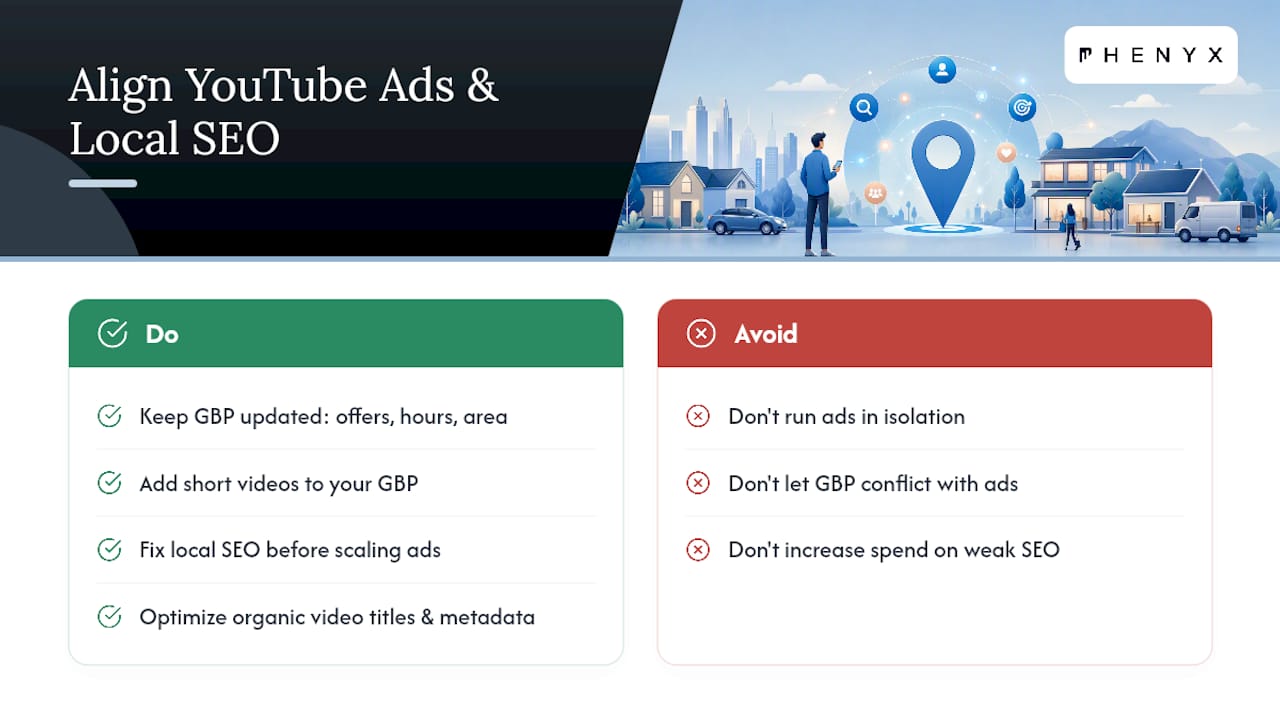
Keep your Google Business Profile updated with the same offers, hours, and service area you’re promoting in your video ads. When someone sees your ad and searches your business name afterward, a mismatched or outdated profile undercuts the trust you just built. Add video content to your profile where possible; a short clip showing your storefront or team reinforces what viewers just saw in the ad.
Local SEO and YouTube ads reinforce each other in a specific way: branded search lift from video campaigns often shows up as increased traffic to your Google Business Profile and website, and a well-optimized local presence gives that curious searcher somewhere solid to land. If your business ranks poorly for its own name or core services, a YouTube campaign is sending paid attention toward a weak foundation. Fixing local SEO gaps before scaling ad spend usually pays off faster than adding more media budget on top of a shaky base.
Video content itself carries SEO value beyond the ad campaign. Optimizing titles, descriptions, and metadata on the organic version of your ad creative can extend its reach well past the paid flight, a point covered in depth in this guide to video SEO and organic visibility. A local bakery running a paid Shorts campaign, for instance, can upload the same clip organically with location-specific keywords in the title and description, giving it a second life in search long after the ad budget runs out.
Using Reviews and Testimonials in Your Ads
A five-star review sitting on your Google Business Profile is doing nothing for you if it never makes it into your video creative. Pulling real customer language directly into an ad is one of the more effective, low-cost improvements a local business can make.
Screen recordings of actual review text, read aloud or displayed as an overlay, work well as a mid-ad trust beat, and right after the hook before the call to action. If you have a customer willing to appear on camera, even a 15-second unscripted comment about their experience often outperforms polished brand messaging, because it reads as authentic rather than produced. Keep it specific. “They fixed my AC same-day and explained everything clearly” carries more weight than a vague “great service.”
Star ratings and review counts displayed as a quick on-screen graphic, sourced from your actual Google Business Profile, give viewers a fast trust signal before they’ve watched 10 seconds. Just make sure any number you display is current and accurate. A stale review count from eight months ago is easy for a sharp viewer to notice and question.
Rotate testimonial creative periodically. The same review clip running for months loses impact with repeat viewers in your remarketing audience, and fresh customer language keeps the ad feeling current rather than recycled.
Partnering With Local Influencers to Extend Reach
Local influencers and complementary businesses can extend a YouTube campaign’s reach in ways paid targeting alone can’t replicate, particularly in a media market where trust often flows through recognizable local faces.
A micro-influencer with a genuinely local following, a food blogger covering a specific neighborhood, a fitness instructor known around town, tends to deliver more relevant attention for a local business than a larger creator with a scattered national audience. Look for overlap in actual audience location, not just follower count.
Cross-promotion with a non-competing local business can work even without a paid influencer relationship. A local gym partnering with a nearby juice bar, each featuring the other briefly in their own video content, extends both businesses’ reach into an audience that’s already primed to trust local recommendations.
If you do work with a paid local influencer, treat their contribution as source footage you can repurpose across your own paid campaigns, not just their own channel. A 30-second segment they film can become the hook for your Demand Gen ad, provided the usage rights are clear upfront. Keep compensation and disclosure requirements in mind here too, matching the same transparency standard covered under advertising compliance.
What Phenyx Sees Working for Local Clients
Local clients who commit to a real test window, not a two-day trial, tend to see the clearest gains: more qualified calls, more direction requests, and a bump in branded search that shows up before the phone even starts ringing more often.
The mistakes we fix most often follow a pattern. Creative that opens with a logo instead of a hook. Campaigns with no call tracking, so nobody can say which ad actually drove the phone to ring. Shorts, in-stream, and Demand Gen all blended into one campaign, making it impossible to tell which placement is actually earning its budget.
None of this requires a massive production budget to fix. It requires structure, and treating the first 5 seconds like the most valuable real estate in the whole campaign. Our blog and service pages go deeper on the specifics once you’re ready to build.
— PHENYX
Get Your Local Video Campaign Built and Managed
Phenyx is the alternative to piecing together a video shoot, a Google Ads account, and a landing page fix across three different freelancers or vendors. We handle all three under one roof, which means your hook, your targeting, and the page someone lands on after clicking are built to work together instead of getting reconciled after the fact.
A typical first engagement starts with a short production shoot built around a strong opening hook, moves into Google Ads setup with the geo and intent targeting covered above, and includes a landing page review so ad traffic doesn’t stall out on a slow or confusing page. Clients usually see the clearest read on performance once a campaign has run its full test window, with calls and bookings as the metric that actually matters.
If your current landing page wasn’t built to convert ad traffic, that’s often the fastest fix available. Take a look at our website redesign work and reach out to talk through what a first campaign would look like for your business.
Where to Go Deeper on Setup and Formats
Google’s own location targeting documentation is the authoritative source for exactly how geo options work inside Google Ads, worth bookmarking before you build your first campaign.
For format and budget specifics beyond what’s covered here, the YouTube Ads Guide covering formats, costs, and results and the SME-focused playbook on running YouTube ads on a real budget both go deeper into placement-level tactics.
On the Phenyx side, our guide to short-form video strategy for small business rounds out the Shorts-specific advice covered above, and pairs well with the conversion tracking and vertical video resources linked earlier in this piece.
Sources
- Location targeting (Google Ads Help)
- YouTube Ads for Business: What Actually Converts in 2026 - BLARE Media
- YouTube Ads On A Real Budget: A Practical Playbook For SMEs

