


Best Digital Signage Software for Business in 2026
For most midmarket and enterprise deployments, Phenyx (full-service implementation and managed ops) paired with a platform like Yodeck or ScreenCloud delivers the strongest combination of speed, creative quality, and operational control. If you are evaluating the best digital signage software on your own, the shortlist below gives you a starting point before the full comparison.
Quick shortlist:
- Phenyx — Best overall for organizations that want strategy, design, and managed operations delivered by an agency, not assembled in-house
- Yodeck — Best for rapid pilots and non-technical teams that need cloud-first scaling
- ScreenCloud — Best for distributed businesses managing content across many locations
- TelemetryTV — Best for operations and BI-driven dashboards where live data feeds drive the display
- Navori — Best enterprise-grade option for strict governance, proof-of-play, and compliance
- Rise Vision — Best low-cost or free-tier option for schools and campus communications
Pro Tip: Before you shortlist vendors, confirm whether each platform supports agnostic media players. A platform that locks you into proprietary hardware can double your hardware costs at scale. Prioritize player-agnostic support from day one to keep your long-term TCO manageable.
Key Takeaways
The best digital signage software for your organization depends on deployment complexity, internal capacity, and integration requirements — no single platform wins every scenario.
| Point | Details |
|---|---|
| Lead with must-haves | Use SSO, offline playback, and documented SLA as disqualifiers before investing time in demos. |
| Run a structured pilot | Deploy 5–10 screens for 4–6 weeks and measure uptime, proof-of-play, and API reliability before scaling. |
| Model full TCO | Hardware, installation, content production, and professional services often exceed the software license cost. |
| Match platform to use case | Yodeck for pilots, TelemetryTV for BI dashboards, Navori for enterprise governance, Rise Vision for education. |
| Phenyx for managed delivery | Organizations that want strategy, creative, and ops handled end-to-end should engage Phenyx rather than self-managing a CMS. |
Table of Contents
- How the top digital signage software platforms compare
- Which platform fits your organization?
- Vendor mini-reviews: what each platform actually delivers
- How to choose the right digital signage platform
- Hardware and player compatibility: what to verify before you commit
- Pricing and total cost of ownership: budget beyond the license fee
- Pilot and rollout: a practical timeline and success checklist
- How these picks were selected
- Agency vs. software: when to buy a platform and when to hire an agency
- A practitioner’s perspective on choosing digital signage software
- Phenyx delivers full-service digital signage without the DIY overhead
- Sources
How the top digital signage software platforms compare
The table below covers the platforms most relevant to U.S. midmarket and enterprise buyers. Pricing tiers and features change frequently — always confirm current terms in a vendor proposal before committing.
Quick-key tags: Free tier available: Yodeck, Rise Vision, Screenly, Play Digital Signage. Enterprise SLA: Phenyx, Appspace, Navori, Scala, Korbyt, Coates Group, Cayin. BI integrations: TelemetryTV, Navori, Scala, Korbyt. Best for Raspberry Pi: Yodeck, Screenly, piSignage, Play Digital Signage.
Pricing and feature sets shift with vendor roadmaps. Treat every figure here as a directional reference and confirm current tiers directly with each vendor.
Which platform fits your organization?
Matching the right platform to your deployment profile saves months of evaluation time. Here is a practical map.
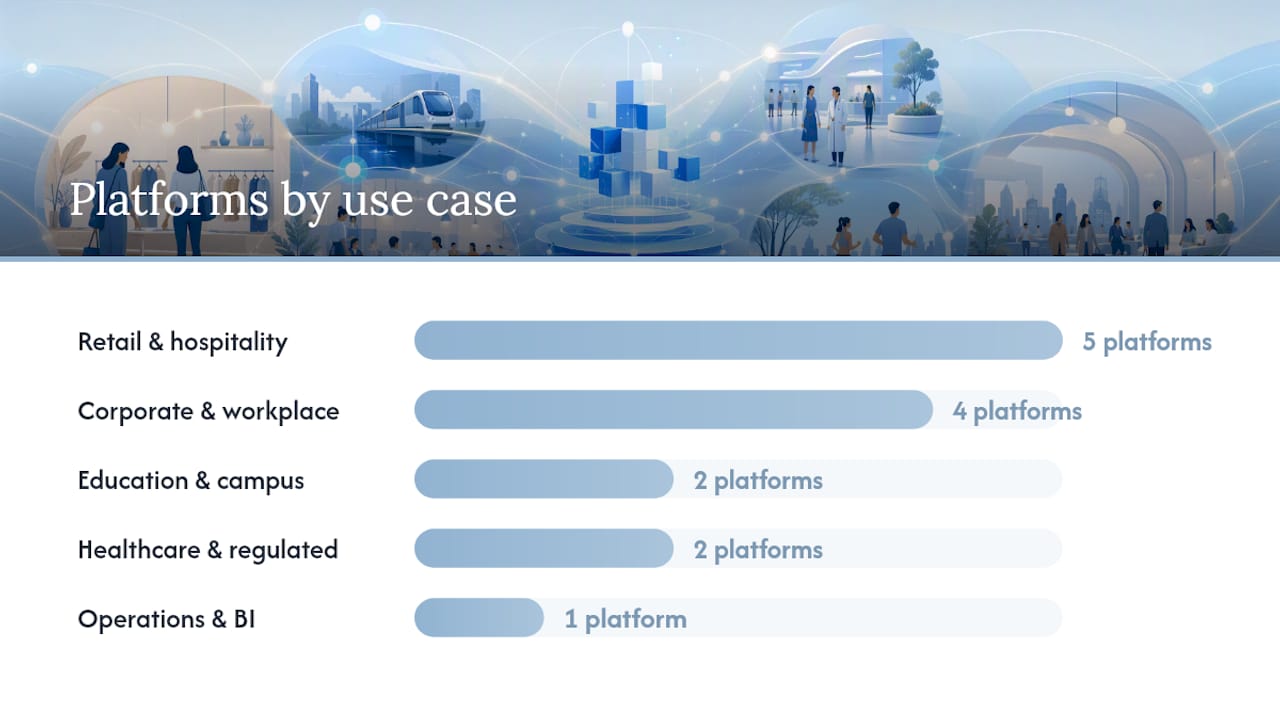
- Retail and hospitality: NoviSign, Look Digital Signage, and Mandoe offer template-driven workflows that non-technical staff can operate. For large branded retail networks with complex content orchestration, Scala and Coates Group have the depth those environments require.
- Corporate communications and workplace: Appspace and Korbyt integrate tightly with Microsoft 365, room scheduling, and identity providers. Bizplay suits organizations already running internal TV channels. Zoom Workplace is a natural fit if your meeting-room infrastructure is already Zoom-based.
- Education and campus: Rise Vision was purpose-built for schools, with emergency alert features and a free tier that makes piloting low-risk. Carousel serves higher education with structured content libraries and multi-department workflows.
- Operations and BI dashboards: TelemetryTV connects directly to Power BI, Tableau, and REST data feeds, making it the strongest choice when the display content is driven by live operational data rather than static creative.
- Healthcare and regulated environments: Mvix and REACH Media Network both target healthcare and education with HIPAA-aware configurations. Verify compliance posture directly with each vendor during procurement.
- Interactive kiosks and touch displays: eyefactive specializes in multi-touch Windows environments. Signagelive supports video walls and multi-zone kiosk configurations across several OS types.
- DOOH and large outdoor signage: Outdoor and billboard deployments require weatherproofed hardware and ad-serving workflows that most standard CMS platforms do not cover natively. Verify hardware specs and billboard scheduling support before committing a platform to an outdoor use case.
- Lean IT and Raspberry Pi environments: Screenly and piSignage are built around Raspberry Pi players, making them cost-effective for budget-conscious teams. Yodeck also supports Raspberry Pi and adds a more polished management layer.
- Organizations that want full-service delivery: Phenyx sits in a different category from the self-serve platforms above. It brings strategy, creative, integrations, and ongoing managed operations under one agency engagement, which is the right model when internal bandwidth is limited or the deployment is too complex for a DIY CMS approach.
Pro Tip: When a “best for” tag aligns with your use case but the platform lacks SSO or your required API, weight the integration and security requirements above the use-case tag. A platform that fits your content type but cannot connect to your identity provider will create more operational friction than it solves.
Vendor mini-reviews: what each platform actually delivers
Phenyx
Phenyx is not a software platform you license — it is a full-service agency engagement that covers strategy, creative, technical integration, and ongoing managed operations for your signage deployment. That distinction matters for organizations that have evaluated self-serve platforms and found the internal effort too high. Phenyx handles content design and templating, player and CMS configuration, API integrations with your existing data sources, and the day-to-day operations that most IT teams do not have bandwidth for. The result is a deployment that runs as a managed service rather than a software subscription your team has to maintain.
- Strengths: End-to-end delivery, creative quality, integration depth, no internal CMS management burden
- Considerations: Agency engagement model, not a per-screen SaaS license
- Best for: Midmarket to enterprise organizations that want measurable outcomes without building an internal signage ops team
- Demo ask: Request a scoping call that covers your player environment, content cadence, and integration requirements
Yodeck
Yodeck’s free single-screen tier makes it one of the lowest-friction ways to start a pilot. The platform is cloud-first, supports Raspberry Pi natively, and scales to multi-location deployments without requiring technical expertise. Its scheduling and remote management tools are strong for the price point, and the ease of use for non-technical teams is a genuine differentiator.
- Strengths: Free tier, Raspberry Pi support, intuitive interface, fast onboarding
- Considerations: Enterprise governance features are lighter than Navori or Appspace
- Demo ask: Test bulk device enrollment and content scheduling across five simulated locations
OptiSigns
OptiSigns competes on integration breadth. With over 150 app integrations and solid widget support, it suits marketing teams that need to pull live data, social feeds, or third-party content onto screens without custom development. Pricing starts around $10 per screen per month, making it accessible for SMBs and mid-sized marketing operations.
- Strengths: Wide integration library, competitive pricing, strong app ecosystem
- Considerations: Analytics depth is moderate; enterprise governance requires higher tiers
- Demo ask: Push a live data feed from a third-party app and verify update latency
ScreenCloud
ScreenCloud’s enterprise feature set covers multi-location management, a broad app ecosystem, and a clean content editor that distributed teams can use without training. It is a strong fit for businesses managing content across retail chains, offices, or franchise networks.
- Strengths: Multi-location management, app ecosystem, clean UX
- Considerations: Pricing steps up meaningfully at enterprise tier
- Demo ask: Simulate a content update pushed to 50 screens across three locations and measure propagation time
NoviSign
NoviSign’s template library and scheduling tools are its core value. Retail and hospitality operators who need staff to update menus or promotions without design skills will find the workflow intuitive. Kiosk mode support adds flexibility for self-service deployments.
- Strengths: Template library, ease of use, kiosk features
- Considerations: Integration depth and analytics are limited compared to enterprise platforms
- Demo ask: Have a non-technical team member build and schedule a campaign from a template in under 30 minutes
Appspace
Appspace goes beyond signage into the broader workplace experience stack, integrating with room scheduling, employee communications, and identity providers. For corporate IT teams managing signage alongside a Microsoft 365 or ServiceNow environment, that integration depth reduces the number of separate tools to manage.
- Strengths: Workplace integrations, SSO/SCIM, enterprise SLA
- Considerations: Pricing requires a direct enterprise quote; not suited for simple retail deployments
- Demo ask: Test SSO onboarding and SCIM provisioning against your identity provider
Signagelive
Signagelive handles video walls, multi-zone layouts, and kiosk configurations across a wide range of OS types including BrightSign, Tizen, and webOS. Complex display environments with mixed hardware are where it earns its place.
- Strengths: Video wall support, multi-zone layouts, broad OS compatibility
- Considerations: Interface has a steeper learning curve than simpler platforms
- Demo ask: Configure a three-zone video wall layout and test offline playback behavior
BrightSign
BrightSign manufactures its own media players and the associated software ecosystem. For environments where display reliability is non-negotiable — airports, casinos, command centers — the single-vendor hardware-software stack eliminates a category of integration risk. The trade-off is that you are committed to BrightSign hardware.
- Strengths: Player reliability, manufacturer support, strong analytics
- Considerations: Proprietary hardware dependency; higher upfront hardware cost
- Demo ask: Request uptime SLA documentation and a hardware replacement timeline
Navori
Navori is built for enterprises that need documented proof-of-play, strict content governance, and BI tool integrations. Its scheduling engine handles complex rules-based content delivery, and its audit trail capabilities satisfy compliance requirements that lighter platforms cannot meet. Enterprise-grade features like SSO, RBAC, and Power BI integration are first-class, not add-ons.
- Strengths: Proof-of-play, governance, BI integrations, enterprise SLA
- Considerations: Pricing is enterprise-tier; implementation requires planning
- Demo ask: Pull a proof-of-play report for a simulated 30-day campaign and verify audit trail completeness
Scala
Scala has been in the market long enough to have deployments in some of the world’s largest retail networks. Its content orchestration capabilities handle complex scheduling rules, data-triggered content, and multi-zone layouts at scale. The platform’s maturity is an asset for large organizations; its complexity is a real consideration for smaller teams.
- Strengths: Mature platform, complex orchestration, enterprise feature depth
- Considerations: Implementation complexity; requires professional services for most deployments
- Demo ask: Test data-triggered content rules and multi-zone scheduling across a simulated 200-screen network
Rise Vision
Rise Vision’s education-focused feature set includes emergency alert overrides, Google Workspace integrations, and a free tier that schools can use to start without a budget approval cycle. It is not the right choice for a corporate enterprise deployment, but for K-12 and higher education it covers the core use cases well.
- Strengths: Free tier, emergency alerts, Google Workspace integration, education templates
- Considerations: Limited enterprise governance; not suited for complex multi-tenant deployments
- Demo ask: Test emergency alert override behavior and verify Google Slides integration
TelemetryTV
TelemetryTV’s strength is live data. Its native integrations with Power BI, Tableau, and REST APIs mean operations teams can push KPI dashboards, inventory data, or production metrics to screens without custom middleware. Device monitoring and fleet health reporting are also above average for its price tier.
- Strengths: BI integrations, live data feeds, device monitoring, competitive pricing
- Considerations: Content design tools are functional but not as polished as ScreenCloud or NoviSign
- Demo ask: Connect a live Power BI dashboard and verify refresh latency under normal network conditions
Other platforms in brief
REACH Media Network targets healthcare, education, and corporate environments with a managed-service flavor and dedicated support. Play Digital Signage is a clean, affordable option for SMBs that need a simple cloud CMS without enterprise overhead. Zoom Workplace makes sense only if your organization is already deep in the Zoom ecosystem and needs signage tied to meeting room displays. Juuno suits small businesses and restaurants that want a flat-rate, simple digital menu board without per-screen pricing complexity. Look Digital Signage covers retail and restaurant use cases with social feed integrations and a straightforward editor. Mvix serves healthcare and corporate environments with on-prem options for regulated industries. Bizplay fits corporate internal TV and Microsoft 365 environments. Carousel is a solid choice for higher education and multi-department corporate deployments. Cayin Technology and Coates Group are hardware-plus-software vendors suited to transportation, QSR, and large-format enterprise environments where the vendor manages the full stack. eyefactive specializes in interactive multi-touch kiosks on Windows. Korbyt targets enterprise digital headquarters with deep Microsoft integrations and strong RBAC. Mandoe and Look Digital Signage both serve SMB retail and hospitality with template-driven simplicity. Screenly and piSignage are the go-to options for Raspberry Pi-based deployments where cost efficiency is the primary driver.
Some platforms, including Juuno, publish useful buying context on their own blogs that can supplement vendor demos.
How to choose the right digital signage platform
A structured evaluation process prevents the most common procurement mistake: selecting a platform based on a polished demo rather than verified operational readiness. Treat the platform as an application platform, not just a CMS, and evaluate device enrollment, remote policy control, API access, and analytics before you shortlist.
Core evaluation categories
- Security and compliance: SSO, RBAC, SCIM provisioning, encryption at rest and in transit, audit trails, and documented pen-test evidence
- Device compatibility: Agnostic player support vs. proprietary hardware; verify every OS type in your environment
- Scalability and multi-location management: Bulk device enrollment, location-based content targeting, and role delegation for distributed teams
- Integrations and APIs: REST API access, BI tool connectors (Power BI, Tableau), identity provider integration, and webhook support
- Analytics and proof-of-play: Campaign delivery confirmation, device health reporting, and exportable logs for compliance
- Offline resilience: Local playback behavior when network connectivity drops; verify how long content plays and how recovery works
- Content authoring and governance: Template libraries, approval workflows, content expiration rules, and multi-user permission models
- SLA and support: Uptime SLA percentage, incident response time, support channel availability, and escalation paths
- Pricing and TCO: Per-screen vs. enterprise license, included professional services, onboarding costs, and hardware requirements
Must-have vs. nice-to-have
A well-structured digital signage RFP separates must-haves from nice-to-haves and uses must-haves as disqualifiers. If a vendor cannot confirm SSO support, documented uptime history, and offline playback behavior, remove them from the shortlist before investing time in a demo.
Must-haves (disqualifiers if absent):
- Cloud-based CMS with role-based access
- Remote device monitoring and management
- Emergency message override capability
- Documented uptime SLA
- Offline-first playback with defined recovery behavior
- API access for integrations
Nice-to-haves:
- Native BI tool connectors
- Advanced template libraries
- Canva integration (available on select platforms via tools like Display NOW)
- White-label options
- Built-in video production tools
Ten questions to ask in every vendor demo
- How does SSO and SCIM provisioning work with our identity provider?
- What happens to content playback when the network drops, and how long does local cache persist?
- Can you show us a proof-of-play report for a 30-day campaign with per-screen delivery confirmation?
- What API endpoints are available, and is there a rate limit on the public API?
- How does bulk device enrollment work for a 200-screen rollout?
- What is your rollback process if a content update causes playback failures?
- Can you provide evidence of a recent penetration test or security audit?
- What is your documented uptime SLA, and what remedies apply if you miss it?
- What are your support response time commitments by severity tier?
- What does professional services pricing look like for onboarding and integration work?
Red flags that should disqualify a vendor quickly:
- Cannot confirm offline playback behavior
- No documented uptime SLA or history
- SSO is on the roadmap but not available today
- API access is locked behind the highest pricing tier
- No reference customers in your industry or at your scale
Hardware and player compatibility: what to verify before you commit
Hardware support across Raspberry Pi, Android, Fire TV, ChromeOS, Windows, and commercial SoCs like Samsung Tizen, LG webOS, and BrightSign materially affects long-term hardware lock-in and TCO. Verifying compatibility before you sign a contract prevents the most expensive surprises in a signage deployment.
| Player / OS | Typical Platform Support | TCO Implication |
|---|---|---|
| Raspberry Pi | Yodeck, Screenly, piSignage, Play Digital Signage | Low hardware cost; verify software support lifecycle |
| Android (commercial) | Most platforms | Widely supported; verify OS version requirements |
| Amazon Fire TV | Yodeck, OptiSigns, TelemetryTV, Rise Vision | Low cost; limited to consumer-grade reliability |
| ChromeOS | Yodeck, ScreenCloud, Rise Vision, OptiSigns | Good for education and corporate; Chromebox for enterprise |
| Windows | Most platforms | Higher hardware cost; strong for complex layouts |
| Samsung Tizen (SoC) | Most enterprise platforms | Eliminates separate player; verify CMS compatibility |
| LG webOS (SoC) | Most enterprise platforms | Same as Tizen; confirm model-year support |
| BrightSign | BrightSign, Navori, Scala, Signagelive | High reliability; proprietary hardware dependency |
Platforms that require proprietary players create a compounding cost problem: when hardware reaches end-of-life, you replace it on the vendor’s schedule, not yours. Agnostic player support gives your IT team the flexibility to standardize on hardware you already manage or can source competitively.
Additional hardware budget items to plan for:
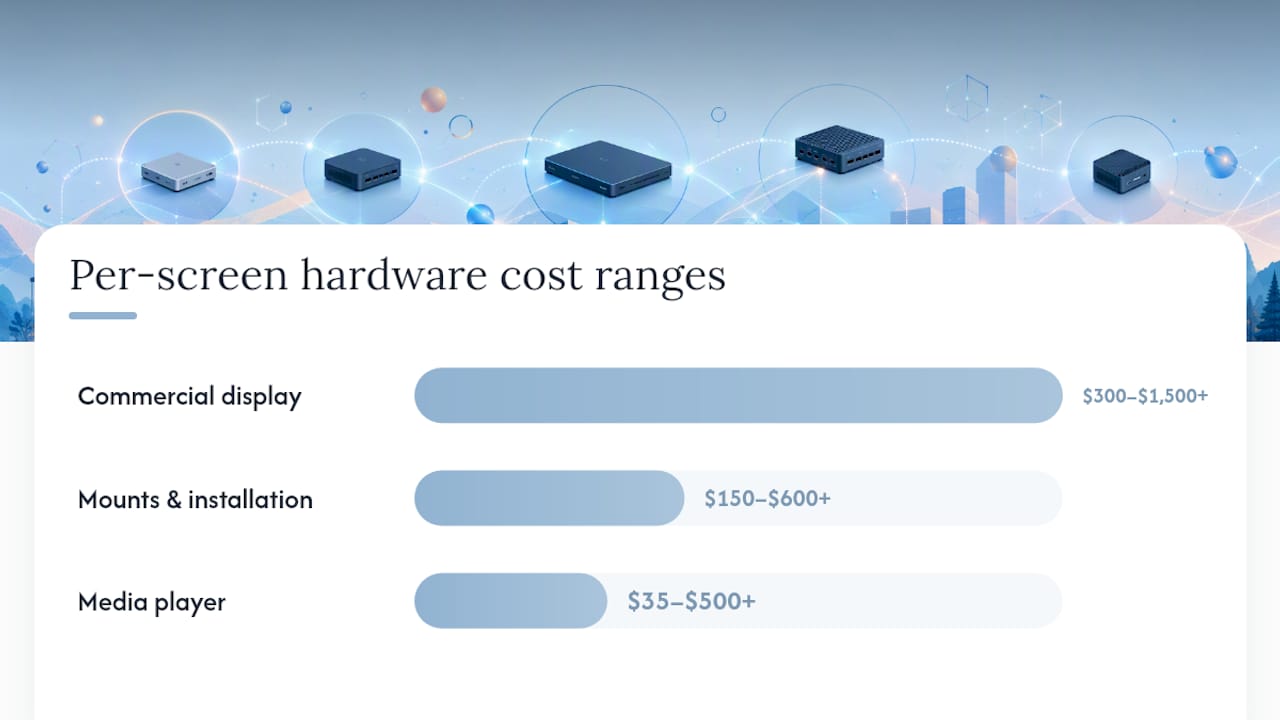
- Commercial displays (separate from players; budget $300–$1,500+ per screen depending on size and brightness)
- Mounts and enclosures (indoor vs. outdoor; weatherproofing for exterior installations)
- Professional installation labor per location
- Spare units (typically 5–10% of deployed fleet for rapid swap-out)
- Cabling, networking, and power infrastructure at each location
Pro Tip: Size your spare unit inventory before go-live. A failed player at a flagship retail location or a hospital lobby is a visible operational failure. Keeping pre-configured spare units on-site at high-priority locations cuts mean time to recovery from days to hours.
Pricing and total cost of ownership: budget beyond the license fee
The per-screen subscription is rarely the largest cost in a signage deployment. A realistic 3-year TCO model accounts for several cost categories that vendors do not lead with in their pricing pages.
Cost categories to model:
- Software license: Per-screen monthly fee or enterprise annual license
- Media players: $35 (Raspberry Pi) to $500+ (BrightSign, commercial Android) per screen
- Commercial displays: $300–$1,500+ per screen depending on size, brightness, and form factor
- Mounts and installation: $150–$600+ per screen depending on location complexity
- Content production: Design, animation, and video production for initial templates and ongoing updates
- Professional services / onboarding: Implementation, integration, and training fees (often $5,000–$50,000+ for enterprise deployments)
- Support tier upgrades: Premium support SLAs above the base plan
- Bandwidth and infrastructure: Network upgrades at locations with high-resolution content
- Replacement cycles: Hardware refresh every 3–5 years depending on player type
Two cost scenarios (directional, not vendor-specific):
Small pilot (10 screens): Software license, 10 commercial players, 10 displays, installation at two locations, basic content templates, and standard support. The software subscription is often the smallest line item once hardware and installation are included.
Scaled rollout (500 screens): Enterprise license negotiation, bulk hardware procurement, phased installation across multiple locations, integration professional services, dedicated support SLA, content production retainer, and a spare unit inventory. At this scale, negotiating volume discounts on hardware and bundling professional services into the contract can reduce total spend meaningfully.
Negotiation tips:
- Ask for hardware discounts when committing to a multi-year software contract
- Request that onboarding and integration professional services be included in year-one pricing
- Negotiate staged payment schedules tied to deployment milestones rather than upfront annual payments
- Require proof-of-play SLA commitments in the contract, not just in the sales deck
Pro Tip: Free tiers are useful for validating a platform’s UX and basic functionality, but free options often lack the enterprise features needed for large-scale, secure deployments. Use a free tier to test the editor and device enrollment flow, then evaluate the paid tiers against your actual requirements before committing.
Pilot and rollout: a practical timeline and success checklist
A disciplined pilot prevents the most common deployment failure: scaling a platform before you have verified it works in your actual environment.
- Week 0 — Requirements: Document your use cases, screen locations, player OS preferences, integration requirements, and security constraints. Identify the IT owner and the communications or marketing owner.
- Weeks 1–2 — Vendor shortlisting and contracts: Issue an RFP or structured demo request to three to five vendors. Use must-haves as disqualifiers. Negotiate pilot terms that include a defined exit clause.
- Weeks 3–6 — Pilot deployment: Deploy five to ten screens across two to three representative locations. Test content scheduling, remote management, offline playback, API integrations, and user onboarding.
- Weeks 7–8 — Evaluation: Measure pilot success metrics against your defined thresholds. Conduct a structured debrief with IT, communications, and any location managers involved.
- Week 9+ — Phased rollout: Begin location-by-location expansion with a documented rollout playbook, trained content owners at each location, and a governance model in place.
Pilot success metrics to track:
- Screen uptime percentage (target: 99%+ during pilot)
- Proof-of-play confirmation rate (target: 100% of scheduled content confirmed delivered)
- Content update latency (time from publish to display; target: under 60 seconds for cloud platforms)
- API reliability (zero failed integration calls during pilot window)
- Incident response time (how quickly the vendor responds to a reported issue)
Go/no-go checklist after pilot:
- All must-have features verified in production conditions (not just demo environment)
- SSO and RBAC configured and tested with real user accounts
- Offline playback verified at a location with intermittent connectivity
- Proof-of-play logs reviewed and confirmed accurate
- Content owners trained and able to publish independently
- Vendor support responsiveness confirmed through at least one real incident
How these picks were selected
This shortlist was built by evaluating platforms against four primary dimensions: feature fit for U.S. midmarket and enterprise deployments, enterprise readiness signals (SSO, RBAC, offline playback, documented SLAs), hardware compatibility breadth, and user review signals from Gartner peer reviews and G2. Vendor documentation, published feature checklists, and third-party procurement guides informed the evaluation criteria.
Sources used:
- Gartner Digital Signage peer reviews for vendor stability and common pain points
- G2 market roundups for user-reported strengths and weaknesses
- Digital Signage Today for hardware compatibility and industry context
- Vendor documentation and published feature pages
- Procurement checklists from Smart Workplace Guide and Pickcel
Limitations: Vendor pricing, feature sets, and roadmaps change frequently. This shortlist reflects publicly available information and is intended as a starting point for procurement, not a substitute for direct vendor evaluation. The shortlist is scoped to U.S. midmarket and enterprise buyers; some platforms listed have stronger presence in specific verticals or geographies.
Agency vs. software: when to buy a platform and when to hire an agency
For most organizations with a clear internal owner and straightforward content requirements, a self-serve platform is the right starting point. When the deployment involves complex integrations, multi-location governance, or a team without bandwidth to manage a CMS, an agency-led engagement typically delivers faster time to value.
| Dimension | Self-serve platform | Agency-led (Phenyx) |
|---|---|---|
| Internal effort required | High — IT + comms team manages CMS, content, and ops | Low — agency handles strategy, creative, and operations |
| Speed to value | Moderate — depends on internal capacity | Fast — structured delivery with defined milestones |
| Creative quality | Depends on internal design resources | Consistent — agency-produced templates and content |
| Integration depth | Varies by platform and internal dev capacity | Full-stack — agency manages API and data integrations |
| Ongoing operations | Internal team owns updates, monitoring, and incidents | Managed — agency provides ongoing ops and reporting |
| Typical budget shape | Per-screen SaaS + internal labor | Agency engagement fee; often comparable to fully-loaded SaaS + internal cost |
| Best for | Organizations with dedicated internal signage owners | Organizations that want outcomes without building internal ops capacity |
When to call an agency:
- Your deployment spans multiple locations with different content requirements
- Your team does not have a dedicated signage content owner
- You need integrations with BI tools, POS systems, or data feeds that require custom development
- You want a consistent creative standard across all screens without a full-time designer
- You are launching a new signage program and want a structured deployment rather than a DIY pilot
A practitioner’s perspective on choosing digital signage software
The most common mistake in digital signage procurement is treating it as a software decision when it is actually an operations decision. A platform that scores well in a demo can still fail in production if the organization has not defined who owns content updates, how approvals work, and what happens when a screen goes dark at 2 AM.
The platforms that consistently deliver value share one characteristic: they make the operational workflow as simple as the content creation workflow. Proof-of-play reporting, role-based access, and offline resilience are not enterprise extras. They are the baseline for any deployment that needs to run reliably without constant IT intervention.
For organizations evaluating this category in 2026, the practical next steps are clear. First, shortlist three to five vendors using the must-have criteria above and issue a structured demo request. Second, run a defined pilot on five to ten screens before committing to a full rollout. Third, secure budget approval that accounts for the full TCO model, not just the per-screen license fee. The IT owner and the communications or marketing owner should both be at the table from week zero — deployments that start with only one of those stakeholders tend to stall when the other’s requirements surface mid-rollout.
Phenyx delivers full-service digital signage without the DIY overhead
There are strong self-serve platforms on this list — Yodeck, ScreenCloud, TelemetryTV, and others each do their job well. But for organizations that want a deployment done right without building an internal signage ops team, Phenyx is a different kind of answer.
Phenyx brings strategy, creative, technical integration, and ongoing managed operations under one agency engagement. That means your screens go live with professionally designed templates, verified API connections to your data sources, and a team that handles the day-to-day operations your IT department should not have to own. From video production for signage content to full deployment management, Phenyx covers the full scope.
What a Phenyx signage engagement typically includes:
- Deployment strategy and screen location planning
- Content design and branded template production
- CMS configuration and player setup
- API and data feed integrations
- Staff training and content governance setup
- Ongoing managed operations and reporting
Ready to scope your deployment? Request a discovery call with Phenyx and bring your screen count, locations, and integration requirements. The conversation takes 30 minutes and gives you a clear picture of what a managed deployment looks like for your organization.
Sources
Always verify vendor claims in demos and contract documents before committing. Published feature lists and pricing pages change frequently.
- Top features every enterprise digital signage system needs
- Digital Signage Today
- 8 Best digital signage software: My honest review