

Google Ads Conversion Tracking: Measure Ad ROI
The single most important action you can take right now: install a sitewide Google tag, create at least one conversion action in Google Ads, and verify the tag fires correctly before you spend another dollar on clicks.
Here is a prioritized checklist to get tracking live in the next 30–90 minutes:
Pro Tip: Trigger a real test conversion immediately after setup and check the Google Ads Conversions column within 24–48 hours. If the status shows “No recent conversions,” open Tag Assistant before touching any bids.
Table of Contents
Why Google Ads conversion tracking is the foundation of every campaign
Conversion tracking for PPC is the mechanism that tells Google Ads what happened after someone clicked your ad. Without it, the platform can only optimize for clicks and impressions, which is a bit like navigating by the sound of traffic rather than a map. With it, every bid decision is grounded in real outcomes.
A conversion action is any customer behavior you define as valuable: a purchase, a lead form submission, a phone call, an app install, or even a key page view. Google Ads uses these signals to power automated bidding strategies like Target CPA (cost per acquisition) and Target ROAS (return on ad spend). Feed the algorithm clean conversion data and Smart Bidding can find the users most likely to complete that action at your target cost. Feed it nothing, or feed it noisy data, and it optimizes for the wrong thing entirely.
The gap between “clicks” and “conversions” is where most ad budgets quietly leak. A campaign generating 500 clicks per week at a strong click-through rate can still be unprofitable if none of those clicks are being attributed to actual sales. Conversion data closes that gap and makes every downstream decision, from budget allocation to audience targeting, defensible.
Two measurement challenges make setup more complex than it used to be. First, users move across devices and browsers, so a click on a mobile ad may convert on a desktop browser hours later. Second, browser-level privacy restrictions are progressively limiting third-party cookies, which traditional conversion tags relied on. Google recommends the Google tag and enhanced conversions specifically to address these gaps, using first-party data and hashed signals to maintain measurement accuracy in a cookieless environment.
Which setup method fits your site and goals?
Three primary setup methods exist for web conversions: URL-based tracking, manual code-based tracking, and importing key events from GA4. Offline conversion imports are a fourth path for sales that close outside the browser. The right choice depends on four factors: how complex the conversion action is, whether you need to pass dynamic values like revenue or transaction IDs, whether you already use GA4, and whether your team has direct access to site code.
MethodEase of SetupDynamic ValuesTime to ImplementBest ForURL-based (Google tag)HighNo30 minSimple page-load confirmationsManual event snippetMediumYes30–60 minClicks, forms, custom parametersGoogle Tag ManagerMediumYes (via variables)90 minComplex sites, multiple tagsGA4 event importMediumYes (if GA4 tracks them)30–60 min + permissionsTeams already using GA4Offline conversion importLow (ongoing)Yes (CRM values)1–3 hours + CRM setupB2B, phone leads, in-person sales
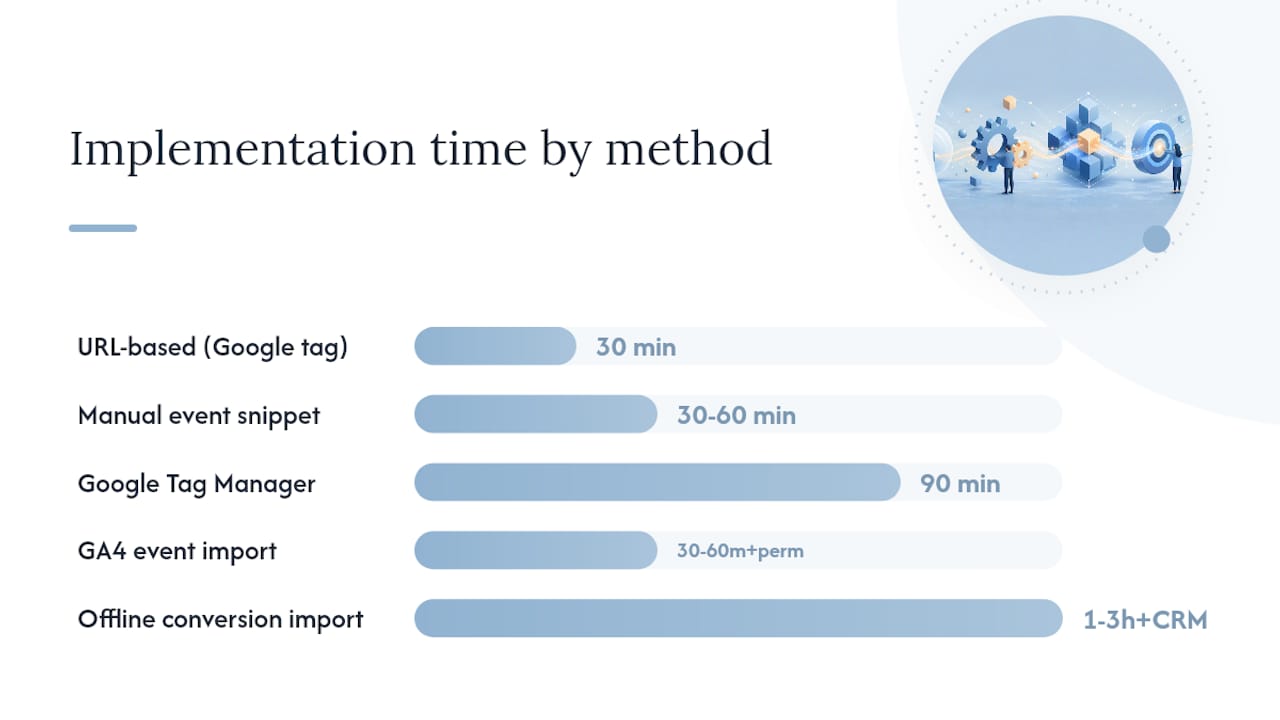
URL-based tracking is the fastest path for a simple thank-you page. Manual event snippets are necessary when you need to capture a button click or pass a dynamic order value. GTM sits in the middle: slightly more setup upfront, but it gives non-developers the ability to manage tags without touching site code. GA4 import is ideal when your analytics team has already structured events carefully and you want a single source of truth. Offline imports are non-negotiable for any business where the sale closes in a CRM, over the phone, or in person.
How to create a web conversion action and install the Google tag
This is the fast path: a URL-based conversion using the Google tag, suitable for most lead-gen and e-commerce confirmation pages.
Pro Tip: Name conversions with a consistent structure: [Action] — [Page/Location] (e.g., “Purchase — Checkout Confirmation”). Consistent naming keeps Smart Bidding signals clean and makes audits far faster when you have dozens of conversion actions across multiple campaigns.
Other setup paths: GTM, manual events, GA4 import, and offline imports
Google Tag Manager
GTM is the preferred method for sites with multiple tags, non-developer marketing teams, or complex trigger logic. The workflow: create a Google Ads Conversion Tracking tag in GTM, set the Conversion ID and Conversion Label from your Google Ads conversion action, define a trigger (e.g., Page URL contains /thank-you), and test in Preview mode before publishing. Critically, always add a Conversion Linker tag in GTM as well. GTM’s Conversion Linker stores ad click information in first-party cookies so conversion tags can read the GCLID across pages and redirects, which is especially important on sites with multiple subdomains or checkout flows that pass through a third-party processor.
The main pitfall with GTM: tag proliferation. When multiple teams add tags independently, you can end up with duplicate conversion tags firing on the same event. Audit your GTM container regularly.
Manual event code
When you need to capture a button click (rather than a page load) or pass a dynamic transaction value, the manual event snippet is the right tool. You fire the gtag('event', 'conversion', {...}) call from a JavaScript event listener, passing parameters like value, currency, and transaction_id directly. This approach requires developer involvement but gives you the most precise control over when and what data is sent.
GA4 event import
If your team has already instrumented GA4 events carefully, importing them into Google Ads avoids duplicating measurement logic. The requirements are specific: you need Admin access in Google Ads and Edit access in the linked GA4 property, and only events marked as key events in GA4 are eligible for import. Once linked, go to Google Ads > Conversions > Import > Google Analytics 4 properties and select the key events you want to use. For deeper guidance on structuring GA4 events before import, the GA4 event tracking guide covers naming conventions and event parameters that translate cleanly into Google Ads.
Offline conversion imports
For B2B advertisers and service businesses where leads close in a CRM days or weeks after the initial click, offline conversion imports reconcile ad clicks with actual revenue. The mechanism relies on the GCLID: when a user clicks your ad, Google appends a GCLID to the landing page URL. Your CRM captures that GCLID alongside the lead record. When the deal closes, you upload a CSV mapping the GCLID to the conversion name, timestamp, and value. The Google Ads API supports this workflow programmatically for teams that want to automate the upload rather than doing it manually each week.
A minimal offline import CSV requires these columns: Google Click ID, Conversion Name, Conversion Time, and Conversion Value. The timestamp must be within the conversion window you set in Google Ads, and the GCLID must have been stored before the cookie expired (typically 90 days). Offline conversion tracking closes the measurement loop for any sale that does not happen on the website, making it indispensable for industries like construction, professional services, and B2B SaaS.
Pro Tip: Store the GCLID in a hidden form field on every landing page. Most CRMs (Salesforce, HubSpot) can capture hidden fields automatically. If you wait until after the deal closes to set this up, the GCLID is gone and the attribution is lost.
Attribution, counting, conversion windows, and settings that affect bidding
Every conversion action has four settings that directly shape what Smart Bidding learns. Getting them wrong is one of the most common reasons campaigns underperform even when tracking appears to be working.
SettingLead Gen RecommendationE-commerce RecommendationRepeat PurchaseCountingOne per clickEvery conversionEvery conversionConversion window30 days90 days90 daysAttribution modelData-drivenData-drivenData-drivenPrimary/SecondaryPrimary (form submit)Primary (purchase)Primary (purchase)ValueFixed (estimated)Dynamic (order value)Dynamic (order value)
Delayed attribution is a subtler issue. If your conversion window is 30 days and you evaluate campaign performance after 7 days, you are looking at incomplete data. Smart Bidding accounts for this internally, but human reviewers often pause campaigns prematurely because early ROAS looks weak. Allow at least one full conversion window before drawing conclusions.
Passing dynamic values and e-commerce details
Static conversion values tell Smart Bidding that a conversion happened. Dynamic values tell it how much that conversion was worth, which is the difference between optimizing for volume and optimizing for revenue.
The standard dataLayer structure for a purchase event looks like this:
dataLayer.push({
  event: 'purchase',
  ecommerce: {
    transaction_id: 'TXN-12345',
    value: 149.99,
    currency: 'USD'
  }
});
GTM can read these dataLayer keys using built-in variables ({{DLV - ecommerce.value}}) and pass them to the Google Ads Conversion Tracking tag automatically. Server-side tagging takes this further by processing the dataLayer server-to-server, which removes the dependency on browser cookies entirely and improves data quality in privacy-restricted environments.
If transaction IDs are missing from your confirmation page, work with your development team to expose them in the dataLayer before the tag fires. A well-structured confirmation page is one of the most overlooked elements of a reliable tracking setup.
How to verify conversion tags and troubleshoot common problems
Conversion tracking is not a one-time task. Site updates, new redirects, and CMS changes routinely break tags that were working perfectly the week before. Build verification into your workflow, not just your launch checklist.
Here is a structured verification and troubleshooting sequence:
Common issues and quick fixes:
Pro Tip: Test across Chrome, Firefox, and Safari, and on both mobile and desktop. Safari’s Intelligent Tracking Prevention (ITP) limits cookie lifespans, which can cause GCLID loss on return visits. Server-side tagging is the most durable solution for high-traffic campaigns where Safari users represent a significant share.
Practical best practices and a periodic audit checklist
Reliable conversion data requires ongoing maintenance, not just a clean launch. Site changes, new team members, and platform updates all create opportunities for measurement to drift.
Naming and grouping:
Audit cadence:
Retiring obsolete conversions:
When to switch a conversion from Secondary to Primary: when a new action becomes the primary business outcome (e.g., a new product launch replaces an old one) and you have at least 30 days of data confirming the new action fires reliably.
Agency-grade audit: Phenyx’s practical conversion-tracking QA checklist
A structured audit separates campaigns that measure accurately from those that only appear to. Phenyx uses a three-phase QA process for every client account.
Pre-launch checklist
CheckpointWhat to VerifyToolAdmin accessGoogle Ads Admin + GA4 Edit access confirmedGoogle Ads > Linked accountsAuto-taggingEnabled in Google Ads account settingsSettings > Account settingsSitewide tagFires on every page (homepage, category, blog)Tag AssistantConversion LinkerPresent in GTM containerGTM container auditEvent snippetFires only on conversion pageGTM PreviewConversion ID/LabelMatches Google Ads conversion action exactlyCross-reference in AdsEnhanced conversionsConfigured with hashed first-party fieldsAds > Conversions > SettingsGoogle SignalsEnabled in GA4 for cross-device reportingGA4 Admin > Data SettingsPrimary designationOnly biddable conversions set to PrimaryAds > Conversions listOffline import fieldsGCLID captured in CRM hidden form fieldCRM field audit
Offline conversion import: sample CSV format
Required columns for a standard offline import upload:
ColumnFormatExampleGoogle Click IDStringEAIaIQobChMI…Conversion NameExact match to Ads action nameContact Form Submit — HomepageConversion TimeMM/DD/YYYY HH:MM:SS timezone—Conversion ValueDecimal—Conversion CurrencyISOUSD
Reconciliation cadence: Upload offline conversions weekly, within the conversion window set in Google Ads. Match CRM closed-won records against the GCLID log. Any GCLID older than your conversion window cannot be attributed, so timely uploads matter.
Privacy settings to verify:
Key Takeaways
Accurate Google Ads conversion tracking requires a sitewide Google tag, at least one Primary conversion action, enhanced conversions for privacy resilience, and offline imports for any sale that closes outside the browser.
PointDetailsInstall the sitewide tag firstThe Google tag must fire on every page, not just the confirmation page, to preserve GCLID.Primary conversions drive biddingOnly conversions marked Primary feed Smart Bidding; secondary conversions are for reporting only.Enhanced conversions protect accuracyAs browsers restrict third-party cookies, enhanced conversions use hashed first-party data to maintain measurement.Offline imports close the revenue loopB2B and service businesses should map CRM closed-won records to GCLIDs via weekly CSV uploads.Phenyx audits and implements end-to-endPhenyx handles tag setup, GTM configuration, GA4 linking, and offline import reconciliation for client campaigns.
The measurement gap most advertisers ignore
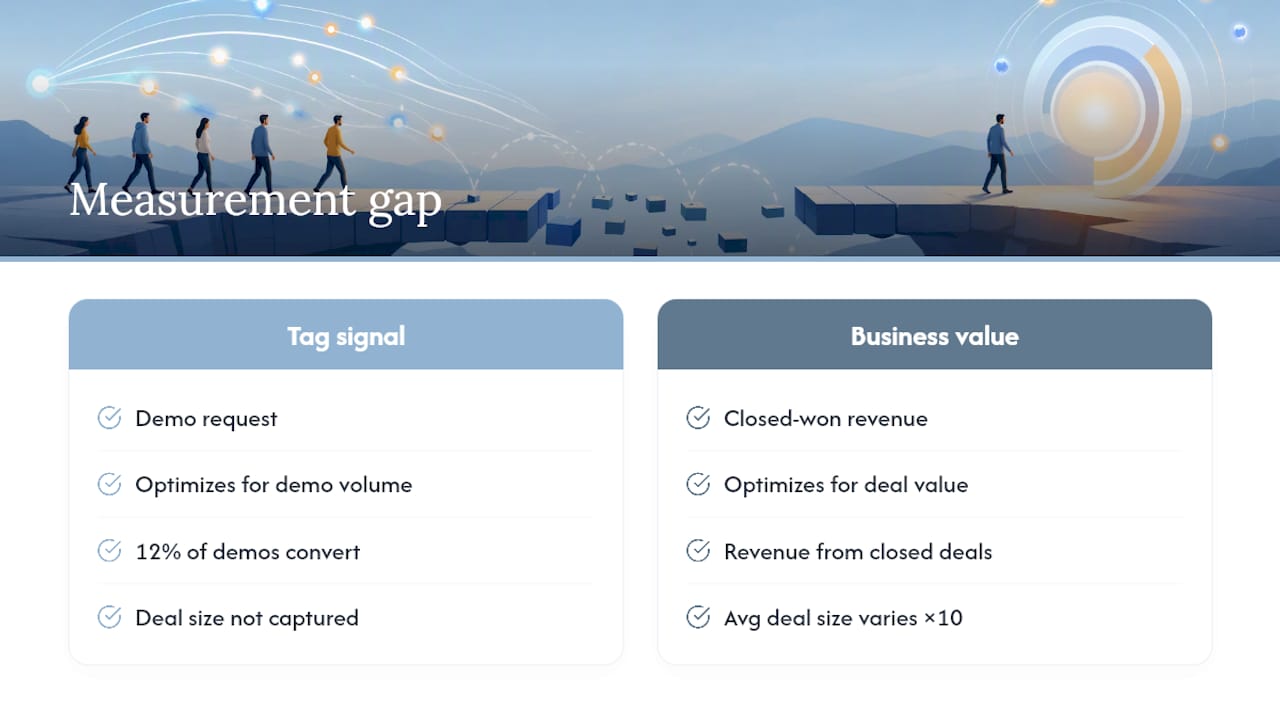
Most conversion tracking guides stop at “install the tag and verify it fires.” That is necessary, but it is not sufficient. The real measurement gap is between what the tag records and what the business actually earns.
Consider a B2B company running Google Ads for a software product with a 60-day sales cycle. The tag fires when a prospect submits a demo request. Smart Bidding optimizes for demo requests. But if only 12% of demo requests become paying customers, and the average deal size varies by a factor of ten, then optimizing for demo volume is optimizing for the wrong signal entirely. The campaigns that look best in Google Ads may be generating the cheapest leads, not the most valuable ones.
This is where offline conversion imports become genuinely powerful, not just a nice-to-have feature. When you feed closed-won revenue back into Google Ads with actual deal values, Smart Bidding recalibrates toward the clicks that produce high-value customers, not just any customers. The algorithm is only as intelligent as the data you give it.
The same logic applies to enhanced conversions. Advertisers who dismiss them as a privacy compliance checkbox are missing the point. In a world where Safari’s ITP and Firefox’s cookie restrictions are already limiting attribution windows, enhanced conversions are the mechanism that keeps measurement from degrading silently over time. A campaign that appears stable in reporting may be losing attribution for a growing share of conversions as cookie lifespans shrink. Enhanced conversions, by using hashed first-party signals, maintain accuracy where cookie-based tracking cannot.
The advertisers who will have a durable measurement advantage are those who treat conversion tracking as a living system: structured thoughtfully at launch, audited regularly, and extended to cover the full customer journey from click to closed revenue.
Phenyx handles the full conversion-tracking setup for your campaigns
Getting conversion tracking right from day one means your ad spend works harder from the first click. Phenyx sets up, audits, and maintains the complete measurement stack for growing businesses: Google tag installation, GTM configuration, GA4 event linking, enhanced conversions, and offline import reconciliation with your CRM.
What Phenyx delivers for paid campaigns:
If your current campaigns are running without verified conversion data, or if your Smart Bidding strategies are optimizing against incomplete signals, an audit is the right first step. Request a conversion tracking audit from Phenyx and get a clear picture of what your measurement stack is missing before your next budget cycle.
Useful sources for deeper reading
These official Google resources are the authoritative references for every setup step and code detail covered in this article.
Before importing GA4 events, confirm your GA4 property is linked to Google Ads under Linked accounts, that the events you want to import are marked as key events in GA4, and that your Google Ads account has Admin-level access. Missing any one of these three requirements blocks the import entirely.
Recommended