

One in Five Searches: How SEOs Recover Clicks Lost to AI Overviews
AI Overviews can reduce clicks for many queries, and the first move is checking your generative AI performance report in Search Console. The evidence shows fewer clicks on traditional results when a summary appears, so the priority is clear: confirm crawlability, tighten your summary content, and measure before reacting.
TL;DR:
- AI Overviews are triggered mainly by longer, question-based searches seeking synthesis, often reducing clicks on traditional search results by nearly half.
- Grounding for AI summaries relies on well-structured, fact-based content with clear citations, but hallucinations and partial source referencing remain risks.
- To appear in AI Overviews, pages should ensure crawlability, include concise top-of-page summaries, and cite specific, trustworthy sources with multimedia support.
- Excluding your site from AI features is possible via Search Console controls, while monitoring impressions and click-through rates helps measure impact and guide adjustments.
- Focus on improving conversions rather than raw traffic, and run small tests on high-impression pages with declining CTR to optimize your content for AI-driven search visibility.
Table of Contents
- What Are AI Overviews and When Does Google Show Them?
- How Does Google Build AI Overviews?
- Why AI Overviews Matter for Clicks and Traffic
- How to Appear in AI Overviews: An Optimization Checklist
- How Do You Control AI Overviews in Search Console?
- How Should You Measure the Impact of AI Overviews?
- What Are the Risks, and How Do You Mitigate Them?
- How We Approach AEO Reporting for Clients
- Our Take: Rethink What Success Looks Like
- Get Help Adapting Your SEO to AI Overviews
- FAQ
- Sources
What Are AI Overviews and When Does Google Show Them?
AI Overviews are the generated summary blocks that appear above traditional blue links on a Google results page, built to answer a query directly rather than send searchers to a single site. We see them most often on longer, question-shaped searches where the intent is informational rather than transactional.
Google tends to trigger these summaries for queries that benefit from synthesis: comparisons, multi-part questions, “how” and “why” searches, and topics where no single page fully answers the question. A typical overview includes a few sentences of synthesized text, a handful of linked sources, and sometimes images or a short list.
For working SEOs, the practical takeaway is pattern recognition. Overviews show up unevenly across query types, so auditing your own site’s top queries in Google Search Central’s AI features documentation is a faster path to clarity than guessing.
Common traits of the queries that trigger overviews:
- They tend to be longer and more conversational than a typical keyword search.
- They often include a question word like “how,” “why,” or “what.”
- They usually seek a definition, comparison, or synthesis rather than a single destination.
- They frequently touch topics where multiple sources are needed to form a complete answer.
How Does Google Build AI Overviews?
Google generates these summaries using a large language model grounded in web content, drawing on multiple sources at once rather than paraphrasing a single page. Grounding means the model pulls supporting text from pages it can crawl and index, then cites a selection of them alongside the generated answer.

Citations and link previews matter here because they signal which sources the system treated as reliable enough to reference. A page that is well-structured, factually specific, and easy to parse has a better shot at being pulled into that grounding process than a page full of vague, generic claims.
That said, the system is not flawless. Hallucinations still happen, meaning the generated text can state something no source actually says, and citation behavior can be partial: a page might contribute to the answer without ever appearing as a visible citation.
One in five searches in a recent sample produced an AI Overview, according to Pew Research Center’s analysis, a scale that makes grounding behavior a mainstream SEO concern instead of a fringe case.
What tends to improve grounding odds:
- Clear, declarative sentences that state a fact or definition directly.
- Content organized under descriptive headers that match how people phrase questions.
- Source transparency, including named studies, dates, and original data rather than secondhand summaries.
Why AI Overviews Matter for Clicks and Traffic
The click data is the part that should worry anyone managing organic traffic. Pew Research Center found that searchers click a traditional result link just 8% of the time when an AI summary appears, compared with 15% when it does not. Even more striking, only about 1% of AI Overviews produced a click on one of the cited sources themselves.
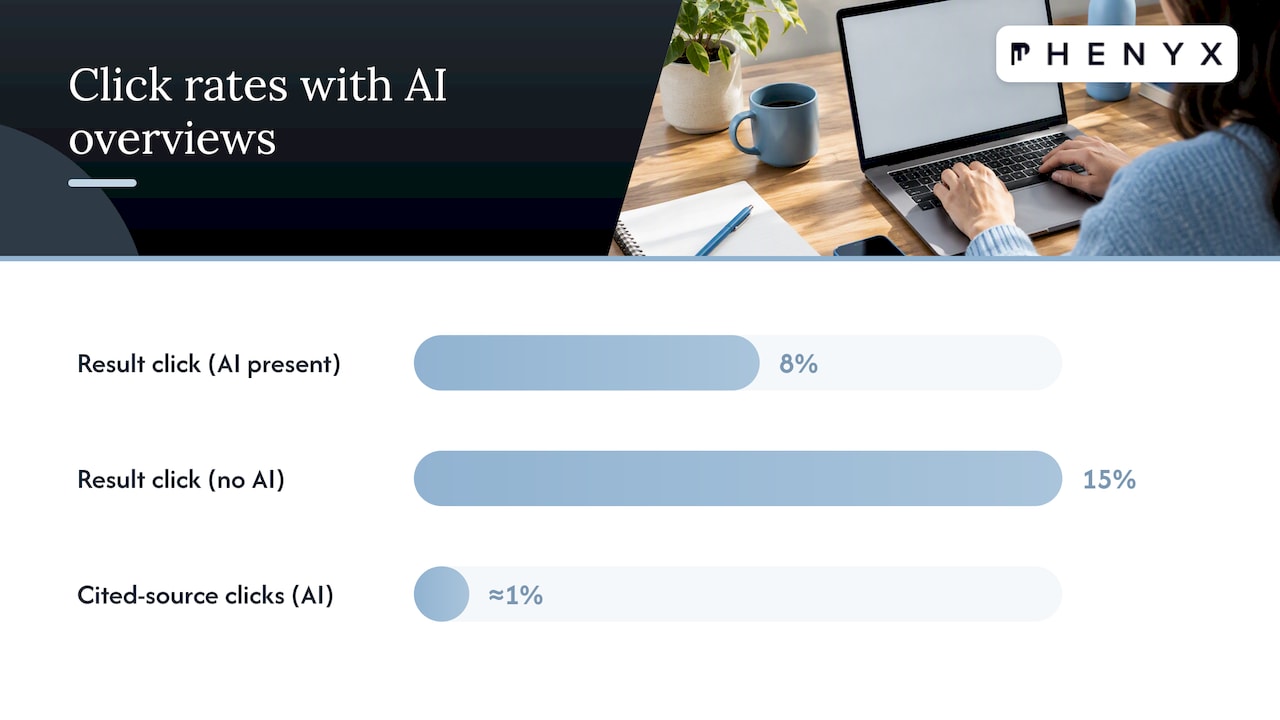
Ars Technica’s reporting on the same research summarized the effect as cutting website clicks by almost half for affected queries, while noting that AI Overviews now appear in a notable share of searches in the sample studied.
That drop does not hit every page the same way. A few patterns worth tracking:
- Top-of-funnel, definition-style content tends to lose the most clicks because the overview often answers the question fully on its own.
- Transactional and branded queries are less affected, since overviews rarely replace the need to visit a specific product or service page.
- Pages that previously ranked for broad informational terms may see impressions hold steady while clicks fall, which is the signal to watch for first.
The business risk is not that traffic disappears everywhere. It is that the queries driving top-of-funnel awareness, often the ones agencies report on most proudly, are the ones most likely to get summarized and never clicked.
How to Appear in AI Overviews: An Optimization Checklist
Getting cited starts with the basics working correctly, then layers in content and authority signals that make a page easy for a model to extract and trust.
- Confirm crawlability and indexability before anything else: check that the page returns a 200 status, has no conflicting canonical tag, and loads cleanly on mobile.
- Fix page speed and mobile UX issues, since slow or broken rendering can keep a page out of the crawl pool Google draws from for grounding.
- Write a concise summary paragraph near the top of the page that answers the core question in two or three direct sentences, similar to how a featured snippet is written.
- Use structured headers that mirror real search phrasing, so the content maps naturally to the questions people ask.
- Add an FAQ or summary block for complex topics, since short question-and-answer pairs are easy for a model to lift cleanly.
- Include a genuine, specific insight rather than a repackaged version of what every competitor already published; synthesis models favor distinct information.
- Cite your own sources clearly, with dates and named studies, so the page itself reads as trustworthy grounding material.
- Strengthen authority signals: earn links from relevant sites, keep brand mentions consistent, and add structured data markup where it applies.
- Use multimedia with real captions and alt text, since images and video with descriptive context can also become grounding material.
- Review Preferred Sources options where available, since Google has signaled it is testing ways for site owners to be recognized as trusted sources in certain categories.
For a deeper walkthrough of how we approach generative-search optimization project by project, our practical GEO playbook breaks down the tactics we prioritize first.
Pro Tip: Start with your five highest-impression, lowest-CTR pages in Search Console. Those are the pages most likely already feeding an AI Overview without earning you a click.
How Do You Control AI Overviews in Search Console?
Google gives site owners two tools that matter most here. The first is the Search generative AI control, which lets you include or exclude your content from generative AI features. The setting defaults to include, and excluding a site removes it from generative features without affecting how it’s indexed elsewhere in Search.
The second is the generative AI performance report inside Search Console, which shows impressions tied specifically to AI features, broken down by page, country, device, and date.
| Control or report | What it does | Why it matters for triage |
|---|---|---|
| Search generative AI control | Includes or excludes a site from generative AI features | Lets you test removal on underperforming pages without affecting regular indexing |
| Generative AI performance report | Shows impressions by page, country, device, and date | Reveals which pages are feeding overviews without driving clicks |
| Regular Search Performance report | Shows clicks, impressions, and CTR for standard results | Gives the baseline to compare against generative-specific data |
Practical steps worth building into a monthly routine:
- Pull the pages with the steepest CTR decline and cross-check whether they also show high generative impressions.
- Run a controlled test: adjust the summary paragraph or structure on a handful of pages, then watch the next reporting cycle.
- Avoid toggling the generative AI control on high-traffic pages without a clear hypothesis, since exclusion is easy to apply but slow to reverse in terms of regained visibility.
How Should You Measure the Impact of AI Overviews?
A clean measurement framework keeps this from turning into guesswork. We recommend tracking four numbers consistently across any site affected by generative features.
- Generative impressions: how often a page’s content appears to be feeding an AI Overview, pulled from the generative AI performance report.
- Click-through rate to the site: compared before and after a change, using at least a four-week window to smooth out normal variance.
- Clicks attributed to AI citations specifically, where visible, versus clicks from standard blue links.
- Downstream conversions, since a page that loses raw clicks but keeps qualified visitors may still be performing its job.
Run experiments in pairs when possible: change one variable (a summary paragraph, a header structure, a citation style) on a test set of pages and leave a comparable set untouched. Expect attribution to stay imperfect. Generative AI performance data and standard Search Performance data do not always reconcile cleanly, so treat both as directional rather than exact. For more on why ranking and visibility data can look inconsistent across tools, see our piece on ranking volatility and what different teams actually see.
What Are the Risks, and How Do You Mitigate Them?
Hallucinations are the most immediate risk: an AI Overview can state something inaccurate about your brand, product, or industry, sourced loosely or not at all from your actual content. Copyright exposure and misinformation are close behind, especially when summaries paraphrase proprietary data without clear attribution.
Practical mitigation steps:
- Monitor your brand name and key product terms in search regularly to catch inaccurate summaries early.
- Request corrections through Google’s standard feedback channels when a summary clearly misstates a fact tied to your content.
- Use the Search generative AI control selectively on pages with sensitive, regulated, or easily misquoted information.
- Keep content provenance clear: dated publication info, named sources, and consistent captions and alt text reduce ambiguity for both readers and the grounding model.
- Build a short rapid-response workflow so a flagged inaccuracy can be reviewed and addressed within days, not months.
Pro Tip: Treat hallucination monitoring like a lightweight brand-mention alert, not a one-time audit. New summaries can surface weeks after a page goes live.
How We Approach AEO Reporting for Clients
We built generative metrics directly into client dashboards rather than treating them as a side report, because impressions from AI features need to sit next to standard clicks and conversions to mean anything.
Our process for prioritizing remediation follows a consistent structure, without relying on a single rigid template:
- Flag pages with high generative impressions and falling CTR as top candidates for a rewrite test.
- Document every source cited or referenced on a page, including publication dates, so updates stay traceable.
- Build summary-ready sections on key pages: a direct two or three sentence answer near the top, followed by supporting detail.
- Report three numbers to clients every cycle: generative impressions, click-through rate, and conversions, so the conversation stays grounded in outcomes rather than raw visibility.
This kind of structured review keeps testing consistent across a client’s full page set, instead of reacting page by page as isolated issues come up.
Our Take: Rethink What Success Looks Like
Clicks were never the real goal, conversions and qualified attention were. Agencies that keep reporting raw traffic as the primary win will struggle to explain a CTR drop that coincides with stable or improving lead quality.
The better move is running small, documented pilots on a handful of pages, then letting the data decide what scales. Transparency about what AI Overviews can and cannot be controlled builds more client trust than overpromising a quick fix.
— PHENYX
Get Help Adapting Your SEO to AI Overviews
We help marketing teams turn this shift into a testable plan instead of a guessing game. Our SEO & AEO services start with an audit of which pages are losing clicks to generative features and which ones are strong candidates for citation-ready rewrites.

Because our website design, content, and reporting work come from the same team, changes to page structure, speed, or summary content move faster than they would across separate vendors. For teams exploring AI visibility in a specific category, our SBA lender and CDC audit shows how we structure a focused review.
What this looks like in practice:
- An SEO & AEO audit that flags your highest-risk, highest-impression pages first.
- A reporting setup that tracks generative impressions alongside clicks and conversions.
- A pilot built around our MODS subscription, so ongoing testing and site updates stay in one place instead of scattered across contractors.
If you want a clear read on where your pages stand, request a free SEO & AEO audit and we’ll walk you through what we find.
FAQ
Is there an AI tool for SEO?
Yes, several platforms now build AI directly into keyword research, content drafting, and technical audits, and Google’s own Search Console includes a generative AI performance report built for this purpose. The right tool depends on whether you need content support, technical analysis, or reporting on generative visibility specifically.
What is the 80/20 rule in SEO?
It’s a general principle suggesting that a small share of pages or efforts tends to drive most of the results, so teams prioritize high-impact pages rather than spreading effort evenly. Applied to AI Overviews, that often means focusing first on pages with high generative impressions and falling click-through rates.
How do you do SEO for AI search?
Start with crawlability and indexability, then write concise, directly worded summary paragraphs near the top of key pages and support them with clear sourcing, as explained in the Role of AI in Search Rankings. Checking the generative AI performance report regularly helps confirm whether those changes are translating into citations.
What is AI SEO called now?
The emerging term is often AEO, short for answer engine optimization, or sometimes GEO, for generative engine optimization, both describing the practice of optimizing content to appear in AI-generated answers rather than only traditional rankings. Definitions are still settling as the field matures.
How do you opt out of AI Overviews?
Site owners can use the Search generative AI control in Search Console to exclude their content from generative AI features. Excluding a site removes it from those features specifically but does not affect how the page is indexed or ranked in standard search results.
Sources
- AI features and your website | Google Search Central
- Search generative AI control - Search Console Help
- Do people click on links in Google AI summaries? | Pew Research Center
- Surprising no one, new research says AI Overviews cause massive drop in search clicks - Ars Technica